Of course! Let's break down the Map interface in Java, which is a fundamental part of the Java Collections Framework.
What is a Map in Java?
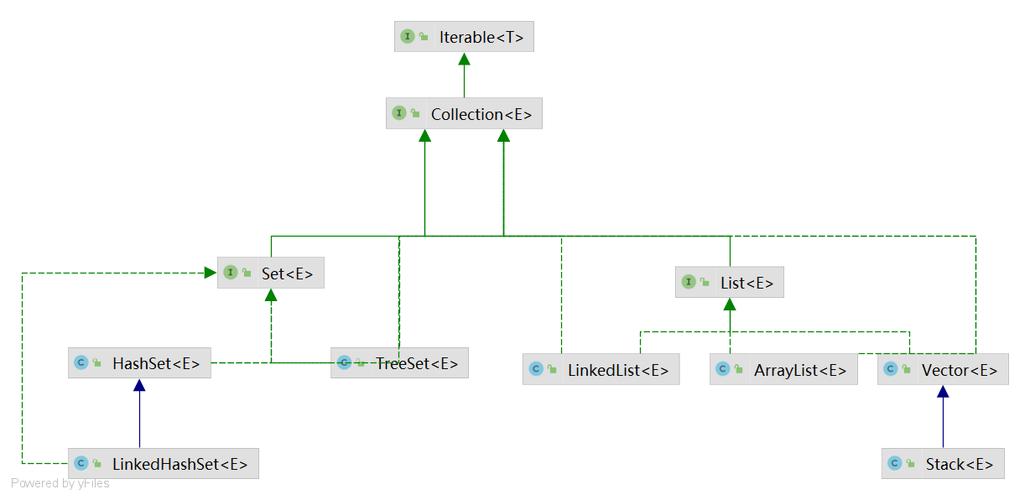
In simple terms, a Map is a collection that stores key-value pairs. It's not a Collection in the strict sense (it doesn't extend the Collection interface), but it's part of the Java Collections Framework because it's a container for data.
The core idea is that you use a key to look up a value. Each key in a Map must be unique. If you try to add a key that already exists, the old value associated with that key will be replaced.
Analogy: Think of a dictionary. The word is the key, and its definition is the value. You look up a word (key) to find its definition (value). You can't have two different definitions for the same word.
Key Characteristics of a Map
- Key-Value Storage: Data is stored as pairs.
- Unique Keys: No duplicate keys are allowed.
- One Null Key: Most
Mapimplementations allow onenullkey. - Multiple Null Values: Most
Mapimplementations allow multiplenullvalues. - Unordered (Historically): The order of elements in a standard
HashMapis not guaranteed (though it often appears based on hash codes). Other implementations likeLinkedHashMapmaintain insertion order, andTreeMapmaintains sorted order.
Common Map Implementations
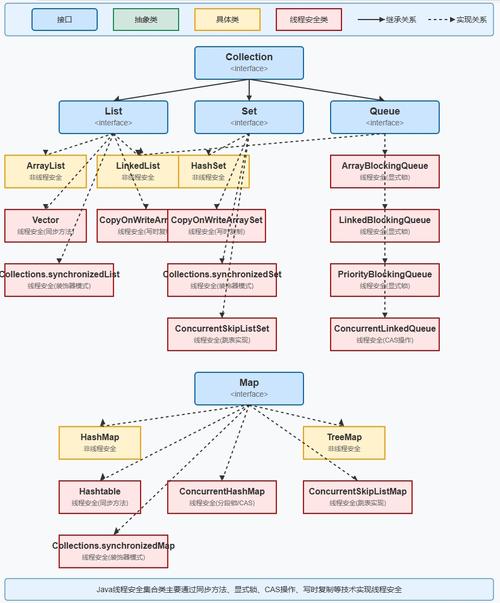
The Java Collections Framework provides several implementations of the Map interface, each with different performance characteristics and use cases.
| Implementation | null Key? |
null Value? |
Order | Performance | Best For... |
|---|---|---|---|---|---|
HashMap |
Yes | Yes | No guaranteed order (but insertion order is preserved in Java 8+ for some cases) | Excellent (O(1) average for get/put) | General purpose, when you don't need a specific order. The most common choice. |
LinkedHashMap |
Yes | Yes | Insertion order | Good (slightly slower than HashMap) |
When you need to iterate over the map in the order elements were added. |
TreeMap |
No | Yes | Sorted order (natural or by a Comparator) |
Slower (O(log n) for get/put) | When you need the map to be sorted by keys. |
Hashtable |
No | No | No guaranteed order | Good (O(1) average for get/put) | Legacy code. Use HashMap instead unless you need thread-safety without ConcurrentHashMap. |
ConcurrentHashMap |
Yes | Yes | Not guaranteed (but can be configured) | Excellent (highly concurrent) | Thread-safe operations in a multi-threaded environment. |
How to Use a Map: A Practical Example
Let's use the most common implementation, HashMap, to demonstrate the core operations.
Import and Declaration
import java.util.HashMap;
import java.util.Map;
public class MapExample {
    public static void main(String[] args) {
        // Create a HashMap that stores String keys and Integer values
        Map<String, Integer> fruitStock = new HashMap<>();
    }
}
Adding Elements (put)
The put(key, value) method adds a key-value pair to the map.
// Add key-value pairs
fruitStock.put("Apple", 50);
fruitStock.put("Banana", 75);
fruitStock.put("Orange", 60);
// If you add a duplicate key, the old value is replaced
fruitStock.put("Apple", 45); // The stock for Apple is now updated to 45
System.out.println("Map after adding/updating: " + fruitStock);
// Output: Map after adding/updating: {Orange=60, Apple=45, Banana=75}
Retrieving Elements (get)
The get(key) method retrieves the value associated with a given key.
// Get the value for a specific key
Integer appleStock = fruitStock.get("Apple");
System.out.println("Stock of Apples: " + appleStock); // Output: Stock of Apples: 45
// If the key doesn't exist, get() returns null
Integer grapeStock = fruitStock.get("Grape");
System.out.println("Stock of Grapes: " + grapeStock); // Output: Stock of Grapes: null
Checking for Keys (containsKey)
Use containsKey(key) to check if a key exists in the map before trying to get its value. This is safer than checking for null after get().
if (fruitStock.containsKey("Banana")) {
    System.out.println("Bananas are in stock.");
} else {
    System.out.println("No bananas available.");
}
// Output: Bananas are in stock.
Removing Elements (remove)
The remove(key) method removes the key-value pair associated with the specified key.
fruitStock.remove("Orange");
System.out.println("Map after removing Orange: " + fruitStock);
// Output: Map after removing Orange: {Apple=45, Banana=75}
Iterating Over a Map
There are several ways to iterate over a Map. The most common are using forEach and entrySet().
Method 1: Using forEach (Java 8+)
This is the most concise way.
System.out.println("\n--- Iterating with forEach ---");
fruitStock.forEach((key, value) -> System.out.println("Fruit: " + key + ", Stock: " + value));
Method 2: Using entrySet()
This is the most efficient method for iteration as it gets both the key and value in one go.
System.out.println("\n--- Iterating with entrySet ---");
for (Map.Entry<String, Integer> entry : fruitStock.entrySet()) {
    String fruit = entry.getKey();
    Integer stock = entry.getValue();
    System.out.println("Fruit: " + fruit + ", Stock: " + stock);
}
Method 3: Iterating over Keys If you only need the keys.
System.out.println("\n--- Iterating over Keys ---");
for (String fruit : fruitStock.keySet()) {
    System.out.println("Fruit: " + fruit);
}
Getting the Size (size)
System.out.println("\nTotal number of fruits: " + fruitStock.size());
// Output: Total number of fruits: 2
Important Map Methods
| Method | Description |
|---|---|
put(K key, V value) |
Associates the specified value with the specified key. |
get(Object key) |
Returns the value to which the specified key is mapped, or null if this map contains no mapping for the key. |
remove(Object key) |
Removes the mapping for the specified key from this map if present. |
containsKey(Object key) |
Returns true if this map contains a mapping for the specified key. |
containsValue(Object value) |
Returns true if this map maps one or more keys to the specified value. |
keySet() |
Returns a Set view of the keys contained in this map. |
values() |
Returns a Collection view of the values contained in this map. |
entrySet() |
Returns a Set view of the mappings contained in this map. (Very useful for iteration) |
size() |
Returns the number of key-value mappings in this map. |
isEmpty() |
Returns true if this map contains no key-value mappings. |
clear() |
Removes all of the mappings from this map. |
When to Use a Map vs. a List or Set
-
Use a
Mapwhen:- You need to associate a value with a unique identifier (the key).
- You need fast lookups, insertions, and deletions based on a key.
- Example: A user's profile (key:
userId, value:UserObject), a product catalog (key:productId, value:ProductDetails), a cache (key:request, value:response).
-
Use a
Listwhen:- You need to store elements in a specific order (insertion or sorted).
- You need to allow duplicate elements.
- Example: A list of tasks to do, a history of user actions.
-
Use a
Setwhen:- You need to store a collection of unique elements.
- The order of elements is not important (unless you use
LinkedHashSetorTreeSet). - Example: A list of unique tags, a list of registered users.