Of course! Let's dive deep into the ServletRequest interface in Java. This is a fundamental concept in Java web development, especially when working with servlets.
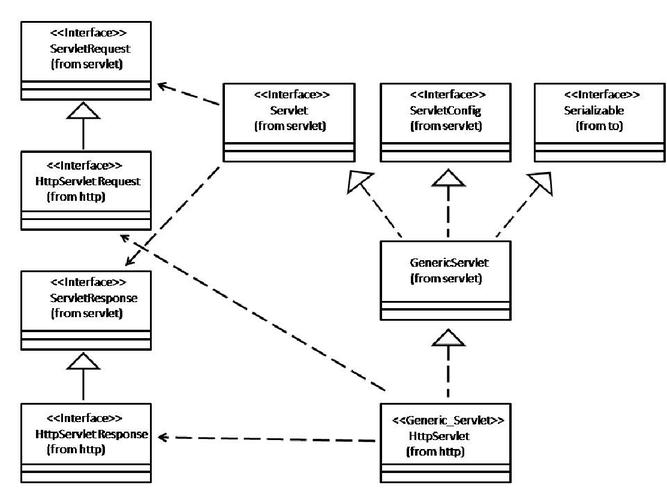
What is ServletRequest?
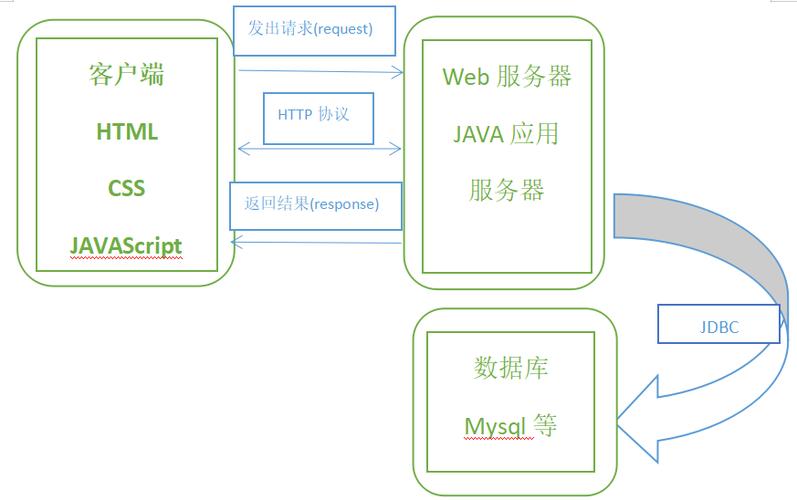
ServletRequest is an interface in the javax.servlet package that defines an object to provide client request information to a servlet. When a client (usually a web browser) makes a request to a web server, the server creates a ServletRequest object. This object acts as a wrapper or a data holder for all the information about that specific request.
A servlet (typically the service() or doGet()/doPost() method) receives this ServletRequest object as its first parameter, along with a ServletResponse object.
// Inside a HttpServlet
protected void doGet(HttpServletRequest request, HttpServletResponse response)
    throws ServletException, IOException {
    // 'request' is the ServletRequest object (specifically, an HttpServletRequest)
    // 'response' is the ServletResponse object (specifically, an HttpServletResponse)
}
Note: In modern servlets, you almost always work with
HttpServletRequest, which is a sub-interface ofServletRequest. It adds HTTP-specific functionality. We'll focus onHttpServletRequestfor most of this explanation.
Key Information You Can Get from ServletRequest
The ServletRequest object gives you access to a wealth of information about the incoming request. Here are the most common things you'll use it for:
A. Request Parameters (getParameter)
This is one of the most common uses. Parameters are sent from the client, typically from an HTML form.
- How it works: You get the value of a form field by its
nameattribute. - Example: A form with
<input type="text" name="username">will send a parameter namedusername. - Method:
String getParameter(String name) - Handling Multiple Values: If a parameter can have multiple values (e.g., checkboxes with the same name), use
String[] getParameterValues(String name).
Example: login.html
<form action="LoginServlet" method="post">
    Username: <input type="text" name="username"><br>
    Password: <input type="password" name="password"><br>
    Hobbies:
    <input type="checkbox" name="hobbies" value="reading"> Reading
    <input type="checkbox" name="hobbies" value="sports"> Sports<br>
    <input type="submit" value="Login">
</form>
Example: LoginServlet.java
protected void doPost(HttpServletRequest request, HttpServletResponse response) {
    // Get single-valued parameters
    String username = request.getParameter("username");
    String password = request.getParameter("password");
    // Get multi-valued parameter
    String[] hobbies = request.getParameterValues("hobbies");
    System.out.println("Username: " + username);
    System.out.println("Password: " + password); // Note: Never log passwords!
    if (hobbies != null) {
        System.out.println("Hobbies:");
        for (String hobby : hobbies) {
            System.out.println("- " + hobby);
        }
    }
}
B. Request Headers (getHeader)
HTTP headers contain metadata about the request, such as the client's browser type, accepted content types, or authentication information.
- Method:
String getHeader(String name) - Common Headers:
User-Agent,Accept,Accept-Language,Cookie,Referer,Authorization.
Example:
// Get the user's browser information
String userAgent = request.getHeader("User-Agent");
System.out.println("Browser: " + userAgent);
// Get the list of accepted languages by the client
String acceptLanguage = request.getHeader("Accept-Language");
System.out.println("Preferred Language: " + acceptLanguage);
C. Request Attributes (setAttribute / getAttribute)
Attributes are objects that you can store in the request scope. They are used to pass data between different components of the application that handle the same request (e.g., from a servlet to a JavaServer Page - JSP).
- Setting an attribute:
void setAttribute(String name, Object o) - Getting an attribute:
Object getAttribute(String name) - Removing an attribute:
void removeAttribute(String name)
Example:
// In a servlet
User user = new User("John Doe");
request.setAttribute("loggedInUser", user);
// Forward the request to a JSP page
request.getRequestDispatcher("/profile.jsp").forward(request, response);
// In profile.jsp
// You can access the attribute like this: ${loggedInUser.name}
D. Request URI vs. URL
It's crucial to understand the difference between these two.
getRequestURI(): Returns the part of the URL from the protocol name up to the query string, but without the domain name.- Example: For
http://example.com/contextPath/servletPath?id=123, this returns/contextPath/servletPath.
- Example: For
getRequestURL(): Reconstructs the full URL the client used to make the request.- Example: For the same URL, this returns
http://example.com/contextPath/servletPath.
- Example: For the same URL, this returns
getQueryString(): Returns the query string (the part after the ).- Example: For
.../servletPath?id=123, this returnsid=123.
- Example: For
Example:
String uri = request.getRequestURI(); // e.g., /myApp/login
String url = request.getRequestURL(); // e.g., http://localhost:8080/myApp/login
String query = request.getQueryString(); // e.g., username=foo&password=bar
System.out.println("URI: " + uri);
System.out.println("URL: " + url);
System.out.println("Query String: " + query);
E. Other Useful Information
- Method Type:
String getMethod()-> Returns "GET", "POST", "PUT", "DELETE", etc. - Protocol:
String getProtocol()-> Returns "HTTP/1.1" or "HTTP/1.0". - Server Name:
String getServerName()-> Returns the host name of the server. - Server Port:
int getServerPort()-> Returns the port number the server is listening on. - Client Information:
String getRemoteAddr(): The IP address of the client.String getRemoteHost(): The fully qualified name of the client.
- Character Encoding:
String getCharacterEncoding()/void setCharacterEncoding(String env): Crucial for handling non-English text correctly.
Request Scope and Lifecycle
The scope of a ServletRequest object is single-request. This means:
- A new
ServletRequestobject is created for every single request that comes to the server. - It is destroyed after the server has finished processing that request and generated the response.
- Attributes set in the request are only visible to components that handle that same request (e.g., when you use
RequestDispatcher.forward()).
This is different from HttpSession scope, which lasts for the duration of a user's session (across multiple requests).
Code Example: A Complete Servlet
Here is a simple servlet that demonstrates many of the concepts above.
InfoServlet.java
import java.io.IOException;
import java.io.PrintWriter;
import java.util.Enumeration;
import javax.servlet.ServletException;
import javax.servlet.annotation.WebServlet;
import javax.servlet.http.HttpServlet;
import javax.servlet.http.HttpServletRequest;
import javax.servlet.http.HttpServletResponse;
@WebServlet("/InfoServlet")
public class InfoServlet extends HttpServlet {
    private static final long serialVersionUID = 1L;
    protected void doGet(HttpServletRequest request, HttpServletResponse response)
            throws ServletException, IOException {
        // Set content type and writer
        response.setContentType("text/html;charset=UTF-8");
        PrintWriter out = response.getWriter();
        // --- 1. Display Request Parameters ---
        out.println("<h1>Request Parameters</h1>");
        String name = request.getParameter("name");
        if (name != null && !name.isEmpty()) {
            out.println("<p>Hello, " + name + "!</p>");
        } else {
            out.println("<p>No 'name' parameter provided. Try adding ?name=YourName to the URL.</p>");
        }
        // --- 2. Display Request Headers ---
        out.println("<h1>Request Headers</h1>");
        Enumeration<String> headerNames = request.getHeaderNames();
        while (headerNames.hasMoreElements()) {
            String headerName = headerNames.nextElement();
            out.println("<p><b>" + headerName + ":</b> " + request.getHeader(headerName) + "</p>");
        }
        // --- 3. Display Request URI, URL, etc. ---
        out.println("<h1>Request Information</h1>");
        out.println("<p><b>Request URI:</b> " + request.getRequestURI() + "</p>");
        out.println("<p><b>Request URL:</b> " + request.getRequestURL() + "</p>");
        out.println("<p><b>Query String:</b> " + request.getQueryString() + "</p>");
out.println("<p><b>Method:</b>