
Of course! Using Python for Big Data is an extremely common and powerful approach. Python's simplicity, vast ecosystem of libraries, and strong community support make it the de-facto language for data science and a key player in the big data ecosystem.
Here’s a comprehensive guide covering the core concepts, tools, and best practices for using Python in a big data context.
The Core Idea: Python's Role in Big Data
It's crucial to understand that Python is not typically used to process massive datasets on a single machine. A standard laptop or even a powerful server will run out of memory (RAM) trying to hold a 100GB+ dataset.
Instead, Python's role is to act as the "glue" or the "orchestrator" in a distributed system. It's used to:
- Define the logic of the data processing (e.g., how to clean, transform, and aggregate data).
- Interact with big data frameworks like Spark, Dask, or PySpark to run this logic on a cluster of machines.
- Analyze and visualize the results once the data has been processed.
The Big Data Ecosystem: Key Python Libraries
The Python big data ecosystem can be broken down into several categories.
A. The Foundation: The Data Science Stack
These are the fundamental libraries you'll use for any data manipulation, whether the data is small or large.
-
Pandas: The cornerstone of data analysis in Python. It provides fast, flexible, and expressive data structures (
DataFrameandSeries) designed to work with "labeled" or relational data.- Use Case: Loading, cleaning, transforming, and analyzing structured data. It's perfect for data that fits into memory.
- Big Data Limitation: Pandas operates on a single machine. When the data is too large for RAM, you'll need to use a tool that can use Pandas-like syntax on a distributed system.
-
NumPy: The fundamental package for numerical computation in Python. It provides a powerful N-dimensional array object and tools for working with these arrays. Pandas is built on top of NumPy.
-
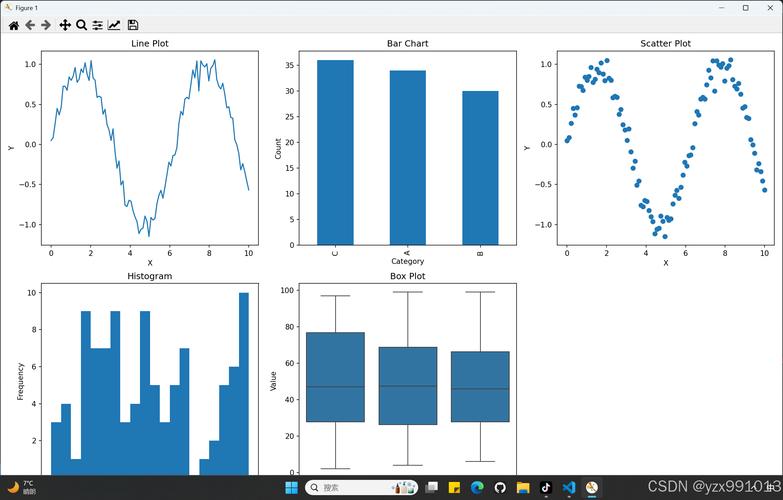
Matplotlib & Seaborn: Essential for data visualization. They allow you to create static, interactive, and publication-quality plots from your data.
 (图片来源网络,侵删)
B. The Distributed Processing Powerhouse: Apache Spark
This is the most popular and widely-used framework for large-scale data processing with Python.
-
PySpark: The Python API for Apache Spark. It allows you to write Spark applications using Python syntax.
-
Key PySpark Components:
SparkSession: The entry point to any Spark functionality. You create aSparkSessionto connect to your Spark cluster.RDD(Resilient Distributed Dataset): The fundamental data structure in Spark—an immutable, distributed collection of objects. It's the low-level API.DataFrame: A higher-level, distributed collection of data organized into named columns (very similar to a Pandas DataFrame, but distributed). This is the most commonly used API due to its ease of use and performance optimizations (Catalyst Optimizer).Spark SQL: Allows you to run SQL queries directly on your DataFrames.
-
Why PySpark?
- Scalability: It can process petabytes of data across thousands of nodes.
- Speed: It uses in-memory processing and a sophisticated execution plan (DAG) to be extremely fast.
- Ease of Use: The DataFrame API makes the transition from Pandas relatively smooth.
-
Example PySpark Code:
from pyspark.sql import SparkSession
# Create a SparkSession
spark = SparkSession.builder \
    .appName("Python Spark SQL basic example") \
    .getOrCreate()
# Read a CSV file into a DataFrame
# Spark reads the data in a distributed manner
df = spark.read.csv("path/to/large_dataset.csv", header=True, inferSchema=True)
# Show the first 5 rows (action)
df.show()
# Perform a transformation: Filter and group by
# This is a lazy operation; it's not executed until an action is called
result = df.filter(df["age"] > 30).groupBy("department").count()
# Show the result (action)
result.show()
# Stop the SparkSession
spark.stop()
-
C. The "Pandas-on-Parallel" Alternative: Dask
Dask is a flexible library for parallel computing in Python. It's designed to scale the existing Python data science ecosystem, particularly Pandas, NumPy, and Scikit-learn.
-
Use Case: When your data is slightly larger than what fits in your RAM (e.g., 10-100 GB) and you want to use familiar Pandas-like syntax without the overhead of setting up a Spark cluster. It's great for single-machine parallelism and can also scale to a cluster.
-
Key Dask Components:
dask.dataframe: Mimics the Pandas DataFrame API but breaks the larger DataFrame into many smaller Pandas DataFrames (called partitions) that can be processed in parallel.dask.array: Mimics the NumPy array API.dask.delayed: A low-level decorator to parallelize custom Python functions.
-
Example Dask Code:
import dask.dataframe as dd
# Read a CSV file. Dask creates a task graph, not loading all data at once.
ddf = dd.read_csv("path/to/large_dataset_*.csv") # Use a wildcard for multiple files
# Perform operations that look exactly like Pandas
# These operations build a task graph but don't compute anything yet.
result = ddf[ddf['age'] > 30].groupby('department').age.mean()
# Compute the result. This is when the actual parallel computation happens.
final_result = result.compute()
print(final_result)
D. The Cloud and Serverless Ecosystem
For modern big data, processing often happens in the cloud. Python is the primary language for interacting with these services.
-
AWS: The
boto3library is the official AWS SDK for Python. You use it to:- Read/write data from S3 (Simple Storage Service).
- Start and manage EMR (Elastic MapReduce) clusters, which run Spark.
- Invoke Lambda functions for serverless data processing.
- Query data using Athena (serverless SQL).
-
Google Cloud Platform (GCP): The
google-cloudlibrary is the SDK for GCP. You use it to:- Read/write data from Google Cloud Storage (GCS).
- Use Dataproc for managed Spark clusters.
- Run Dataflow jobs for serverless stream and batch processing.
- Query data with BigQuery.
-
Azure: The
azure-storage-blobandazure-databricks-sql-connectorlibraries are used to interact with Azure Blob Storage and Azure Databricks, respectively.
A Typical Big Data Workflow with Python
Here’s a step-by-step example of a common data pipeline:
-
Ingestion: Use Python with a cloud SDK (
boto3,google-cloud) to read raw data from a source like AWS S3 or Google Cloud Storage.import boto3 s3 = boto3.client('s3') obj = s3.get_object(Bucket='my-data-bucket', Key='raw_data/sales.csv') # ... or pass the S3 path directly to PySpark/Dask -
Processing: Use PySpark (for large-scale distributed processing) or Dask (for medium-scale parallel processing on a single machine) to clean, transform, and aggregate the data.
# PySpark example df = spark.read.csv("s3a://my-data-bucket/raw_data/sales.csv", header=True, inferSchema=True) cleaned_df = df.na.drop() # Drop rows with null values aggregated_df = cleaned_df.groupBy("product_category").sum("sales_amount") -
Storage: Save the processed, aggregated data back to a data lake (S3, GCS) or a data warehouse (BigQuery, Redshift, Snowflake) for easy querying and analysis.
# PySpark example aggregated_df.write.parquet("s3a://my-data-bucket/processed_data/sales_by_category/") -
Analysis & Visualization: Load the processed, smaller dataset (which now fits in memory) into Pandas and use Matplotlib/Seaborn or Plotly for visualization and reporting.
import pandas as pd
import matplotlib.pyplot as plt
# Read the processed data from S3 using Pandas (it's small now)
sales_df = pd.read_parquet("s3a://my-data-bucket/processed_data/sales_by_category/")
# Visualize the results
sales_df.plot(kind='bar', x='product_category', y='sum(sales_amount)')
plt.show()
Choosing the Right Tool
| Scenario | Recommended Tool(s | Why? |
|---|---|---|
| Data < RAM size (e.g., < 10-20 GB) | Pandas, NumPy, Scikit-learn | Simple, fast, and has the richest ecosystem for statistical modeling and ML. No overhead. |
| Data > RAM but fits on one disk | Dask | Scales Pandas/NumPy to your available cores and disk. Familiar API, easy to set up. |
| Massive Data (TBs/PBs) across a cluster | PySpark | The industry standard for distributed data processing. Highly scalable, fault-tolerant, and fast. |
| Real-time Stream Processing | PySpark Structured Streaming or Apache Flink (with Python API) | Designed for processing continuous, unbounded data streams. |
| Serverless, Event-Driven Processing | AWS Lambda / Google Cloud Functions (with Python) | Run code in response to events (e.g., a new file in S3) without managing servers. |
| Big Data on the Cloud | Cloud SDKs (boto3, google-cloud) + PySpark/Dask |
The standard way to interact with cloud storage and managed big data services. |
Essential Skills for Python in Big Data
- Python Fundamentals: Strong grasp of OOP, functions, and data structures.
- Pandas Proficiency: You'll use it for the final analysis stages and for understanding data logic.
- SQL: Almost all big data systems (Spark, BigQuery, Redshift) use SQL for querying. Knowing SQL is non-negotiable.
- Linux Command Line: Big data clusters run on Linux. You'll need to be comfortable with commands like
ssh,ls,cat,grep, andvim. - Cloud Fundamentals: Understanding concepts of virtual machines, storage (object vs. block), and networking is key.
- Distributed Systems Concepts: Understanding concepts like parallelism, fault tolerance, and data partitioning will help you write more efficient and robust code.











