
Of course! The Java Properties class is a fundamental part of the Java language, primarily used for managing application configuration. It's a handy tool for reading and storing key-value pairs in a simple, human-readable format.
Here's a comprehensive guide covering everything from the basics to advanced use cases.
What is the Properties Class?
The Properties class in Java (java.util.Properties) is a subclass of Hashtable. It is specifically designed to handle configuration data in the form of key-value pairs.
Key Characteristics:
- Key-Value Pairs: Stores data as strings in a
String-to-Stringmapping. - Ordered (as of Java 1.6): While
Hashtableis unordered,Propertiesmaintains the insertion order of its elements. - Persistent Data: Its primary purpose is to easily load properties from a file and save them back to a file.
- Synchronization: It is thread-safe, as it inherits synchronized methods from
Hashtable.
Common Use Cases
You will find the Properties class used everywhere in Java applications:
- Configuration Files: Loading settings for an application (e.g., database URLs, API keys, feature flags).
- Internationalization (i18n): Storing text for different languages (e.g.,
button.save=SaveinMessages_en.propertiesandbutton.save=EnregistrerinMessages_fr.properties). - System Properties: Accessing JVM and OS-level settings via
System.getProperties(). - Build Tools & Frameworks: Used by Maven, Gradle, Spring, and many others to manage configuration.
The .properties File Format
This is the standard format for storing properties data. It's simple and text-based.
Rules:
- The file is encoded in ISO-8859-1 (Latin-1) by default. For other encodings like UTF-8, you need special handling (more on this later).
- Comments start with a or symbol.
- Keys and values are separated by an , , or whitespace.
- Leading and trailing whitespace for both keys and values is ignored.
- To include a literal , , or in a value, you must escape it with a backslash (
\). - To include a literal space in a key, you can use
\or surround the key in quotes.
Example: config.properties
# Database Configuration
db.url=jdbc:mysql://localhost:3306/mydb
db.user=admin
db.password=secret!@#123
# Application Settings
app.name=My Cool App
app.version=1.2.0
app.debug.mode=true
Core Operations (Code Examples)
A. Loading Properties from a File
This is the most common operation. You use a FileInputStream to read the file and load() to populate the Properties object.
import java.io.FileInputStream;
import java.io.IOException;
import java.io.InputStream;
import java.util.Properties;
public class PropertiesLoader {
    public static void main(String[] args) {
        Properties prop = new Properties();
        // Use try-with-resources to automatically close the stream
        try (InputStream input = new FileInputStream("config.properties")) {
            // Load the properties file
            prop.load(input);
            // Get individual properties
            String dbUrl = prop.getProperty("db.url");
            String dbUser = prop.getProperty("db.user");
            String appName = prop.getProperty("app.name");
            System.out.println("Database URL: " + dbUrl);
            System.out.println("Database User: " + dbUser);
            System.out.println("App Name: " + appName);
            // Get a property with a default value if it's not found
            String dbHost = prop.getProperty("db.host", "localhost"); // Returns "localhost" if "db.host" is not found
            System.out.println("Database Host (with default): " + dbHost);
        } catch (IOException ex) {
            ex.printStackTrace();
        }
    }
}
B. Getting Properties
getProperty(String key): Returns the value for the specified key. Returnsnullif the key is not found.getProperty(String key, String defaultValue): Returns the value for the key, or thedefaultValueif the key is not found.
C. Setting and Storing Properties
You can modify the Properties object in memory and then save it back to a file using a FileOutputStream.
import java.io.FileOutputStream;
import java.io.IOException;
import java.io.OutputStream;
import java.util.Properties;
public class PropertiesSaver {
    public static void main(String[] args) {
        Properties prop = new Properties();
        // Set properties
        prop.setProperty("message", "Hello, World!");
        prop.setProperty("counter", "100");
        prop.setProperty("feature.enabled", "true");
        // Save to a file
        try (OutputStream output = new FileOutputStream("output.properties")) {
            // Save the properties to the file
            // The second argument is a comment for the file header
            prop.store(output, "This is an automatically generated file. Do not edit.");
            System.out.println("Properties file saved successfully.");
        } catch (IOException io) {
            io.printStackTrace();
        }
    }
}
Resulting output.properties:
#This is an automatically generated file. Do not edit.
#Wed Oct 26 10:30:00 CEST 2025
message=Hello, World!
counter=100
feature.enabled=true
Advanced Topics & Best Practices
A. Loading from the Classpath (Recommended for JARs)
When you package your application into a JAR, you can't access files using a FileInputStream relative to the filesystem. Instead, you should load them from the classpath.
// Use the ClassLoader to load the resource from the classpath
try (InputStream input = PropertiesLoader.class.getClassLoader().getResourceAsStream("config.properties")) {
    if (input == null) {
        System.out.println("Sorry, unable to find config.properties");
        return;
    }
    prop.load(input);
    // ... rest of the code
} catch (IOException ex) {
    ex.printStackTrace();
}
Where to place config.properties:
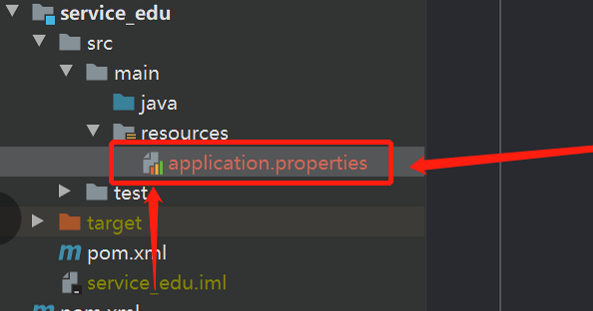
- In a standard Maven project:
src/main/resources/ - In a standard Gradle project:
src/main/resources/
B. Handling UTF-8 Encoding (A Common Pitfall)
The default load(InputStream) method uses ISO-8859-1. If your .properties file contains special characters (like , , ) and is saved as UTF-8, you must use a Reader with the correct encoding.
import java.io.InputStreamReader;
import java.nio.charset.StandardCharsets;
// ...
try (InputStream input = PropertiesLoader.class.getClassLoader().getResourceAsStream("config.properties");
     // Use an InputStreamReader to specify the charset
     Reader reader = new InputStreamReader(input, StandardCharsets.UTF_8)) {
    prop.load(reader);
    // Now special characters will be read correctly
    String greeting = prop.getProperty("greeting");
    System.out.println("Greeting: " + greeting); // Will print "Café" correctly
} catch (IOException ex) {
    ex.printStackTrace();
}
When saving, use store(Writer, String) for UTF-8 support:
try (Writer writer = new OutputStreamWriter(new FileOutputStream("output_utf8.properties"), StandardCharsets.UTF_8)) {
    prop.store(writer, "File saved with UTF-8 encoding");
}
C. PropertyResourceBundle for Internationalization
The Properties class is the backing store for ResourceBundle, which is the standard Java way to handle internationalization.
File Structure:
src/
  main/
    resources/
      Messages.properties        # Default (English)
      Messages_fr.properties     # French
Messages_es.properties # SpanishMessages.properties:
greeting=Hello
farewell=Goodbye
Messages_fr.properties:
greeting=Bonjour
farewell=Au revoir
Java Code:
import java.util.Locale;
import java.util.ResourceBundle;
public class I18nExample {
    public static void main(String[] args) {
        // Get the bundle for the default locale
        ResourceBundle bundle = ResourceBundle.getBundle("Messages", Locale.getDefault());
        System.out.println("Default Locale - Greeting: " + bundle.getString("greeting"));
        // Get the bundle for a specific locale (French)
        ResourceBundle frenchBundle = ResourceBundle.getBundle("Messages", new Locale("fr"));
        System.out.println("French Locale - Greeting: " + frenchBundle.getString("greeting"));
        // Get the bundle for another specific locale (Spanish)
        ResourceBundle spanishBundle = ResourceBundle.getBundle("Messages", new Locale("es"));
        System.out.println("Spanish Locale - Greeting: " + spanishBundle.getString("greeting")); // Will fall back to default
    }
}
D. System Properties
You can access and set JVM-wide system properties.
// Get a system property
String javaHome = System.getProperty("java.home");
System.out.println("JDK Home: " + javaHome);
// Get a system property with a default
String userName = System.getProperty("user.name", "Guest");
System.out.println("User: " + userName);
// Set a custom system property (only for this JVM instance)
System.setProperty("my.app.custom.property", "custom_value");
String customProp = System.getProperty("my.app.custom.property");
System.out.println("Custom Property: " + customProp);
Modern Alternatives
While Properties is still widely used, modern frameworks often prefer other formats:
- JSON (e.g., with Jackson/Gson): More flexible, supports nested objects and arrays, and is the de-facto standard for web APIs. Most Java developers are more comfortable with it.
- YAML (e.g., with SnakeYAML): Human-friendly, supports comments and nested data structures. Very popular in Spring Boot and other modern frameworks.
- XML: Used by older Java EE configurations (
web.xml,ejb-jar.xml). Verbose and generally less preferred today for simple configuration.
Conclusion: The Properties class is a lightweight, simple, and effective tool for basic key-value configuration. Understanding how to load, save, and handle encoding with it is a core Java skill. However, for complex or new projects, consider using JSON or YAML for their greater flexibility and readability.


