Of course! The term "Python workers" in the context of Caffe isn't a single, built-in feature like in a distributed computing framework (e.g., Apache Spark). Instead, it refers to several common and powerful patterns where you use Python scripts to manage, parallelize, and accelerate your Caffe workflow.
Here’s a breakdown of the different types of "Python workers" you can use with Caffe, from simple to advanced.
The Python Wrapper: caffe.py (The Foundation)
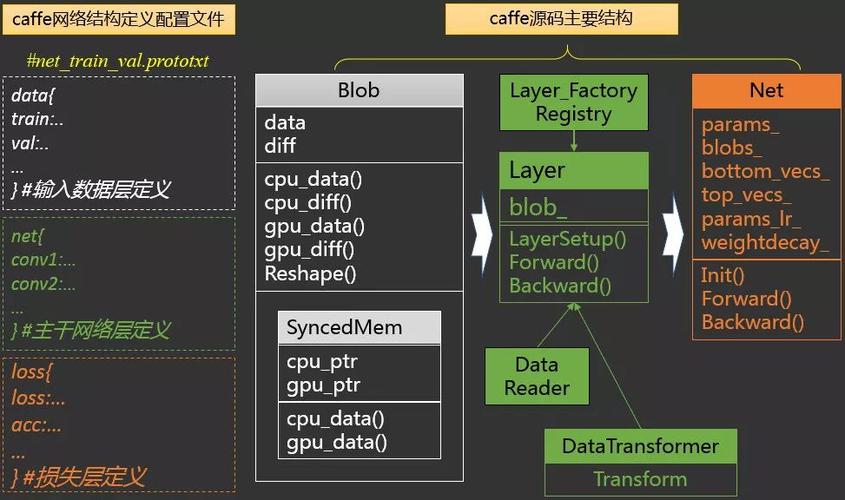
Before talking about workers, it's essential to understand the core Python interface. Caffe comes with a Python module (caffe.py) that allows you to interact with the Caffe C++ backend directly from Python.
This wrapper is the foundation for all "workers." It lets you:
- Load a trained model (
caffemodel). - Define a network architecture (
prototxt). - Perform forward and backward passes.
- Access data (blobs) and parameters (weights) in the network.
- Use GPU acceleration seamlessly.
Example: Simple Forward Pass
import caffe
import numpy as np
# Set the mode to CPU or GPU
# caffe.set_device(0) # Use the first GPU
# caffe.set_mode_gpu()
# Load the network and model
net = caffe.Net('deploy.prototxt', 'weights.caffemodel', caffe.TEST)
# Create some dummy input data
# Shape must match the input layer's dimensions (e.g., (1, 3, 224, 224) for AlexNet)
input_data = np.random.randn(1, 3, 224, 224).astype(np.float32)
# Set the input data and run a forward pass
net.blobs['data'].data[...] = input_data
output = net.forward()
# Get the output
print(net.blobs['prob'].data.shape) # e.g., (1, 1000) for 1000 classes
print("Output probabilities:", output['prob'])
This script is a single process. To make it a "worker," we need to run multiple instances of it in parallel.
The Multi-Processing Approach: multiprocessing Module
This is the most common and straightforward way to create "Python workers" for Caffe. The idea is to use Python's built-in multiprocessing library to distribute the workload across multiple CPU cores.
Use Case: You have a large number of images to classify and want to process them in parallel to speed up inference.
How it Works:

- A "Master" Process: This process reads the list of input files and creates a "job queue" (e.g., a
multiprocessing.Queue). - "Worker" Processes: You launch a pool of worker processes (e.g., 4 for a 4-core CPU). Each worker process:
- Loads the Caffe model once (this is crucial for performance, as loading from disk is slow).
- Pulls a job (an image path) from the queue.
- Performs inference on that image.
- Stores or returns the result.
- Result Collection: The master process collects results from all workers as they complete.
Example: Parallel Image Classification
import caffe
import os
import numpy as np
from multiprocessing import Pool, cpu_count
# --- Configuration ---
# Define the model architecture and weights
MODEL_FILE = 'deploy.prototxt'
PRETRAINED = 'weights.caffemodel'
# List of image paths to process
IMAGE_FILES = ['image1.jpg', 'image2.jpg', ...] # A long list
# Number of worker processes to use
NUM_WORKERS = cpu_count() # Use all available CPU cores
# --- Worker Function ---
# This function will be executed by each worker process
def process_image(image_path):
    """
    Loads a single image, runs inference, and returns the result.
    """
    print(f"Worker {os.getpid()} processing {image_path}")
    # IMPORTANT: Each worker loads the model into its own memory space.
    # This is memory-intensive but necessary for true parallelism.
    net = caffe.Net(MODEL_FILE, PRETRAINED, caffe.TEST)
    # Preprocess the image (this part is highly application-specific)
    # For example, using OpenCV
    # import cv2
    # img = cv2.imread(image_path)
    # img = cv2.resize(img, (224, 224))
    # img = img.transpose((2, 0, 1)) # HWC -> CHW
    # img = img[np.newaxis, :, :, :] # Add batch dimension
    # img = img.astype(np.float32)
    # For simplicity, let's assume we have a function `get_image_data`
    img_data = get_image_data(image_path) # You need to implement this
    net.blobs['data'].data[...] = img_data
    output = net.forward()
    # Get the predicted class index
    class_index = output['prob'].argmax()
    # Clean up to free memory
    del net
    return (image_path, class_index)
# --- Main Execution ---
if __name__ == '__main__':
    # Create a pool of worker processes
    pool = Pool(processes=NUM_WORKERS)
    # Map the process_image function to each image file in parallel
    results = pool.map(process_image, IMAGE_FILES)
    # Close the pool and wait for all workers to finish
    pool.close()
    pool.join()
    print("\nAll images processed.")
    for image_path, class_idx in results:
        print(f"{image_path} -> Predicted Class: {class_idx}")
Pros:
- Simple to implement with standard Python libraries.
- Excellent for CPU-bound tasks or when you have multiple GPUs and want to run one Caffe instance per GPU.
Cons:
- High Memory Usage: Each worker process loads a full copy of the Caffe model and its weights into memory. If your model is large (e.g., 1-2 GB), this can quickly exhaust your RAM.
- Process Overhead: Creating and managing processes has more overhead than threads.
The GPU-Parallel Approach: One Process per GPU
If you have multiple GPUs on a single machine, the most efficient way to use "Python workers" is to run a single Python process and manually assign different parts of the job to different GPUs.
Use Case: Same as above (processing many images), but on a multi-GPU machine.
How it Works:
- A Single Python Process: This process orchestrates the work.
- GPU Assignment: It assigns a batch of images (or a single image) to a specific GPU.
- Caffe's GPU Control: Before running
net.forward()for a specific batch, you usecaffe.set_device(gpu_id)andcaffe.set_mode_gpu()to tell Caffe which GPU to use for that operation. - Synchronization: The process waits for all GPU operations to complete before moving to the next batch.
Example:
import caffe
import numpy as np
import os
# --- Configuration ---
MODEL_FILE = 'deploy.prototxt'
PRETRAINED = 'weights.caffemodel'
IMAGE_FILES = ['img1.jpg', 'img2.jpg', ...] # A long list
NUM_GPUS = 2 # Assume you have 2 GPUs
# --- Main Execution ---
# Initialize the network once
net = caffe.Net(MODEL_FILE, PRETRAINED, caffe.TEST)
# Split the image list among the GPUs
images_per_gpu = len(IMAGE_FILES) // NUM_GPUS
gpu_batches = [IMAGE_FILES[i:i + images_per_gpu] for i in range(0, len(IMAGE_FILES), images_per_gpu)]
all_results = []
for gpu_id, batch in enumerate(gpu_batches):
    if not batch:
        continue
    print(f"Processing batch for GPU {gpu_id}...")
    # Tell Caffe to use this specific GPU
    caffe.set_device(gpu_id)
    caffe.set_mode_gpu()
    # Process the batch for this GPU
    for image_path in batch:
        img_data = get_image_data(image_path)
        net.blobs['data'].data[...] = img_data
        output = net.forward()
        class_index = output['prob'].argmax()
        all_results.append((image_path, class_index))
print("\nAll images processed.")
for res in all_results:
    print(f"{res[0]} -> Predicted Class: {res[1]}")
Pros:
- Memory Efficient: Only one copy of the model is loaded in the main process's memory.
- Highly Efficient: Maximizes hardware utilization by running computations on all available GPUs simultaneously.
Cons:
- More complex to manage than
multiprocessing. - Requires careful handling of device switching.
The Distributed Approach: caffe-distributed (Advanced)
For very large-scale training or inference across a cluster of machines, you need a true distributed framework. The Caffe community has developed caffe-distributed to handle this.
How it Works:
- Parameter Server Architecture: One or more "server" nodes store and update the model's parameters (weights).
- **Worker