
Of course! Working with ASCII in Python is a common task. Here’s a comprehensive guide covering the most important aspects, from basic encoding to practical operations.
The Core Concept: encode() and decode()
In Python, strings are sequences of Unicode characters by default. To work with ASCII, you need to convert a string into a sequence of bytes using the ASCII encoding.
encode(): Converts a string into bytes using a specified encoding (like ASCII).decode(): Converts bytes back into a string using a specified encoding.
Example: Encoding to ASCII
my_string = "Hello, World! 你好"
# Encode the string to ASCII bytes
# This will fail if the string contains non-ASCII characters
try:
    ascii_bytes = my_string.encode('ascii')
    print(f"Encoded bytes: {ascii_bytes}")
    print(f"Type: {type(ascii_bytes)}")
except UnicodeEncodeError as e:
    print(f"Error: {e}")
    print("Cannot encode because the string contains non-ASCII characters.")
# To handle non-ASCII characters, you can use 'ignore' or 'replace'
# 'ignore' will drop any non-ASCII characters
ignored_bytes = my_string.encode('ascii', errors='ignore')
print(f"\nEncoded with 'ignore': {ignored_bytes}")
# 'replace' will replace non-ASCII characters with a placeholder (usually '?')
replaced_bytes = my_string.encode('ascii', errors='replace')
print(f"Encoded with 'replace': {replaced_bytes}")
Output:
Error: 'ascii' codec can't encode characters in position 13-14: not in range(128)
Cannot encode because the string contains non-ASCII characters.
Encoded with 'ignore': b'Hello, World! '
Encoded with 'replace': b'Hello, World! ??'
Example: Decoding from ASCII
# Let's use a string that is purely ASCII
ascii_string = "Python is fun"
ascii_bytes = ascii_string.encode('ascii')
# Now, decode the bytes back to a string
decoded_string = ascii_bytes.decode('ascii')
print(f"Original string: {ascii_string}")
print(f"Encoded bytes: {ascii_bytes}")
print(f"Decoded string: {decoded_string}")
print(f"Are they equal? {ascii_string == decoded_string}")
Output:
Original string: Python is fun
Encoded bytes: b'Python is fun'
Decoded string: Python is fun
Are they equal? True
Checking if a String is ASCII
You can't directly check a string's encoding, but you can check if all its characters are within the ASCII range (0-127).
Method 1: Using a Loop (Easy to Understand)
def is_ascii_loop(s):
    """Checks if a string is ASCII using a loop."""
    for char in s:
        if ord(char) > 127:
            return False
    return True
print(f"'hello' is ASCII: {is_ascii_loop('hello')}")
print(f"'café' is ASCII: {is_ascii_loop('café')}")
print(f"'123!' is ASCII: {is_ascii_loop('123!')}")
Method 2: Using the str.isascii() Method (Python 3.7+)
This is the most modern and readable way.
def is_ascii_builtin(s):
    """Checks if a string is ASCII using the built-in method."""
    return s.isascii()
print(f"'hello' is ASCII: {is_ascii_builtin('hello')}")
print(f"'café' is ASCII: {is_ascii_builtin('café')}")
print(f"'123!' is ASCII: {is_ascii_builtin('123!')}")
Method 3: Using all() and ord() (Pythonic and Concise)
This is a one-liner that is very efficient.
def is_ascii_all(s):
    """Checks if a string is ASCII using all() and ord()."""
    return all(ord(char) < 128 for char in s)
print(f"'hello' is ASCII: {is_ascii_all('hello')}")
print(f"'café' is ASCII: {is_ascii_all('café')}")
print(f"'123!' is ASCII: {is_ascii_all('123!')}")
Practical Operations on ASCII Strings
Getting the ASCII Value of a Character
Use the built-in ord() function.
char = 'A'
ascii_value = ord(char)
print(f"The ASCII value of '{char}' is {ascii_value}")
char = 'z'
ascii_value = ord(char)
print(f"The ASCII value of '{char}' is {ascii_value}")
Output:
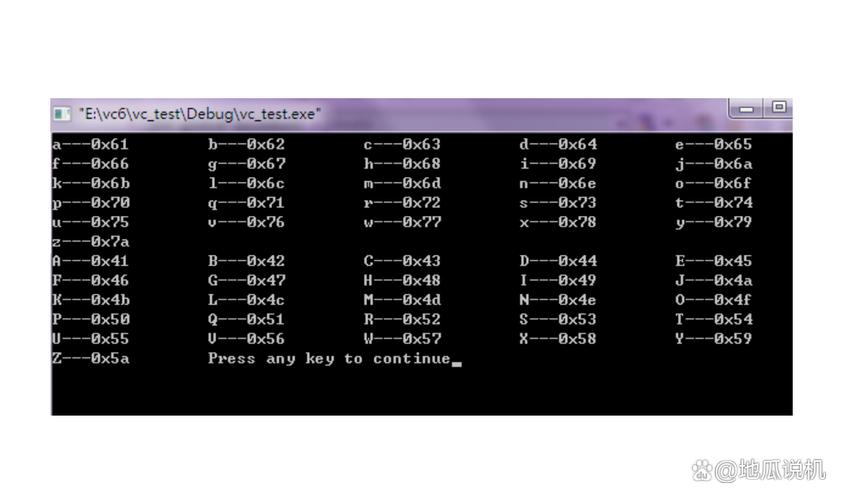
The ASCII value of 'A' is 65
The ASCII value of 'z' is 122
Getting the Character from an ASCII Value
Use the built-in chr() function.
ascii_value = 65
char = chr(ascii_value)
print(f"The character for ASCII value {ascii_value} is '{char}'")
ascii_value = 97
char = chr(ascii_value)
print(f"The character for ASCII value {ascii_value} is '{char}'")
Output:
The character for ASCII value 65 is 'A'
The character for ASCII value 97 is 'a'
Checking for Character Types
You can use standard string methods which work based on Unicode, but for basic ASCII, they behave predictably.
print(f"Is 'A' an alphabet? {'A'.isalpha()}")
print(f"Is '7' a digit? {'7'.isdigit()}")
print(f"Is '@' alphanumeric? {'@'.isalnum()}") # Alphanumeric means alphabet or number
Output:
Is 'A' an alphabet? True
Is '7' a digit? True
Is '@' alphanumeric? False
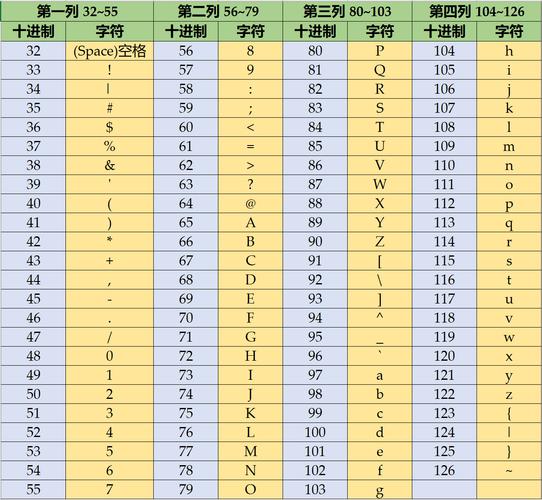
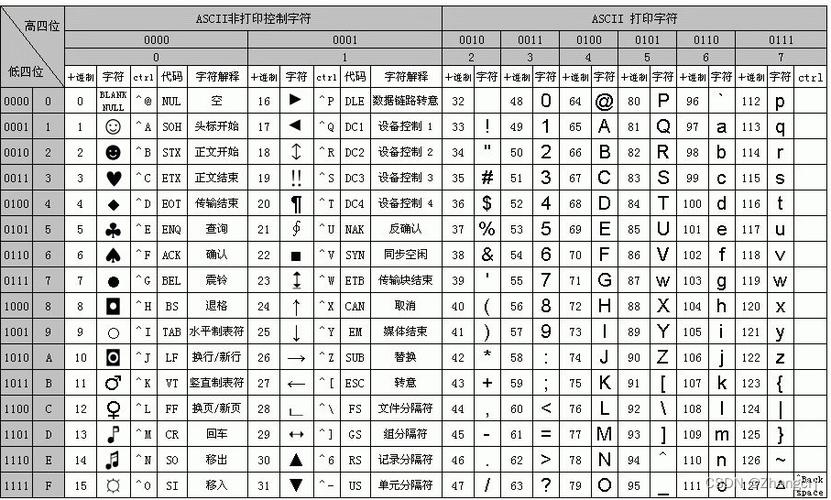
ASCII Table Reference
For quick reference, here are the common character ranges:
| Range (Decimal) | Range (Hex) | Characters | Description |
|---|---|---|---|
| 48 - 57 | 0x30-0x39 |
0 1 2 3 4 5 6 7 8 9 |
Digits |
| 65 - 90 | 0x41-0x5A |
A B C ... X Y Z |
Uppercase Letters |
| 97 - 122 | 0x61-0x7A |
a b c ... x y z |
Lowercase Letters |
| 32 | 0x20 |
` ` | Space |
| 33 - 47, 58-64, 91-96, 123-126 | 0x21-0x7E |
Punctuation & Symbols | |
| 0 - 31, 127 | 0x00-0x1F, 0x7F |
Control Characters (e.g., \n, \t) |
Non-printable / Control |
Summary of Key Functions
| Function/Method | Description | Example |
|---|---|---|
str.encode() |
Converts a string to bytes using a specified encoding. | "hello".encode('ascii') -> b'hello' |
bytes.decode() |
Converts bytes back to a string. | b'hello'.decode('ascii') -> 'hello' |
str.isascii() |
Returns True if all characters in the string are ASCII. |
'hello'.isascii() -> True |
ord(char) |
Returns the integer (ASCII/Unicode) value of a character. | ord('A') -> 65 |
chr(num) |
Returns the character for a given integer (ASCII/Unicode). | chr(65) -> 'A' |











