Of course! The Python time module is a fundamental built-in library for handling time-related tasks. It provides a variety of functions to work with time, including getting the current time, measuring the duration of code, and formatting time for display.
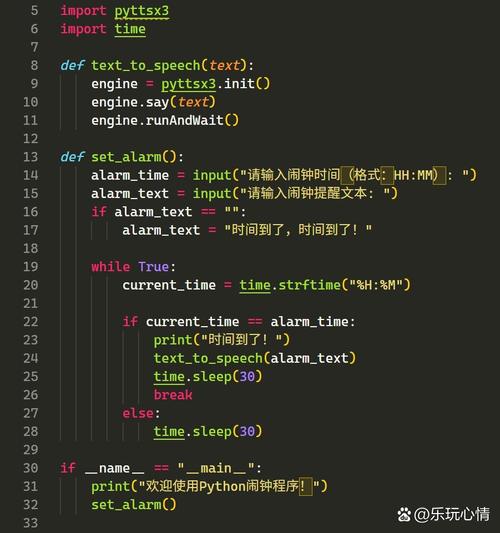
Here's a comprehensive guide to the time function and module, broken down into key concepts.
The Core Concept: The Epoch
The time module measures time as seconds since the Epoch. The Epoch is a predefined point in time. On most modern systems (like Windows, macOS, and Linux), the Epoch is 00:00:00 UTC on January 1, 1970.
This means any time you get from time.time() is a floating-point number representing the total seconds that have passed since that exact moment. This is also known as Unix time or POSIX time.
Key Functions in the time Module
Here are the most commonly used functions, categorized by their purpose.
A. Getting the Current Time
These functions return the current time in different formats.
time.time()
This is the most basic function. It returns the current time in seconds since the Epoch as a floating-point number (e.g., 123456).
- Use Case: Measuring elapsed time, calculating time differences, or storing timestamps in a database.
import time
current_time_seconds = time.time()
print(f"Current time in seconds since the Epoch: {current_time_seconds}")
# Example Output: Current time in seconds since the Epoch: 1678886400.123456
time.ctime([seconds])
This function converts a time expressed in seconds since the Epoch into a human-readable string. If you don't provide an argument, it uses the current time.
The format is: Day Month Date HH:MM:SS Year (e.g., Wed Mar 15 14:30:00 2025).
- Use Case: Getting a simple, readable string for the current time.
import time
# Get current time in seconds and convert it
current_time_readable = time.ctime()
print(f"Current time as a readable string: {current_time_readable}")
# Example Output: Current time as a readable string: Wed Mar 15 14:30:00 2025
# You can also convert a specific timestamp
timestamp = time.time() - 86400 # 86400 seconds = 1 day ago
yesterday_readable = time.ctime(timestamp)
print(f"Time one day ago: {yesterday_readable}")
B. Structuring Time: time.struct_time
Many functions in the time module work with or return a struct_time object. This is a named tuple that holds a collection of time attributes in a structured way.
| Index | Attribute | Value | Example |
|---|---|---|---|
| 0 | tm_year |
Year | 2025 |
| 1 | tm_mon |
Month (1-12) | 3 |
| 2 | tm_mday |
Day of month (1-31) | 15 |
| 3 | tm_hour |
Hour (0-23) | 14 |
| 4 | tm_min |
Minute (0-59) | 30 |
| 5 | tm_sec |
Second (0-61) | 0 |
| 6 | tm_wday |
Weekday (0-6, Monday is 0) | 2 |
| 7 | tm_yday |
Day of year (1-366) | 74 |
| 8 | tm_isdst |
Daylight Savings Flag | 0 or 1 |
time.localtime([seconds])
Converts seconds since the Epoch into a struct_time in your local timezone.
- Use Case: Getting detailed time components (year, month, day, etc.) for the current time.
import time
# Get current time as a struct_time
local_time_struct = time.localtime()
print(f"Local time as a struct_time: {local_time_struct}")
# Example Output: Local time as a struct_time: time.struct_time(tm_year=2025, tm_mon=3, tm_mday=15, tm_hour=14, tm_min=30, tm_sec=0, tm_wday=2, tm_yday=74, tm_isdst=0)
# Access individual attributes
print(f"Year: {local_time_struct.tm_year}")
print(f"Month: {local_time_struct.tm_mon}")
print(f"Day of the week (0=Monday): {local_time_struct.tm_wday}")
time.gmtime([seconds])
Works just like time.localtime(), but it returns the time in UTC (Coordinated Universal Time), which is the primary time standard. This is timezone-independent.
- Use Case: When you need a consistent, timezone-neutral representation of time.
import time
# Get current time in UTC as a struct_time
utc_time_struct = time.gmtime()
print(f"UTC time as a struct_time: {utc_time_struct}")
C. Converting Between Formats
time.mktime(t)
This is the reverse of time.localtime(). It takes a struct_time object in your local timezone and converts it back into seconds since the Epoch.
import time
# Get a struct_time for a specific moment
my_struct = time.localtime()
print(f"Struct time: {my_struct}")
# Convert it back to seconds
seconds_back = time.mktime(my_struct)
print(f"Converted back to seconds: {seconds_back}")
time.asctime([t])
This is a shortcut for time.ctime(). It takes a struct_time object and returns a human-readable string, just like ctime.
import time
my_struct = time.localtime()
readable_string = time.asctime(my_struct)
print(f"String from struct_time: {readable_string}")
D. Pausing Execution (Sleeping)
time.sleep(seconds)
This function suspends (pauses) the execution of the current thread for the given number of seconds. This is incredibly useful for delays in loops, waiting for resources, or rate-limiting API calls.
- Use Case: Creating delays, pacing scripts, or implementing simple retries.
import time
print("Starting...")
print("Waiting for 2 seconds...")
time.sleep(2) # Pauses the program for exactly 2 seconds
print("Done waiting!")
E. Performance Measurement
For high-precision timing, especially for measuring how long a piece of code takes to run, time.perf_counter() is the recommended function.
time.perf_counter()
This function returns a high-resolution monotonic clock value. Monotonic means it only goes forward, making it perfect for measuring elapsed time. It's not tied to the system clock, so it won't be affected by system time changes.
- Use Case: Benchmarking code performance.
import time
def my_function():
    """A dummy function that does some work."""
    total = 0
    for i in range(1000000):
        total += i
    return total
# Start the timer
start_time = time.perf_counter()
# Run the code you want to measure
result = my_function()
# Stop the timer
end_time = time.perf_counter()
# Calculate the elapsed time
elapsed_time = end_time - start_time
print(f"The function took {elapsed_time:.6f} seconds to run.")
# Example Output: The function took 0.045123 seconds to run.
Summary Table
| Function | Purpose | Returns |
|---|---|---|
time.time() |
Seconds since the Epoch (floating-point) | float |
time.ctime() |
Human-readable time string | str |
time.localtime() |
Time in local timezone as struct_time |
struct_time |
time.gmtime() |
Time in UTC as struct_time |
struct_time |
time.mktime() |
struct_time (local) to seconds since Epoch |
float |
time.asctime() |
struct_time to human-readable string |
str |
time.sleep() |
Pause execution for a given time | None |
time.perf_counter() |
High-resolution counter for performance timing | float |
When to Use time vs. Other Modules
-
timemodule: Best for low-level timekeeping, measuring performance (perf_counter), and getting timestamps (time.time). It's the foundation for time in Python. -
datetimemodule: More user-friendly for most applications. It provides objects likedatetime,date, andtimethat are easier to work with for arithmetic, formatting, and timezone conversions. Use this for displaying dates/times to users or doing date calculations. -
calendarmodule: Useful for calendar-related functions, like getting the month's calendar as a text