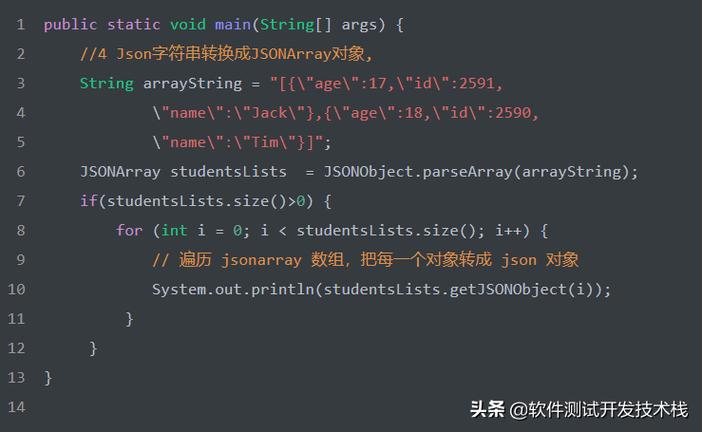
Of course! Converting a Java String to a JSON structure is a very common task. The key is to understand that you're not converting the string itself into JSON, but rather parsing the string's content to create a Java object that represents JSON data, like a JSONObject or JSONArray.
Here’s a complete guide covering the most popular and recommended libraries.
The Core Concept: Parsing vs. Serialization
- Parsing: You have a String that contains JSON data, and you want to convert it into a Java object (e.g., a
Map, a custom POJO, or a library-specificJSONObject). This is what this guide focuses on. - Serialization: You have a Java object (like a
Userclass instance) and you want to convert it into a JSON-formatted String. This is the reverse process.
Option 1: Using Jackson (The Industry Standard)
Jackson is the most popular, powerful, and flexible JSON library for Java. It's the default choice for most Spring Boot applications.
Step 1: Add the Jackson Dependency
If you're using Maven, add this to your pom.xml:
<dependency>
    <groupId>com.fasterxml.jackson.core</groupId>
    <artifactId>jackson-databind</artifactId>
    <version>2.15.2</version> <!-- Use the latest version -->
</dependency>
If you're using Gradle, add this to your build.gradle:

implementation 'com.fasterxml.jackson.core:jackson-databind:2.15.2' // Use the latest version
Step 2: Write the Java Code
Jackson provides an ObjectMapper class to do all the work. The most common use cases are parsing into a JsonNode tree or directly into a custom Java object (POJO).
Example 1: Parsing into a JsonNode (Flexible)
This is great when you don't know the exact structure of the JSON or when you only need to access a few fields.
import com.fasterxml.jackson.databind.JsonNode;
import com.fasterxml.jackson.databind.ObjectMapper;
public class JacksonJsonNodeExample {
    public static void main(String[] args) throws Exception {
        // 1. Your JSON string
        String jsonString = "{\"name\":\"John Doe\",\"age\":30,\"isStudent\":false,\"courses\":[\"History\",\"Math\"]}";
        // 2. Create an ObjectMapper instance
        ObjectMapper objectMapper = new ObjectMapper();
        // 3. Parse the string into a JsonNode tree
        JsonNode rootNode = objectMapper.readTree(jsonString);
        // 4. Access data from the JsonNode
        String name = rootNode.get("name").asText();
        int age = rootNode.get("age").asInt();
        boolean isStudent = rootNode.get("isStudent").asBoolean();
        // Access an array element
        String firstCourse = rootNode.get("courses").get(0).asText();
        System.out.println("Name: " + name);
        System.out.println("Age: " + age);
        System.out.println("Is Student: " + isStudent);
        System.out.println("First Course: " + firstCourse);
    }
}
Example 2: Parsing into a Custom Java Object (POJO - Best Practice)
This is the most robust and type-safe approach. You create a Java class that mirrors the JSON structure.
import com.fasterxml.jackson.databind.ObjectMapper;
import java.util.List;
// 1. Create a Java class that matches the JSON structure
class User {
    private String name;
    private int age;
    private boolean isStudent;
    private List<String> courses;
    // Getters and Setters are required by Jackson
    public String getName() { return name; }
    public void setName(String name) { this.name = name; }
    public int getAge() { return age; }
    public void setAge(int age) { this.age = age; }
    public boolean isStudent() { return isStudent; }
    public void setStudent(boolean student) { isStudent = student; }
    public List<String> getCourses() { return courses; }
    public void setCourses(List<String> courses) { this.courses = courses; }
    // Optional: toString() for easy printing
    @Override
    public String toString() {
        return "User{" +
                "name='" + name + '\'' +
                ", age=" + age +
                ", isStudent=" + isStudent +
                ", courses=" + courses +
                '}';
    }
}
public class JacksonPojoExample {
    public static void main(String[] args) throws Exception {
        // Your JSON string
        String jsonString = "{\"name\":\"John Doe\",\"age\":30,\"isStudent\":false,\"courses\":[\"History\",\"Math\"]}";
        // Create ObjectMapper
        ObjectMapper objectMapper = new ObjectMapper();
        // Parse the string directly into a User object
        User user = objectMapper.readValue(jsonString, User.class);
        // Now you have a fully typed Java object
        System.out.println(user);
        System.out.println("User's name: " + user.getName());
    }
}
Option 2: Using Gson (Google's Library)
Gson is another excellent, straightforward library from Google. It's very similar to Jackson in functionality.
Step 1: Add the Gson Dependency
Maven (pom.xml):
<dependency>
    <groupId>com.google.code.gson</groupId>
    <artifactId>gson</artifactId>
    <version>2.10.1</version> <!-- Use the latest version -->
</dependency>
Gradle (build.gradle):
implementation 'com.google.code.gson:gson:2.10.1' // Use the latest version
Step 2: Write the Java Code
Gson uses a Gson class for parsing. The POJO approach is identical to Jackson's.
Example 1: Parsing into a JsonElement (Tree Model)
import com.google.gson.JsonElement;
import com.google.gson.JsonObject;
import com.google.gson.JsonParser;
public class GsonJsonElementExample {
    public static void main(String[] args) {
        // 1. Your JSON string
        String jsonString = "{\"name\":\"Jane Doe\",\"age\":25,\"isStudent\":true}";
        // 2. Create a JsonParser and parse the string
        JsonElement jsonElement = JsonParser.parseString(jsonString);
        JsonObject jsonObject = jsonElement.getAsJsonObject();
        // 3. Access data
        String name = jsonObject.get("name").getAsString();
        int age = jsonObject.get("age").getAsInt();
        boolean isStudent = jsonObject.get("isStudent").getAsBoolean();
        System.out.println("Name: " + name);
        System.out.println("Age: " + age);
        System.out.println("Is Student: " + isStudent);
    }
}
Example 2: Parsing into a Custom Java Object (POJO)
You use the same User.java class as in the Jackson example.
import com.google.gson.Gson;
import java.util.List;
// Reuse the User class from the Jackson example
class User { ... }
public class GsonPojoExample {
    public static void main(String[] args) {
        // Your JSON string
        String jsonString = "{\"name\":\"Jane Doe\",\"age\":25,\"isStudent\":true,\"courses\":[\"Art\",\"Science\"]}";
        // Create a Gson instance
        Gson gson = new Gson();
        // Parse the string into a User object
        User user = gson.fromJson(jsonString, User.class);
        // Now you have a fully typed Java object
        System.out.println(user);
        System.out.println("User's name: " + user.getName());
    }
}
Option 3: Using org.json (The Simple Library)
This is a minimal, no-dependency library (just a single JAR). It's simple but less powerful than Jackson or Gson.
Step 1: Add the Dependency
Maven (pom.xml):
<dependency>
    <groupId>org.json</groupId>
    <artifactId>json</artifactId>
    <version>20251013</version> <!-- Use the latest version -->
</dependency>
Gradle (build.gradle):
implementation 'org.json:json:20251013' // Use the latest version
Step 2: Write the Java Code
The org.json library parses directly into its own JSONObject and JSONArray classes.
import org.json.JSONArray;
import org.json.JSONObject;
public class OrgJsonExample {
    public static void main(String[] args) {
        // 1. Your JSON string
        String jsonString = "{\"name\":\"Peter Jones\",\"age\":42,\"isStudent\":false,\"courses\":[\"Geography\",\"Physics\"]}";
        // 2. Parse the string into a JSONObject
        JSONObject jsonObject = new JSONObject(jsonString);
        // 3. Access data
        String name = jsonObject.getString("name");
        int age = jsonObject.getInt("age");
        boolean isStudent = jsonObject.getBoolean("isStudent");
        // Access an array
        JSONArray coursesArray = jsonObject.getJSONArray("courses");
        String firstCourse = coursesArray.getString(0);
        System.out.println("Name: " + name);
        System.out.println("Age: " + age);
        System.out.println("Is Student: " + isStudent);
System.out.println