Of course! Let's dive into using ajaxfileupload with Java. This is a classic combination for handling file uploads in a modern web application without a full page refresh.
Here's a complete guide covering:
- What is
ajaxfileupload? (A brief explanation) - Project Setup (Maven dependencies)
- Backend: Java Servlet (The server-side logic)
- Frontend: JSP & JavaScript (The client-side code)
- How It Works (The flow of data)
- Modern Alternatives (Why you might choose something else today)
What is ajaxfileupload?
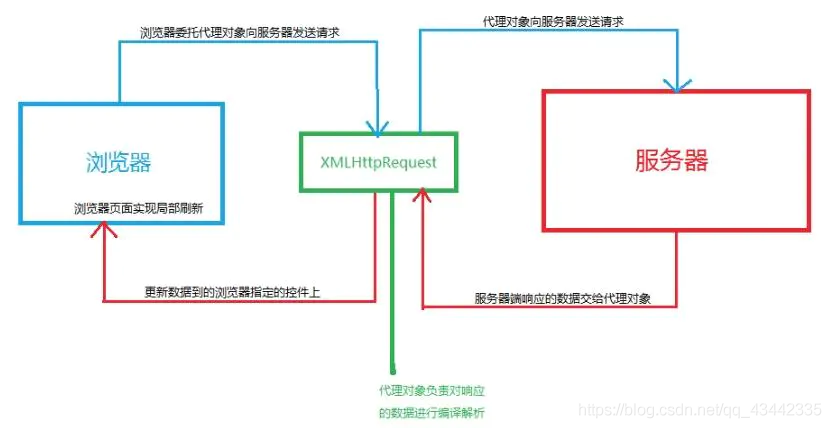
ajaxfileupload is a lightweight, open-source jQuery plugin that simplifies asynchronous file uploads. It works by creating an hidden <iframe> in the background. When you submit the form, it targets this iframe, allowing the server to process the file and return a response without reloading the main page.
Important Note: This plugin is quite old and hasn't been updated in a long time. It works best with jQuery 1.x. While it's still functional for legacy projects, for new projects, you should consider more modern solutions.
Project Setup (Using Maven)
We'll use a standard Maven web project. The key dependency is for the Servlet API, which is required to create the backend endpoint.
pom.xml
<project xmlns="http://maven.apache.org/POM/4.0.0"
         xmlns:xsi="http://www.w3.org/2001/XMLSchema-instance"
         xsi:schemaLocation="http://maven.apache.org/POM/4.0.0 http://maven.apache.org/xsd/maven-4.0.0.xsd">
    <modelVersion>4.0.0</modelVersion>
    <groupId>com.example</groupId>
    <artifactId>ajaxfileupload-demo</artifactId>
    <version>1.0-SNAPSHOT</version>
    <packaging>war</packaging>
    <properties>
        <maven.compiler.source>1.8</maven.compiler.source>
        <maven.compiler.target>1.8</maven.compiler.target>
        <project.build.sourceEncoding>UTF-8</project.build.sourceEncoding>
    </properties>
    <dependencies>
        <!-- Servlet API for the backend -->
        <dependency>
            <groupId>javax.servlet</groupId>
            <artifactId>javax.servlet-api</artifactId>
            <version>4.0.1</version>
            <scope>provided</scope>
        </dependency>
    </dependencies>
    <build>
        <finalName>ajaxfileupload-demo</finalName>
        <plugins>
            <plugin>
                <groupId>org.apache.maven.plugins</groupId>
                <artifactId>maven-war-plugin</artifactId>
                <version>3.3.2</version>
            </plugin>
        </plugins>
    </build>
</project>
Backend: Java Servlet
This servlet will handle the file upload request. It's responsible for getting the Part object from the request, saving it to a server directory, and sending back a JSON response.
File: src/main/java/com/example/servlet/FileUploadServlet.java
package com.example.servlet;
import javax.servlet.ServletException;
import javax.servlet.annotation.MultipartConfig;
import javax.servlet.annotation.WebServlet;
import javax.servlet.http.HttpServlet;
import javax.servlet.http.HttpServletRequest;
import javax.servlet.http.HttpServletResponse;
import javax.servlet.http.Part;
import java.io.File;
import java.io.IOException;
import java.io.PrintWriter;
import java.nio.file.Files;
import java.nio.file.Path;
import java.nio.file.Paths;
import java.util.UUID;
@WebServlet("/upload")
@MultipartConfig(
    fileSizeThreshold = 1024 * 1024,      // 1 MB
    maxFileSize = 1024 * 1024 * 10,       // 10 MB
    maxRequestSize = 1024 * 1024 * 15     // 15 MB
)
public class FileUploadServlet extends HttpServlet {
    // Define the upload directory relative to the web application
    private static final String UPLOAD_DIR = "uploads";
    @Override
    protected void doPost(HttpServletRequest request, HttpServletResponse response) throws ServletException, IOException {
        // 1. Create the upload directory if it doesn't exist
        String applicationPath = getServletContext().getRealPath("");
        String uploadPath = applicationPath + File.separator + UPLOAD_DIR;
        File uploadDir = new File(uploadPath);
        if (!uploadDir.exists()) {
            uploadDir.mkdirs();
        }
        // 2. Get the file part from the request
        Part filePart = request.getPart("file"); // "file" must match the name in the form
        String fileName = getFileName(filePart);
        if (fileName != null && !fileName.isEmpty()) {
            // 3. Generate a unique file name to avoid overwrites
            String uniqueFileName = UUID.randomUUID().toString() + "-" + fileName;
            Path filePath = Paths.get(uploadPath, uniqueFileName);
            // 4. Write the file to the server
            filePart.write(filePath.toString());
            // 5. Send a success response in JSON format
            response.setContentType("application/json");
            response.setCharacterEncoding("UTF-8");
            PrintWriter out = response.getWriter();
            String jsonResponse = String.format(
                "{\"success\": true, \"message\": \"File '%s' uploaded successfully!\", \"fileName\": \"%s\"}",
                fileName, uniqueFileName
            );
            out.print(jsonResponse);
            out.flush();
        } else {
            // 6. Send an error response if no file was selected
            response.setContentType("application/json");
            response.setCharacterEncoding("UTF-8");
            PrintWriter out = response.getWriter();
            String jsonResponse = "{\"success\": false, \"message\": \"No file selected.\"}";
            out.print(jsonResponse);
            out.flush();
        }
    }
    // Helper method to extract the file name from the Part object
    private String getFileName(Part part) {
        String contentDisp = part.getHeader("content-disposition");
        String[] items = contentDisp.split(";");
        for (String s : items) {
            if (s.trim().startsWith("filename")) {
                // The filename might be enclosed in quotes
                return s.substring(s.indexOf('=') + 2, s.length() - 1);
            }
        }
        return "";
    }
}
Key points in the Servlet:
@WebServlet("/upload"): Maps the servlet to the URL/upload.@MultipartConfig: Essential! This annotation tells the servlet container to handlemultipart/form-datarequests (the type used for file uploads). It also sets size limits.request.getPart("file"): Gets the uploaded file part. The name"file"must match thenameattribute of your<input type="file">.filePart.write(...): A convenient method provided by thePartAPI to save the file directly to the server's file system.
Frontend: JSP & JavaScript
This is the user interface. It includes a file input and a button to trigger the upload. The jQuery plugin will handle the AJAX call.
File: src/main/webapp/index.jsp
<%@ page contentType="text/html;charset=UTF-8" language="java" %>
<html>
<head>AjaxFileUpload Demo</title>
    <style>
        body { font-family: Arial, sans-serif; margin: 20px; }
        #status { margin-top: 15px; padding: 10px; border: 1px solid #ccc; }
        .success { background-color: #dff0d8; color: #3c763d; }
        .error { background-color: #f2dede; color: #a94442; }
    </style>
</head>
<body>
    <h1>Upload a File with AJAX</h1>
    <form id="uploadForm" enctype="multipart/form-data">
        <input type="file" id="fileInput" name="file" />
        <button type="submit">Upload File</button>
    </form>
    <div id="status"></div>
    <!-- jQuery 1.x is recommended for this plugin -->
    <script src="https://code.jquery.com/jquery-1.12.4.min.js"></script>
    <!-- The ajaxfileupload plugin -->
    <script src="https://cdnjs.cloudflare.com/ajax/libs/ajaxfileupload/3.9.1/ajaxfileupload.min.js"></script>
    <script>
        $(document).ready(function() {
            $('#uploadForm').on('submit', function(e) {
                e.preventDefault(); // Prevent the default form submission
                // Clear previous status
                $('#status').removeClass('success error').html('Uploading...');
                // Use the ajaxfileupload plugin
                $.ajaxFileUpload({
                    url: '${pageContext.request.contextPath}/upload', // Servlet URL
                    securefile: false, // For false, you must add a timestamp to prevent caching
                    fileElementId: 'fileInput', // ID of the file input
                    dataType: 'json', // Expected response type
                    success: function (data, status) {
                        // This function is called on success
                        console.log(data);
                        if (data.success) {
$('#status