Of course! Let's break down Java Filters and Servlets, starting with a clear analogy and then diving into the technical details, code examples, and their relationship.
The Analogy: A Restaurant
Imagine a restaurant:
- The Customer's Request: A customer walks in and says, "I want the steak dinner."
- The Servlet (The Chef): The chef in the kitchen is the
Servlet. His only job is to prepare the steak dinner (the business logic). He doesn't care who the customer is, if they have a reservation, or if they're on a diet. He just cooks the meal. - The Filter (The Maître d' or Bouncer): Before the customer even gets to the chef, they might interact with a maître d' or a bouncer at the door. This is the
Filter. They can perform common, repetitive tasks for every single customer:- Check ID (Authentication): "Are you old enough to be served?"
- Check Dress Code (Authorization): "Sir, you need a jacket to dine here."
- Take a Reservation (Logging): "Table for two, under the name Smith. I'll note that you arrived at 7:30 PM."
- Sanitize the Order (Input Validation): "I'm sorry, we can't serve that drink with that meal, it's against our policy."
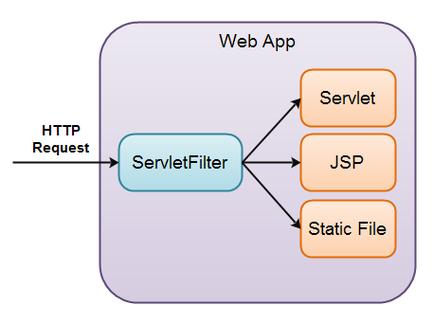
The customer's request goes through the filter(s) first. If a filter blocks them, they never reach the chef. If they pass all filters, the request is then passed to the chef (the Servlet) to be processed.
What is a Servlet?
A Servlet (Server Applet) is a Java class that handles requests from a web client (like a browser). Its primary purpose is to generate dynamic content, typically in HTML, and send it back as an HTTP response.
Key Characteristics:
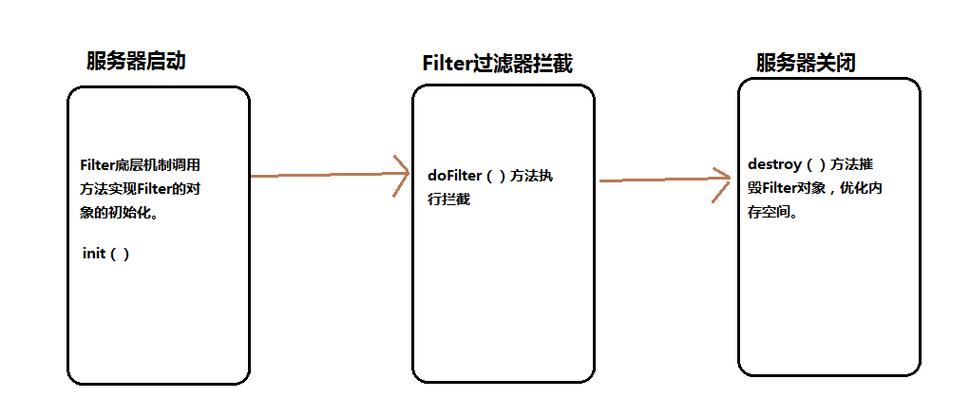
- Lifecycle Managed by the Container: A web server (like Tomcat, Jetty) or application server (like JBoss, WebLogic) that hosts servlets is called a "servlet container." The container manages the servlet's lifecycle: it creates the instance, calls its initialization methods, handles requests, and finally destroys it.
- HTTP-centric: While there are other types of servlets, the most common are
HttpServlet, which is specialized for handling HTTP requests (GET, POST, PUT, DELETE, etc.). - Request-Response Model: A servlet receives a
ServletRequestobject (which contains all information about the client's request) and uses aServletResponseobject to send the response back to the client.
The Lifecycle of a Servlet
- Loading and Instantiation: The container loads the servlet class and creates an instance of it. This typically happens when the application is first deployed or when the first request for that servlet is made.
- Initialization (
init()): The container calls theinit(ServletConfig config)method. This method is called only once in the servlet's lifetime. It's used for one-time setup, like loading database connection pools or reading configuration files. - Request Handling (
service()): For every client request, the container calls theservice()method.HttpServlet'sservice()method then delegates to the appropriate method based on the HTTP request type (doGet(),doPost(), etc.). This is where the core business logic resides. - Destruction (
destroy()): When the application is being shut down or undeployed, the container calls thedestroy()method. This is used for cleanup, like closing database connections or releasing other resources.
Simple Servlet Example
import java.io.IOException;
import java.io.PrintWriter;
import javax.servlet.ServletException;
import javax.servlet.annotation.WebServlet;
import javax.servlet.http.HttpServlet;
import javax.servlet.http.HttpServletRequest;
import javax.servlet.http.HttpServletResponse;
// The @WebServlet annotation maps this servlet to the URL "/hello"
@WebServlet("/hello")
public class HelloServlet extends HttpServlet {
    // 1. Initialization (called once)
    @Override
    public void init() throws ServletException {
        System.out.println("HelloServlet is being initialized.");
    }
    // 2. Handling GET requests
    @Override
    protected void doGet(HttpServletRequest request, HttpServletResponse response)
            throws ServletException, IOException {
        // Set the content type of the response
        response.setContentType("text/html");
        // Get a writer to output the response
        PrintWriter out = response.getWriter();
        // Generate the HTML content
        out.println("<html>");
        out.println("<head><title>Hello Servlet</title></head>");
        out.println("<body>");
        out.println("<h1>Hello from a Java Servlet!</h1>");
        out.println("<p>This page was generated dynamically.</p>");
        out.println("</body>");
        out.println("</html>");
    }
    // 3. Destruction (called once)
    @Override
    public void destroy() {
        System.out.println("HelloServlet is being destroyed.");
    }
}
What is a Filter?
A Filter is a Java component that can intercept requests and responses from a client to a servlet. It sits between the client and the servlet, allowing you to perform pre-processing and post-processing on the request and response.
Key Characteristics:
- Interception: Filters are a classic example of the Interceptor design pattern.
- Chainable: You can have multiple filters for a single servlet. They are executed in a specific order, forming a "filter chain."
- Reusable: Since they handle cross-cutting concerns (like logging, security), they can be applied to any number of servlets or URL patterns.
- Lifecycle: Similar to servlets, the container manages the filter's lifecycle (
init(),doFilter(),destroy()).
The Lifecycle of a Filter
- Instantiation and Initialization: Like servlets, the container creates a single instance of the filter and calls its
init()method once at startup. - Request Processing (
doFilter()): For every request that matches the filter's URL pattern, the container calls thedoFilter()method. This is where the magic happens. - The Crucial
chain.doFilter()Call: InsidedoFilter(), you have the power to decide what happens next.- Before the call: You can perform pre-processing on the
request(e.g., logging, authentication, modifying headers). chain.doFilter(request, response);: This is the most important line. This line passes the request and response to the next filter in the chain or, if this is the last filter, to the target servlet. If you comment out or omit this line, the request will never reach the servlet.- After the call: You can perform post-processing on the
response(e.g., compressing the output, adding a footer to the HTML).
- Before the call: You can perform pre-processing on the
Simple Filter Example (Logging)
import java.io.IOException;
import javax.servlet.Filter;
import javax.servlet.FilterChain;
import javax.servlet.FilterConfig;
import javax.servlet.ServletException;
import javax.servlet.ServletRequest;
import javax.servlet.ServletResponse;
import javax.servlet.annotation.WebFilter;
import javax.servlet.http.HttpServletRequest;
// This filter will apply to all requests ("/*")
@WebFilter("/*")
public class LoggingFilter implements Filter {
    @Override
    public void init(FilterConfig filterConfig) throws ServletException {
        System.out.println("LoggingFilter is being initialized.");
    }
    @Override
    public void doFilter(ServletRequest request, ServletResponse response, FilterChain chain)
            throws IOException, ServletException {
        // 1. Pre-processing
        HttpServletRequest httpRequest = (HttpServletRequest) request;
        String path = httpRequest.getRequestURI();
        System.out.println("Request received for path: " + path);
        // 2. Pass the request to the next filter or the servlet
        chain.doFilter(request, response);
        // 3. Post-processing
        System.out.println("Response sent for path: " + path);
    }
    @Override
    public void destroy() {
        System.out.println("LoggingFilter is being destroyed.");
    }
}
The Relationship: How Filters and Servlets Work Together
This is the core concept. The execution flow is sequential.
Client Request -> Filter 1 -> Filter 2 -> ... -> Servlet -> ... -> Filter 2 -> Filter 1 -> Client Response
Step-by-step Flow:
- A client sends an HTTP request (e.g., for
/hello). - The servlet container receives the request.
- The container checks the URL against all configured filters. Suppose
LoggingFilterandAuthenticationFilterare mapped to . - The container calls
LoggingFilter.doFilter().- Inside
LoggingFilter, it logs the incoming request. - It then calls
chain.doFilter(request, response).
- Inside
- The request is passed to the next filter in the chain:
AuthenticationFilter.- Inside
AuthenticationFilter, it checks if the user is logged in. - If authenticated, it calls
chain.doFilter(request, response). - If not authenticated, it might send an error response or redirect to a login page and does not call
chain.doFilter(). The request stops here.
- Inside
- Since the request passed through