Of course! Using Python to make an HTTP request and then parsing the HTML response with XPath is a very common and powerful web scraping technique.
Here's a complete guide, breaking it down into the necessary steps, the required libraries, and a practical example.
The Core Workflow
- Request: Use a library like
requeststo fetch the HTML content of a webpage. - Parse: Use a library like
lxmlorBeautifulSoup(with a parser likelxml) to convert the raw HTML into a structured document that you can navigate. - Extract: Use XPath expressions to query the structured document and extract the specific data you need.
Step 1: Install Necessary Libraries
You'll need two main libraries:
requests: To send HTTP requests and get the HTML content.lxml: A powerful and fast library for parsing HTML and XML, which supports XPath. You can also useBeautifulSoupwith thelxmlparser as an alternative.
Open your terminal or command prompt and install them using pip:
pip install requests
pip install lxml
Step 2: The Python Code
Let's scrape the headlines from the BBC News homepage as a practical example. Our goal is to get the main headline and the summary text.
Here is the complete, commented code.
import requests
from lxml import html
# 1. Define the URL to scrape
url = 'https://www.bbc.com/news'
# 2. Send an HTTP GET request to the URL
# It's good practice to set a User-Agent to mimic a real browser
headers = {
    'User-Agent': 'Mozilla/5.0 (Windows NT 10.0; Win64; x64) AppleWebKit/537.36 (KHTML, like Gecko) Chrome/91.0.4472.124 Safari/537.36'
}
try:
    # Make the request with a timeout to avoid hanging indefinitely
    response = requests.get(url, headers=headers, timeout=10)
    # Raise an exception if the request was unsuccessful (e.g., 404, 500)
    response.raise_for_status()
    # 3. Parse the HTML content using lxml
    # The 'html' parser from lxml is specifically designed for parsing HTML
    tree = html.fromstring(response.content)
    # 4. Define and use XPath expressions to extract data
    # NOTE: XPath selectors can change if the website updates its HTML structure.
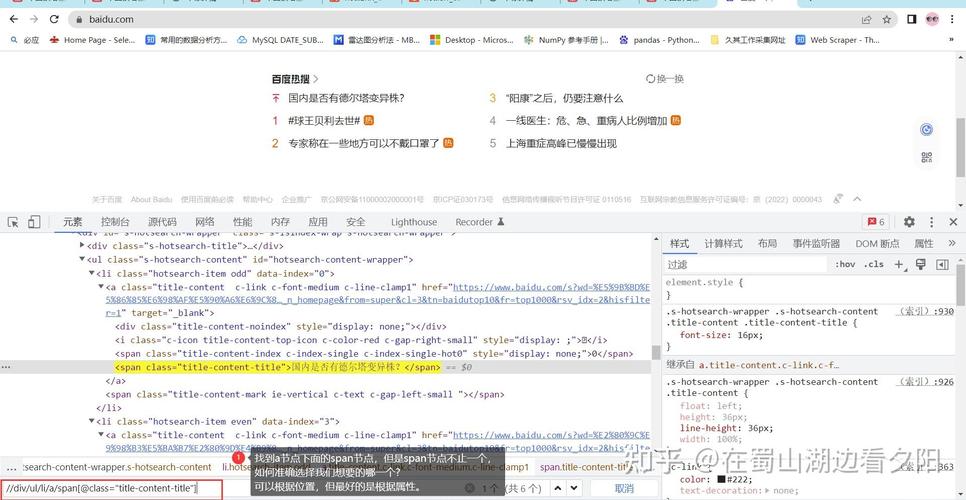
    # You can find these by using your browser's "Inspect Element" tool.
    # Extract the main headline
    # This XPath looks for an <h2> tag inside an <a> tag with a specific class, within a specific container.
    main_headline = tree.xpath('//div[@class="sc-5fef9d2d-0 kYmCZK"]/h2/a/text()')
    # Extract the summary text for the main headline
    main_summary = tree.xpath('//div[@class="sc-5fef9d2d-0 kYmCZK"]/p/text()')
    # Extract other headlines (using a more general selector)
    # This XPath finds all <h3> tags inside links within a container with a different class.
    other_headlines = tree.xpath('//div[@class="sc-5fef9d2d-2 dCwzUB"]/h3/a/text()')
    # 5. Print the extracted data
    print("--- BBC News Headlines ---\n")
    if main_headline:
        print(f"Main Headline: {main_headline[0].strip()}")
    if main_summary:
        print(f"Summary: {main_summary[0].strip()}")
    print("\n--- Other Headlines ---")
    for i, headline in enumerate(other_headlines, 1):
        print(f"{i}. {headline.strip()}")
except requests.exceptions.RequestException as e:
    print(f"Error during requests to {url}: {e}")
except Exception as e:
    print(f"An unexpected error occurred: {e}")
Explanation of the Code
The Request
response = requests.get(url, headers=headers, timeout=10)
response.raise_for_status()
requests.get(url): Sends an HTTP GET request to the specified URL.headers: We send aUser-Agentheader. Some websites block requests that don't look like they're coming from a real browser. This helps avoid being blocked.timeout=10: If the server doesn't respond within 10 seconds, the request will fail, preventing your script from hanging indefinitely.response.raise_for_status(): This is a useful method that will raise anHTTPErrorif the HTTP request returned an unsuccessful status code (4xx or 5xx).
The Parsing
tree = html.fromstring(response.content)
response.content: This gives you the raw HTML content of the page as bytes.html.fromstring(...): This function from thelxmllibrary parses the raw HTML and turns it into anElementTreeobject, which we've namedtree. Thistreeobject is the key to using XPath.
The XPath Extraction (The Core Part)
main_headline = tree.xpath('//div[@class="sc-5fef9d2d-0 kYmCZK"]/h2/a/text()')
Let's break down this XPath expression:
- Selects nodes in the document from the current node that match the selection no matter where they are. It's a "global" search.
div: Selects all<div>elements.[@class="sc-5fef9d2d-0 kYmCZK"]: This is a predicate. It filters the<div>elements to find only those that have anattributenamedclasswith the exact value"sc-5fef9d2d-0 kYmCZK". This is the most common way to pinpoint a specific element.- Selects the direct child of the previous node.
h2: Selects the<h2>child of the<div>./a: Selects the<a>(link) child of the<h2>./text(): Selects the text content of the<a>tag.
Important: The classes in the XPath (sc-5fef9d2d-0, kYmCZK, etc.) are likely generated dynamically and can change at any time. If you run this code in a few months and it stops working, the first thing to check is if the website's HTML structure has changed.
Handling the Results
tree.xpath()always returns a list, even if it only finds one matching element. That's why we access the first result withmain_headline[0].- The
strip()method is used to remove any leading or trailing whitespace from the extracted text.
Alternative: Using BeautifulSoup with lxml
Many developers prefer the more user-friendly API of BeautifulSoup. It can use lxml as its underlying parser, giving you the best of both worlds: easy-to-use syntax and powerful XPath capabilities.
First, install beautifulsoup4:
pip install beautifulsoup4
Here's how you would write the same scraper using BeautifulSoup:
import requests
from bs4 import BeautifulSoup
from lxml import etree # Import the lxml parser
url = 'https://www.bbc.com/news'
headers = {'User-Agent': 'Mozilla/5.0 (Windows NT 10.0; Win64; x64) AppleWebKit/537.36 (KHTML, like Gecko) Chrome/91.0.4472.124 Safari/537.36'}
try:
    response = requests.get(url, headers=headers, timeout=10)
    response.raise_for_status()
    # Use BeautifulSoup for parsing
    soup = BeautifulSoup(response.content, 'lxml')
    # To use XPath with BeautifulSoup, you need to use the underlying lxml parser
    # and convert the BeautifulSoup object to an lxml Element
    # This is a bit more advanced but shows how to combine them.
    # For simpler cases, BeautifulSoup's CSS selectors are often preferred.
    # For this example, let's stick to pure lxml as it's more direct for XPath.
    # --- The XPath part is identical to the first example ---
    tree = html.fromstring(response.content) # Re-use the tree from before
    main_headline = tree.xpath('//div[@class="sc-5fef9d2d-0 kYmCZK"]/h2/a/text()')
    main_summary = tree.xpath('//div[@class="sc-5fef9d2d-0 kYmCZK"]/p/text()')
    other_headlines = tree.xpath('//div[@class="sc-5fef9d2d-2 dCwzUB"]/h3/a/text()')
    # --- The printing part is also identical ---
    print("--- BBC News Headlines (BeautifulSoup + lxml) ---\n")
    if main_headline:
print(f"Main Headline