
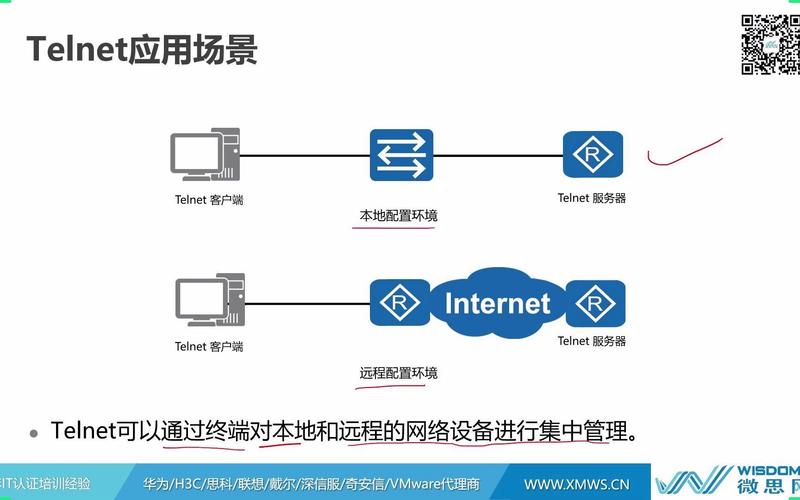
Of course! Creating a Telnet server in Python is a great way to understand network programming. While Telnet itself is an insecure protocol (sends data in plaintext), it's excellent for learning the fundamentals of client-server communication.
(图片来源网络,侵删)
We'll use Python's built-in socket module, which is perfect for creating a simple, educational server.
Core Concepts
- Socket Programming: This is the foundation of all network communication in Python. A socket is like an endpoint for sending or receiving data across a computer network.
- The Server's Job:
- Bind: Associate the server with a specific network interface and port (e.g.,
('localhost', 23)). - Listen: Start listening for incoming connection requests.
- Accept: When a client connects,
accept()it, which creates a new connection socket for communication with that specific client. - Receive & Send: Use the connection socket to receive data from the client and send data back.
- Bind: Associate the server with a specific network interface and port (e.g.,
- Concurrency: A single server needs to handle multiple clients. The simplest way to do this is with threading. Each time a new client connects, we spawn a new thread to handle its requests, while the main server loop goes back to listening for more connections.
Step 1: A Simple, Single-Client Telnet Server
This version is the most basic. It can only handle one client at a time. After the client disconnects, the server shuts down.
# simple_telnet_server.py
import socket
# Define the host and port
# '0.0.0.0' means the server will listen on all available network interfaces
HOST = '0.0.0.0'
PORT = 23  # Standard Telnet port
def handle_client(conn, addr):
    """Handles a single client connection."""
    print(f"[+] New connection from {addr}")
    conn.sendall(b"Welcome to the Python Telnet Server!\n")
    conn.sendall(b"Type 'exit' to disconnect.\n\n")
    while True:
        # Receive data from the client (up to 1024 bytes)
        data = conn.recv(1024)
        if not data:
            # If recv() returns an empty object, the client has disconnected
            break
        # Decode the bytes to a string and strip the trailing newline
        message = data.decode('utf-8').strip()
        print(f"Received from {addr}: {message}")
        # Process the message
        if message.lower() == 'exit':
            conn.sendall(b"Goodbye!\n")
            break
        # Echo the message back to the client (with a prefix)
        response = f"Server received: {message}\n"
        conn.sendall(response.encode('utf-8'))
    print(f"[-] Connection from {addr} closed.")
    conn.close()
def start_server():
    """Starts the Telnet server."""
    with socket.socket(socket.AF_INET, socket.SOCK_STREAM) as s:
        s.bind((HOST, PORT))
        s.listen()
        print(f"[*] Server listening on {HOST}:{PORT}")
        # This loop will run once, handling the first and only client
        conn, addr = s.accept()
        with conn:
            handle_client(conn, addr)
if __name__ == "__main__":
    start_server()
How to Run This Example:
- Save the code as
simple_telnet_server.py. - Run it from your terminal:
python simple_telnet_server.py - You'll see:
[*] Server listening on 0.0.0.0:23 - Open a new terminal and connect to it using the
telnetclient:telnet localhost 23
- You should see the welcome message. Type something and press Enter. You'll get an echo back. Type
exitand the connection will close.
Step 2: A Multi-Client Telnet Server (Using Threads)
This is a much more practical version. It uses the threading module to handle multiple clients simultaneously.
# multi_client_telnet_server.py
import socket
import threading
# Define the host and port
HOST = '0.0.0.0'
PORT = 23
# A simple list to keep track of connected clients
clients = []
def broadcast(message, sender_conn=None):
    """Sends a message to all connected clients except the sender."""
    for client in clients:
        if client != sender_conn:
            try:
                client.send(message)
            except:
                # If sending fails, the client might have disconnected, remove it
                clients.remove(client)
def handle_client(conn, addr):
    """Handles a single client connection in a separate thread."""
    print(f"[+] New connection from {addr}")
    conn.sendall(b"Welcome to the Multi-Client Python Telnet Server!\n")
    conn.sendall(b"Type 'exit' to disconnect.\n\n")
    # Add the new client to the list
    clients.append(conn)
    while True:
        try:
            data = conn.recv(1024)
            if not data:
                break # Client disconnected
            message = data.decode('utf-8').strip()
            print(f"Received from {addr}: {message}")
            if message.lower() == 'exit':
                conn.sendall(b"Goodbye!\n")
                break
            # Echo the message back to the sender
            response = f"You ({addr[0]}): {message}\n"
            conn.sendall(response.encode('utf-8'))
            # Broadcast the message to other clients
            broadcast_msg = f"Client {addr[0]} said: {message}\n"
            broadcast(broadcast_msg.encode('utf-8'), conn)
        except ConnectionResetError:
            print(f"[-] Client {addr} forcibly closed the connection.")
            break
    # Clean up: remove the client from the list and close the connection
    print(f"[-] Connection from {addr} closed.")
    if conn in clients:
        clients.remove(conn)
    conn.close()
def start_server():
    """Starts the Telnet server."""
    server = socket.socket(socket.AF_INET, socket.SOCK_STREAM)
    server.bind((HOST, PORT))
    server.listen()
    print(f"[*] Server listening on {HOST}:{PORT}")
    try:
        while True:
            conn, addr = server.accept()
            # Create a new thread for each new client
            thread = threading.Thread(target=handle_client, args=(conn, addr))
            thread.start()
            print(f"[*] Active connections: {threading.active_count() - 1}") # -1 for the main thread
    except KeyboardInterrupt:
        print("\n[*] Server is shutting down.")
    finally:
        server.close()
if __name__ == "__main__":
    start_server()
How to Run This Example:
- Save the code as
multi_client_telnet_server.py. - Run it:
python multi_client_telnet_server.py - Open two or more new terminals.
- In each terminal, connect to the server:
telnet localhost 23 - Now, type a message in one terminal. You will see it echoed back to you, and it will be broadcast to all other connected clients!
Important Considerations and Improvements
-
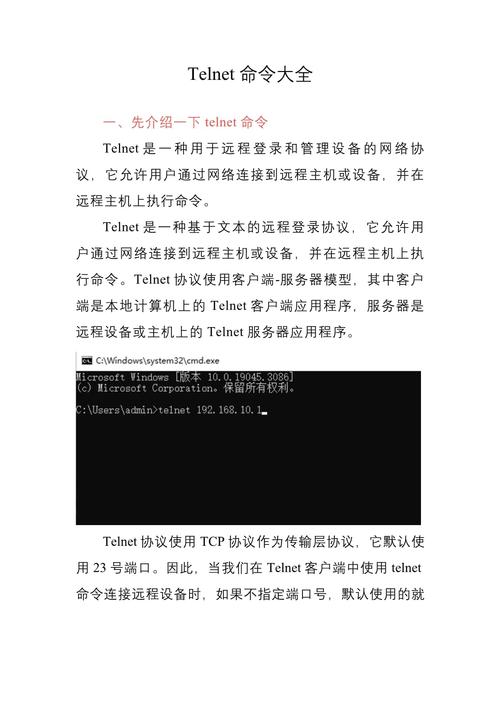
Security (The Elephant in the Room):
 (图片来源网络,侵删)
- Plaintext: Everything you send and receive, including usernames and passwords, is sent in plain text. Never use Telnet for anything sensitive on a real network.
- Solution: For a real-world application, you should use SSH (Secure Shell), which encrypts all traffic. The
paramikolibrary is the standard for creating SSH servers and clients in Python.
-
Protocol Implementation (Pseudo-Terminal):
- A real Telnet client does more than just send and receive text. It uses special sequences (like
IAC- Interpret As Command) to negotiate terminal settings (e.g., terminal type, window size, echo mode). - Our simple server is a "line-oriented" echo server. A true Telnet server would need to parse these commands and manage a pseudo-terminal (
pty) to correctly simulate a shell environment.
- A real Telnet client does more than just send and receive text. It uses special sequences (like
-
Robustness:
- The
try...exceptblocks in the multi-client server make it more robust by handling cases where a client disconnects abruptly. - For a production server, you'd want more sophisticated logging, connection limits, and error handling.
- The
-
Using
asyncio:- For high-performance servers,
threadingcan become inefficient due to the overhead of creating and managing threads. - Python's
asynciolibrary provides a way to handle thousands of concurrent connections in a single thread using an event loop, which is much more scalable. This is the modern approach for I/O-bound network applications.
- For high-performance servers,
(图片来源网络,侵删)











