Of course! Let's dive deep into os.path.walk. This is a classic and powerful tool from Python's standard library for recursively traversing directory trees.
Overview
os.path.walk is a function that walks a directory tree either top-down or bottom-up. For each directory in the tree, it calls a user-defined function (often called a "visitor" function), passing it three arguments: the directory path, a list of subdirectories, and a list of files within that directory.
It's important to note that os.path.walk was part of the original os module. In modern Python (3.5+), its functionality has been largely superseded by the more flexible and object-oriented os.walk(). However, understanding os.path.walk is still valuable, especially when maintaining older codebases.
The os.path.walk Function Signature
os.path.walk(top, func, arg)
Parameters:
top(string): The starting directory path for the walk. This is the root of the tree you want to traverse.func(function): The "visitor" function that will be called for each directory visited. This function must accept three arguments:arg: The third argument passed toos.path.walk(the "data" argument).dirname: A string representing the path to the current directory being visited.names: A list of strings, the names of the files and subdirectories indirname.
arg(any object): An arbitrary object that is passed to thefuncon every call. This is how you can pass data into your visitor function (e.g., a list to store results, a counter, etc.).
Return Value:
The function returns None.
How It Works: The Visitor Function
The core of os.path.walk is the func you provide. It's a "callback" function. The os.path.walk function does the traversal and, at each step, says, "Hey, func, here's some information. Do what you need to with it."
A common pattern is to use a mutable object for arg, like a list, so the visitor function can modify it and have those changes persist after the walk is complete.
Simple Example: Finding All .py Files
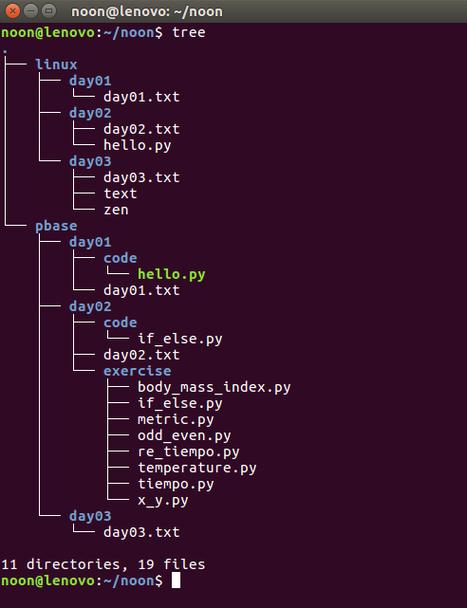
Let's say we have the following directory structure:
/my_project
|-- main.py
|-- subdir1
|   |-- utils.py
|   `-- empty_file.txt
|-- subdir2
|   |-- config.json
|   `-- another_subdir
|       `-- helper.py
`-- notes.txt
Our goal is to find all files ending with .py.
The Visitor Function
We'll create a function that appends the full path of any .py file it finds to a list.
import os
def find_py_files(arg, dirname, names):
    """
    Visitor function to find all .py files.
    'arg' is expected to be a list to store the results.
    """
    # We are only interested in files, not directories
    for name in names:
        # Check if the file ends with .py
        if name.endswith('.py'):
            # Create the full path
            full_path = os.path.join(dirname, name)
            # Append it to our list (which is 'arg')
            arg.append(full_path)
# The list to store our results
py_files_found = []
# Start the walk from the current directory ('.')
os.path.walk('.', find_py_files, py_files_found)
# Print the results
print("Found .py files:")
for f in py_files_found:
    print(f)
Output:
Found .py files:
./main.py
./subdir1/utils.py
./subdir2/another_subdir/helper.py
Breakdown:
py_files_found = []: We create an empty list. This will be ourarg.os.path.walk('.', find_py_files, py_files_found): We start the walk.topis (the current directory).funcisfind_py_files.argis ourpy_files_foundlist.
os.path.walkcallsfind_py_filesrepeatedly:- First call (for ):
argispy_files_found,dirnameis ,namesis['main.py', 'subdir1', 'subdir2', 'notes.txt']. It finds'main.py', joins it to to get'./main.py', and appends it topy_files_found. - Second call (for
'./subdir1'):argispy_files_found,dirnameis'./subdir1',namesis['utils.py', 'empty_file.txt']. It finds'utils.py', appends'./subdir1/utils.py'to the list. - ...and so on for every other directory in the tree.
- First call (for ):
- After the walk: The
py_files_foundlist is now populated with all the.pyfile paths, and we print them.
Important Considerations and Differences from os.walk()
While os.path.walk is useful, it's crucial to know its limitations and how it compares to the modern os.walk().
| Feature | os.path.walk() |
os.walk() |
|---|---|---|
| Availability | Python 2, Python 3 (but deprecated in favor of os.walk) |
Python 2.3+ (Recommended) |
| Traversal Order | Always top-down. | Can be top-down or bottom-up. |
| Modification | The visitor function cannot modify the names list to prevent traversal into subdirectories. |
The visitor function can modify the names list in-place to prune the traversal. |
| Generator vs. Function | A simple function that calls the visitor for each directory. | A generator. It yields a tuple for each directory, which is more memory-efficient for very large trees. |
| API | os.path.walk(top, func, arg) |
os.walk(top, topdown=True, onerror=None) |
Key Limitation: Inability to Prune
This is the biggest difference. In os.walk(), you can decide not to descend into a subdirectory by simply removing it from the names list inside the loop. You cannot do this with os.path.walk.
Let's look at a scenario where you'd want to prune: skipping directories named __pycache__.
How you would do it with os.walk() (Recommended):
import os
def find_py_files_walk():
    py_files = []
    for dirpath, dirnames, filenames in os.walk('.'):
        # Prune the directory tree by removing '__pycache__' from dirnames
        # This prevents os.walk from ever going into it.
        if '__pycache__' in dirnames:
            dirnames.remove('__pycache__')
        for name in filenames:
            if name.endswith('.py'):
                py_files.append(os.path.join(dirpath, name))
    return py_files
found_files = find_py_files_walk()
print("\nFound .py files using os.walk():")
for f in found_files:
    print(f)
Why you can't do this with os.path.walk():
The names list passed to os.path.walk's visitor function is a copy of the directory's contents. Modifying it has no effect on the traversal logic, which has already decided which directories to visit next.
Modern Alternative: os.walk()
For any new code, you should strongly prefer os.walk(). It's more flexible, memory-efficient (as a generator), and the standard way to handle directory traversal today.
Here is the same first example, rewritten with os.walk():
import os
def find_py_files_with_walk():
    """
    Finds all .py files using the modern os.walk() function.
    """
    py_files_found = []
    # os.walk is a generator, so we use a for loop
    for dirpath, dirnames, filenames in os.walk('.'):
        for name in filenames:
            if name.endswith('.py'):
                # os.path.join is still the best way to build paths
                full_path = os.path.join(dirpath, name)
                py_files_found.append(full_path)
    return py_files_found
# Get the results
py_files = find_py_files_with_walk()
print("\nFound .py files using os.walk():")
for f in py_files:
    print(f)
Summary
When to use os.path.walk... |
When to use os.walk()... |
|---|---|
| ...you are maintaining legacy Python 2 code. | ...you are writing any new Python code. |
| ...you need a simple, top-down traversal and don't need to prune directories. | ...you need flexibility (top-down/bottom-up). |
| ...you prefer the simple callback function style. | ...you want memory efficiency for large directory trees. |
| ...you need to prune the directory tree during traversal. |
In conclusion, os.path.walk is a solid, easy-to-understand tool for its specific purpose. However, its modern successor, os.walk(), is superior in almost every way and should be your default choice for directory traversal in contemporary Python development.