
Of course! This is a classic and powerful combination for building web applications. Let's break down what each component is, how they work together, and how you can get started.
The High-Level Analogy: A Restaurant
Think of your web application as a restaurant:
- Apache (The Waiter): It's the first point of contact. It listens for customers (web requests) coming through the door (the internet). It takes their order (the request), figures out what they want (e.g., a webpage, some data), and brings it back to them. It's great at serving static content like HTML, CSS, and images.
- Python (The Chef): This is where the magic happens. The waiter (Apache) doesn't know how to cook. When an order is complex (e.g., "get user data from the database," "process a login," "calculate a price"), the waiter hands the order to the chef (Python). The chef follows a recipe (your Python code) to prepare the meal (generate dynamic content, process logic).
- MySQL (The Pantry/Refrigerator): This is where all the raw ingredients are stored. The chef (Python) needs ingredients to cook. The pantry (MySQL) is a structured, organized place to find ingredients (user profiles, product catalogs, blog posts, etc.). The chef knows exactly where to find what he needs.
Apache: The Web Server
What it is: Apache HTTP Server is the most popular web server software in the world. Its primary job is to serve web content to clients (browsers) over the internet.
Key Responsibilities:
- Listening for Requests: It runs on a server and waits for HTTP requests from clients.
- Serving Static Files: It can directly deliver files that don't change, like HTML pages, CSS stylesheets, JavaScript files, and images. This is very fast and efficient.
- Acting as a Reverse Proxy: This is the most crucial part of our stack. Apache can be configured to pass dynamic requests to another program (like our Python application) instead of trying to handle them itself.
How it fits in: Apache is the front door of your application. It handles the communication with the user's browser and is optimized for serving simple files quickly.
Python: The Application Logic / "Glue Code"
What it is: Python is a high-level, versatile programming language. In this stack, it's used to write the "backend" or "server-side" logic of your web application.
Key Responsibilities:
- Business Logic: This is the core of your application. Python code handles user authentication, data processing, form validation, calculations, etc.
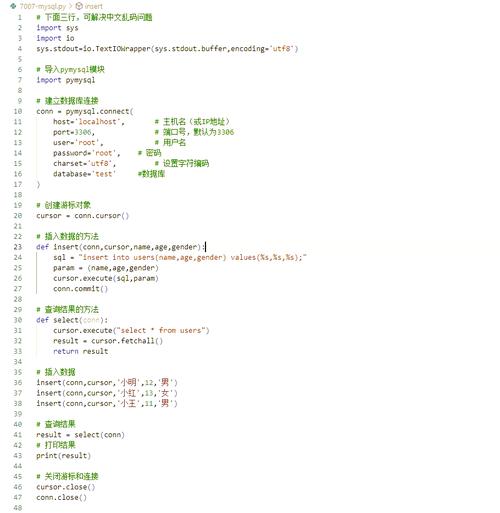
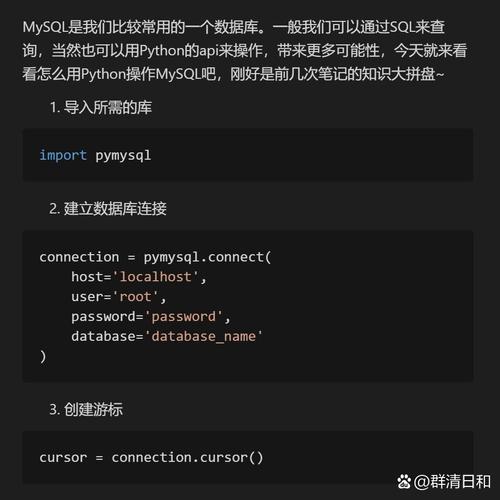
- Database Interaction: Python connects to MySQL to query, insert, update, and delete data.
- Dynamic Content Generation: Python takes data from the database and templates to create the HTML that will be sent back to the user's browser.
How it fits in: Python is the brain. It receives the request from Apache, does all the heavy lifting, and prepares the response.
MySQL: The Database
What it is: MySQL is a popular open-source relational database management system (RDBMS). It's used to store and manage the data for your application in a structured way.
Key Responsibilities:
- Data Storage: It holds all your application's persistent data, such as user accounts, product information, blog posts, comments, etc.
- Data Integrity: It enforces rules (schema, constraints, data types) to ensure the data is consistent and reliable.
- Efficient Querying: It provides a powerful language (SQL) for quickly retrieving and manipulating specific pieces of information from vast amounts of data.
How it fits in: MySQL is the memory of your application. It provides the structured data that Python needs to create dynamic pages.
How They Work Together: The Request-Response Cycle
Here’s the step-by-step flow when a user visits your website:
- Request: A user types
www.yourapp.com/profileinto their browser and hits Enter. The browser sends an HTTP request to your server. - Apache Intercepts: The Apache web server, listening on port 80 or 443, receives the request for
/profile. - Apache Delegates: Apache checks its configuration. It sees that
/profileis a dynamic URL and not a static file. It uses a module (likemod_wsgifor Python) to pass the request to your Python application. - Python Processes: Your Python code (running via a framework like Django or Flask) receives the request.
- It might parse the URL to know it's looking for a user profile.
- It connects to the MySQL database.
- It runs a SQL query like
SELECT username, bio FROM users WHERE user_id = 123;
- MySQL Responds: The MySQL database receives the query, finds the matching row, and sends the data (e.g.,
username: 'jane_doe', bio: 'Loves Python') back to the Python application. - Python Generates Response: The Python code takes this data and plugs it into an HTML template, creating a complete, personalized HTML page for the user.
- Python Returns to Apache: The Python application sends the final HTML page back to Apache.
- Apache Sends to User: Apache receives the HTML and sends it back to the user's browser, which then renders the page for the user to see.
This entire process happens in a fraction of a second for a simple request.
Popular Python Frameworks for This Stack
You rarely write Python web code from scratch. You use a framework that makes this process much easier.
- Django: A "batteries-included" framework. It has its own ORM (Object-Relational Mapper) that makes talking to MySQL (and other databases) very easy. It also has a built-in web server, user authentication system, and admin panel. It's great for complex, data-driven applications.
- Flask: A "micro-framework." It's lightweight and gives you the bare essentials to get a web app running. It's very flexible and great for smaller projects or APIs. You would typically add a library like Flask-SQLAlchemy to handle the database connection.
How to Get Started: A Simple "Hello World" Example
Here's a conceptual overview of setting up a simple Flask app that connects to MySQL.
Step 1: Install Prerequisites
- Apache:
sudo apt-get install apache2(on Debian/Ubuntu) - Python & Pip:
sudo apt-get install python3 python3-pip - MySQL Server & Python Connector:
sudo apt-get install mysql-server python3-mysqldb - Flask:
pip3 install Flask
Step 2: Configure Apache to talk to Python (using mod_wsgi)
- Install the module:
sudo apt-get install libapache2-mod-wsgi-py3 - Create an Apache configuration file (
/etc/apache2/sites-available/myapp.conf) that tells Apache to forward requests to your Python application.
Step 3: Write the Python Application (e.g., app.py)
from flask import Flask, jsonify
import mysql.connector
app = Flask(__name__)
# --- Database Connection ---
db_connection = mysql.connector.connect(
    host="localhost",
    user="your_db_user",
    password="your_db_password",
    database="your_db_name"
)
db_cursor = db_connection.cursor(dictionary=True) # dictionary=True makes results easy to use
@app.route('/')
def hello_world():
    return '<h1>Hello, World!</h1><p>Welcome to my Apache/Python/MySQL app!</p>'
@app.route('/api/users')
def get_users():
    try:
        db_cursor.execute("SELECT id, username FROM users")
        users = db_cursor.fetchall()
        return jsonify(users)
    except mysql.connector.Error as err:
        return jsonify({"error": str(err)}), 500
if __name__ == '__main__':
    # For development only. Apache will run it in production.
    app.run(debug=True)
Step 4: Create a MySQL Table
CREATE DATABASE your_db_name;
USE your_db_name;
CREATE TABLE users (
    id INT AUTO_INCREMENT PRIMARY KEY,
    username VARCHAR(50) NOT NULL UNIQUE,
    email VARCHAR(100) NOT NULL UNIQUE
);
INSERT INTO users (username, email) VALUES ('alice', 'alice@example.com');
INSERT INTO users (username, email) VALUES ('bob', 'bob@example.com');
Step 5: Run and Test
- Restart Apache:
sudo systemctl restart apache2 - Visit
http://localhost/in your browser. You should see "Hello, World!". - Visit
http://localhost/api/usersin your browser or API tool. You should see a JSON list of users:[{"id": 1, "username": "alice"}, {"id": 2, "username": "bob"}].
This combination is a robust, scalable, and industry-standard foundation for building almost any type of web application.











