Java Base64 编码图片
在 Java 中,你可以使用 java.util.Base64 类来对图片进行 Base64 编码和解码,以下是完整的实现方法:
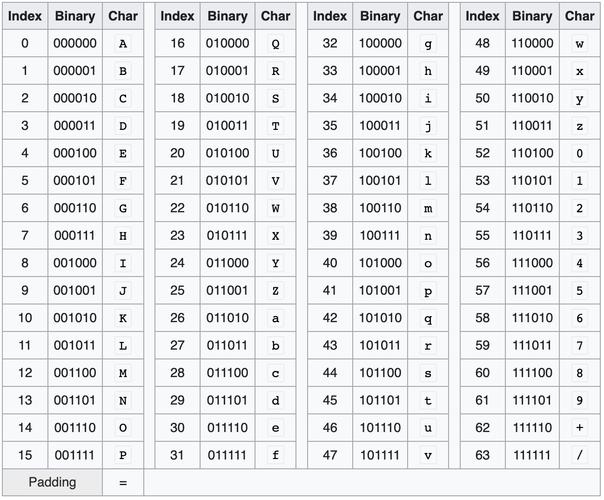
(图片来源网络,侵删)
图片转 Base64 编码字符串
import java.io.FileInputStream;
import java.io.IOException;
import java.io.InputStream;
import java.util.Base64;
public class ImageToBase64 {
    public static String encodeImageToBase64(String imagePath) throws IOException {
        // 读取图片文件
        InputStream imageStream = new FileInputStream(imagePath);
        byte[] imageBytes = imageStream.readAllBytes();
        imageStream.close();
        // 进行Base64编码
        String base64String = Base64.getEncoder().encodeToString(imageBytes);
        return base64String;
    }
    public static void main(String[] args) {
        try {
            String imagePath = "path/to/your/image.jpg";
            String base64 = encodeImageToBase64(imagePath);
            System.out.println("Base64编码结果: " + base64);
        } catch (IOException e) {
            e.printStackTrace();
        }
    }
}
Base64 字符串转图片并保存
import java.io.FileOutputStream;
import java.io.IOException;
import java.util.Base64;
public class Base64ToImage {
    public static void decodeBase64ToImage(String base64String, String outputPath) throws IOException {
        // 解码Base64字符串
        byte[] imageBytes = Base64.getDecoder().decode(base64String);
        // 写入文件
        try (FileOutputStream imageOutput = new FileOutputStream(outputPath)) {
            imageOutput.write(imageBytes);
        }
    }
    public static void main(String[] args) {
        try {
            String base64String = "BASE64编码的字符串";
            String outputPath = "output.jpg";
            decodeBase64ToImage(base64String, outputPath);
            System.out.println("图片已保存到: " + outputPath);
        } catch (IOException e) {
            e.printStackTrace();
        }
    }
}
包含MIME类型的完整Base64编码
如果你需要在HTML或CSS中使用Base64编码的图片,通常需要包含MIME类型信息:
public class ImageToBase64WithMime {
    public static String encodeImageToBase64WithMime(String imagePath, String mimeType) throws IOException {
        InputStream imageStream = new FileInputStream(imagePath);
        byte[] imageBytes = imageStream.readAllBytes();
        imageStream.close();
        String base64String = Base64.getEncoder().encodeToString(imageBytes);
        // 组合成data URI格式
        return "data:" + mimeType + ";base64," + base64String;
    }
    public static void main(String[] args) {
        try {
            String imagePath = "path/to/your/image.png";
            String base64WithMime = encodeImageToBase64WithMime(imagePath, "image/png");
            System.out.println("带MIME的Base64: " + base64WithMime);
        } catch (IOException e) {
            e.printStackTrace();
        }
    }
}
注意事项
-
内存使用:对于大图片,直接读取整个文件到内存可能会导致内存问题,可以考虑使用缓冲流分块处理。
-
异常处理:实际应用中应该添加更完善的异常处理。
-
性能考虑:对于频繁的编码/解码操作,可以考虑重用
Base64编码器/解码器实例。 (图片来源网络,侵删)
 -
URL安全编码:如果需要在URL中使用Base64,可以使用
Base64.getUrlEncoder()和Base64.getUrlDecoder()。 -
换行符:默认情况下Base64编码可能会包含换行符,可以使用
withoutPadding()方法去除填充,或使用Base64.getMimeEncoder()处理MIME格式。
希望这些代码示例能帮助你在Java中处理图片的Base64编码!
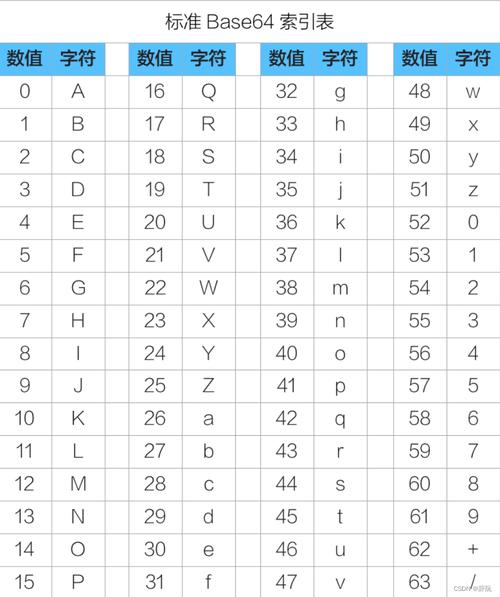
(图片来源网络,侵删)