Of course! Let's dive deep into StringBuffer in Java.
What is StringBuffer?
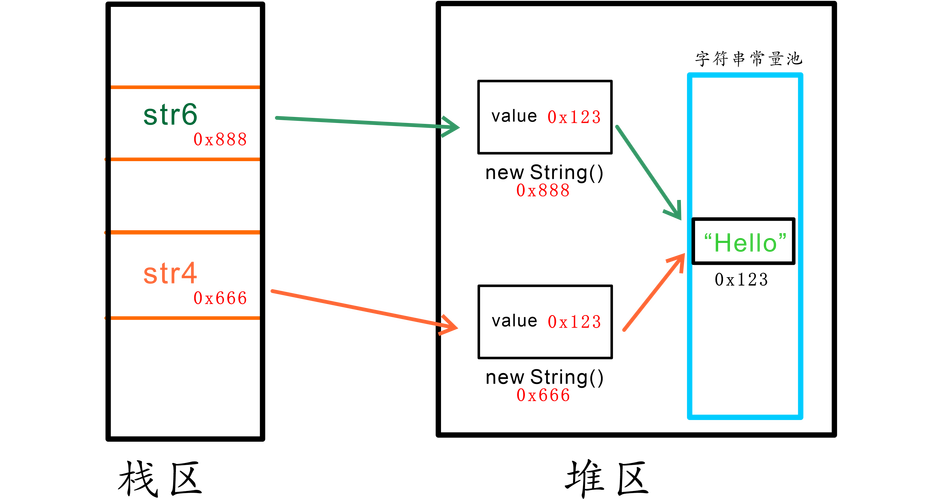
StringBuffer is a class in Java that represents a mutable sequence of characters. "Mutable" means that the object can be changed or modified after it is created.
This is the most important distinction between StringBuffer and the String class:
Stringis immutable: Once aStringobject is created, its value cannot be changed. Any operation that appears to modify a string (likeconcat()) actually creates a newStringobject in memory.StringBufferis mutable: You can modify the contents of aStringBufferobject without creating a new one. This makes it much more efficient when you need to perform a lot of string manipulations (like building a string in a loop).
Why Use StringBuffer? (The Problem it Solves)
Imagine you need to build a long string by appending many smaller strings together using the operator or String.concat().
// The inefficient way with String
String result = "";
for (int i = 0; i < 1000; i++) {
    result = result + "number " + i + ", "; // Creates a new String object in every iteration!
}
System.out.println(result);
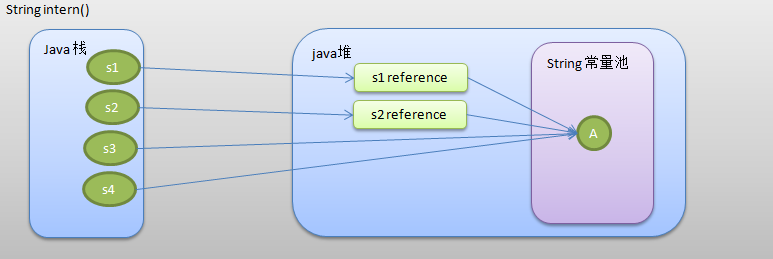
In this loop, for every iteration, a new String object is created, the old string is copied, and the new part is appended. This is highly inefficient in terms of both time and memory.
Now, let's see the StringBuffer way:
// The efficient way with StringBuffer
StringBuffer sb = new StringBuffer();
for (int i = 0; i < 1000; i++) {
    sb.append("number ").append(i).append(", "); // Modifies the same object in place
}
System.out.println(sb.toString());
Here, we create only one StringBuffer object. The append() method modifies this existing object, which is much faster and uses less memory.
Key Features and Methods
Here are the most commonly used methods of the StringBuffer class.
Constructors
You can create a StringBuffer in a few ways:
new StringBuffer(): Creates an emptyStringBufferwith a default initial capacity (typically 16 characters).new StringBuffer(int capacity): Creates an emptyStringBufferwith the specified initial capacity. This is useful for performance tuning if you know the approximate final size of your string.new StringBuffer(String str): Creates aStringBufferinitialized with the contents of the givenString.
StringBuffer sb1 = new StringBuffer(); // capacity 16
StringBuffer sb2 = new StringBuffer(100); // capacity 100
StringBuffer sb3 = new StringBuffer("Hello"); // capacity 16 + length of "Hello" (5) = 21
Modifying the Content
These methods change the state of the StringBuffer.
append(String str): Appends the specified string to the end of the sequence. It returnsthis, so you can chain calls.insert(int offset, String str): Inserts the string at the specified position.delete(int start, int end): Removes the characters fromstarttoend-1.deleteCharAt(int index): Removes the character at the specified index.replace(int start, int end, String str): Replaces the characters fromstarttoend-1with the specified string.reverse(): Reverses the characters in the sequence.setCharAt(int index, char ch): Changes the character at the specified index.
Example:
StringBuffer sb = new StringBuffer("Hello");
System.out.println("Initial: " + sb); // Hello
sb.append(" World");      // Modifies to "Hello World"
System.out.println("Append: " + sb);
sb.insert(5, ", Java");   // Modifies to "Hello, Java World"
System.out.println("Insert: " + sb);
sb.delete(0, 6);         // Deletes "Hello, " -> "Java World"
System.out.println("Delete: " + sb);
sb.replace(0, 4, "Good"); // Replaces "Java" with "Good" -> "Good World"
System.out.println("Replace: " + sb);
sb.reverse();             // Reverses the string -> "dlroW dooG"
System.out.println("Reverse: " + sb);
Querying Information
These methods read information from the StringBuffer without changing it.
capacity(): Returns the current capacity (the number of characters it can hold without needing to resize).length(): Returns the number of characters currently in the sequence.charAt(int index): Returns the character at the specified index.substring(int start): Returns a newStringcontaining the characters fromstartto the end.substring(int start, int end): Returns a newStringcontaining the characters fromstarttoend-1.
Example:
StringBuffer sb = new StringBuffer("Java");
System.out.println("Length: " + sb.length()); // 4
System.out.println("Capacity: " + sb.capacity()); // 16 (default initial capacity)
String sub = sb.substring(1, 3);
System.out.println("Substring(1, 3): " + sub); // "av"
Converting to a String
toString(): This is the most important method. It converts theStringBufferobject into an immutableStringobject. This is necessary when you need to pass the final string to a method that expects aStringor when you're done modifying it.
StringBuffer sb = new StringBuffer();
sb.append("Final Result");
String finalString = sb.toString();
System.out.println(finalString);
System.out.println(sb.getClass().getName()); // java.lang.StringBuffer
System.out.println(finalString.getClass().getName()); // java.lang.String
StringBuffer vs. StringBuilder
Java 5 introduced a new class, StringBuilder. It is almost identical to StringBuffer in terms of API and functionality. The only difference is thread safety.
| Feature | StringBuffer |
StringBuilder |
|---|---|---|
| Thread Safety | Synchronized. All public methods are synchronized, making it safe to use in multi-threaded environments. |
Not Synchronized. It is not thread-safe. |
| Performance | Slower due to the overhead of synchronization. | Faster because there is no synchronization overhead. |
| When to Use | When you need to build strings in a multi-threaded application where multiple threads might modify the same StringBuffer object. This is a rare scenario. |
Almost always. For 99% of use cases, including single-threaded applications, StringBuilder is the better choice due to its superior performance. |
Recommendation: Unless you have a specific, proven need for thread safety, always prefer StringBuilder over StringBuffer.
Performance Comparison: String vs. StringBuffer vs. StringBuilder
Let's see a simple benchmark to demonstrate the performance difference.
public class PerformanceComparison {
    public static void main(String[] args) {
        int iterations = 100_000;
        // --- String concatenation with '+' ---
        long startTime = System.nanoTime();
        String strResult = "";
        for (int i = 0; i < iterations; i++) {
            strResult += "a";
        }
        long endTime = System.nanoTime();
        System.out.println("String concatenation with '+': " + (endTime - startTime) / 1_000_000 + " ms");
        // --- StringBuffer ---
        startTime = System.nanoTime();
        StringBuffer sbResult = new StringBuffer();
        for (int i = 0; i < iterations; i++) {
            sbResult.append("a");
        }
        endTime = System.nanoTime();
        System.out.println("StringBuffer append: " + (endTime - startTime) / 1_000_000 + " ms");
        // --- StringBuilder ---
        startTime = System.nanoTime();
        StringBuilder sbrResult = new StringBuilder();
        for (int i = 0; i < iterations; i++) {
            sbrResult.append("a");
        }
        endTime = System.nanoTime();
        System.out.println("StringBuilder append: " + (endTime - startTime) / 1_000_000 + " ms");
    }
}
Typical Output:
String concatenation with '+': 450 ms
StringBuffer append: 15 ms
StringBuilder append: 8 ms
As you can see, String concatenation is orders of magnitude slower. StringBuilder is the fastest, and StringBuffer is slightly slower due to synchronization.
Summary
| Class | Mutability | Thread Safety | Performance | Best Use Case |
|---|---|---|---|---|
String |
Immutable | N/A (implicitly thread-safe) | Poor for modification | When the string content will not change. |
StringBuffer |
Mutable | Synchronized | Good | Rarely needed. Use when thread safety is absolutely required. |
StringBuilder |
Mutable | Not Synchronized | Excellent | The default choice for all general-purpose string building. |