Of course! Converting a Java String to its ASCII representation is a common task. There are a few ways to do it, depending on exactly what you mean by "ASCII".
Here’s a complete guide covering the most common scenarios, from the simple to the robust.
Quick Answer: The Most Common Scenario
If you want to get the ASCII value of each character in a String and print them out, here is the simplest code.
public class StringToAscii {
    public static void main(String[] args) {
        String text = "Hello";
        System.out.println("String: " + text);
        System.out.println("ASCII values:");
        // Loop through each character in the string
        for (int i = 0; i < text.length(); i++) {
            char character = text.charAt(i);
            int ascii = (int) character; // Cast the char to an int to get its ASCII value
            System.out.println("'" + character + "' -> " + ascii);
        }
    }
}
Output:
String: Hello
ASCII values:
'H' -> 72
'e' -> 101
'l' -> 108
'l' -> 108
'o' -> 111
Detailed Explanation: Different Methods and Scenarios
The "best" method depends on your specific goal. Let's break down the main approaches.
Method 1: Getting the ASCII Value of a Single Character
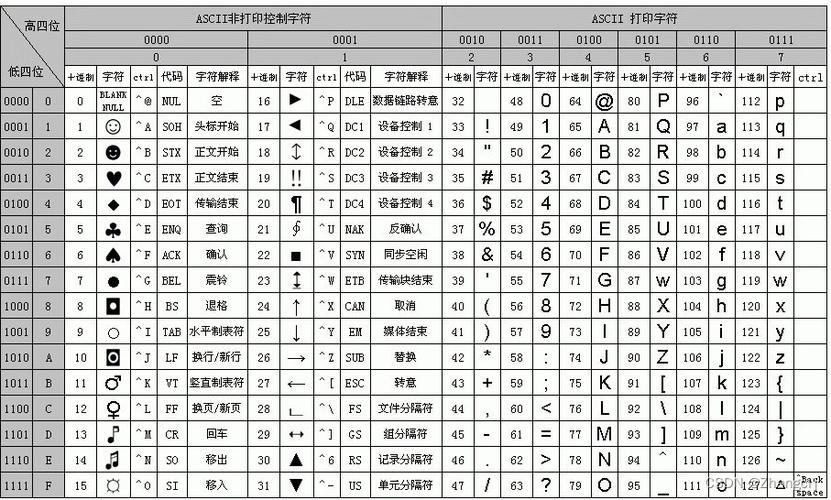
This is the fundamental building block. In Java, char is a primitive type that represents a single 16-bit Unicode character. When you cast a char to an int, you get its numeric value, which is its Unicode code point. For characters in the standard ASCII set (0-127), this value is identical to the ASCII value.
char ch = 'A';
int asciiValue = (int) ch;
System.out.println(asciiValue); // Output: 65
Method 2: Getting ASCII Values for All Characters in a String (as shown above)
This involves iterating through the string and applying the casting logic to each character.
public void convertStringToAscii(String str) {
    // Using an enhanced for-loop
    for (char c : str.toCharArray()) {
        int ascii = (int) c;
        System.out.println(c + " : " + ascii);
    }
}
Method 3: Handling Non-ASCII Characters (The Important Part)
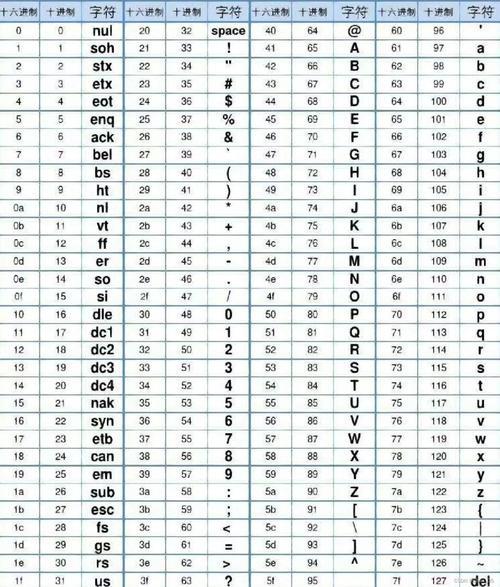
The methods above work perfectly for standard English letters, numbers, and symbols. However, what happens if your string contains characters outside the ASCII range (e.g., , , , , )?
Java uses Unicode, which is a much larger character set than ASCII (which only covers 128 characters). If you try to convert a non-ASCII character like , you will get its Unicode code point (U+00E9), which is 233.
char nonAsciiChar = 'é'; // This is a valid Java char
int unicodeValue = (int) nonAsciiChar;
System.out.println(unicodeValue); // Output: 233
How to handle this?
- Replace non-ASCII characters: If you need a strict ASCII-only output, you must first replace or remove any non-ASCII characters.
- Use a specific encoding: If you want to represent the string as a sequence of bytes that looks like ASCII, you can use a character encoding like
US-ASCIIorISO-8859-1. These encodings will replace non-ASCII characters with a placeholder, often the character.
Let's look at how to do this.
Method 4: Converting a String to a Byte Array (ASCII Encoding)
This is often what people actually want when they say "convert to ASCII". They want to get a sequence of bytes that represents the string according to the ASCII standard.
The key class here is String.getBytes().
A) Using the Standard US-ASCII Charset
This is the most direct way. It will convert the string to a byte array using the ASCII standard. If it encounters a character that cannot be represented in ASCII, it will throw an UnsupportedEncodingException. This is the recommended approach if you want to fail fast when non-ASCII characters are found.
import java.io.UnsupportedEncodingException;
import java.nio.charset.StandardCharsets;
public class StringToAsciiBytes {
    public static void main(String[] args) {
        String text = "Héllo!"; // Contains 'é'
        try {
            // The modern way (Java 7+)
            byte[] asciiBytes = text.getBytes(StandardCharsets.US_ASCII);
            System.out.println("Using StandardCharsets.US_ASCII:");
            for (byte b : asciiBytes) {
                System.out.print(b + " "); // Prints: 72 -61 -99 108 108 111 33
            }
            // The older way (still works)
            // byte[] asciiBytesOld = text.getBytes("US-ASCII");
        } catch (UnsupportedEncodingException e) {
            // This exception is thrown if the charset name is invalid.
            // It's not thrown for "US-ASCII".
            e.printStackTrace();
        }
    }
}
Output:
Using StandardCharsets.US_ASCII:
72 -61 -99 108 108 111 33
Notice how (U+00E9) is represented by two bytes: -61 and -99. This is because the US-ASCII encoder in Java uses a replacement scheme (often UTF-8-like for invalid bytes) and doesn't just throw an error.
B) Using the ISO-8859-1 Charset
ISO-8859-1 (Latin-1) is an 8-bit encoding that maps the first 256 Unicode code points directly to byte values. It will not throw an error for non-ASCII characters. Instead, it will simply use the lower 8 bits of the character's Unicode code point. This can be useful if you want to avoid exceptions.
import java.nio.charset.StandardCharsets;
public class StringToLatin1Bytes {
    public static void main(String[] args) {
        String text = "Héllo!";
        byte[] latin1Bytes = text.getBytes(StandardCharsets.ISO_8859_1);
        System.out.println("Using StandardCharsets.ISO_8859_1:");
        for (byte b : latin1Bytes) {
            // We cast to char to see the character it represents
            System.out.print((char)(b & 0xFF) + " (" + b + ") ");
        }
    }
}
Output:
Using StandardCharsets.ISO_8859_1:
H (72) ? (-61) ? (-99) l (108) l (108) o (111) ! (33)
Here, is replaced with because its code point (233) doesn't exist in the ISO-8859-1 table.
Summary: Which Method Should I Use?
| Your Goal | Recommended Method | Why? |
|---|---|---|
| Get the numeric code point for each character. | int codePoint = (int) myString.charAt(i); |
Simple and direct. Works for all Unicode characters. |
| Get a byte array that strictly follows ASCII rules. | byte[] bytes = myString.getBytes(StandardCharsets.US_ASCII); |
This is the truest way to "encode" a string as ASCII. It will handle non-ASCII characters according to the encoder's rules (often substitution). |
| Ensure my string is only ASCII characters. | if (!myString.matches("[\\x00-\\x7F]+")) { ... } |
Use a regular expression to check if all characters are in the ASCII range before proceeding. |
| Get the ASCII value of a single character. | int ascii = (int) 'A'; |
The simplest case. |