Of course! Here's a comprehensive guide to handling ASCII characters in Java strings, covering the most common methods, best practices, and potential pitfalls.
What is ASCII?
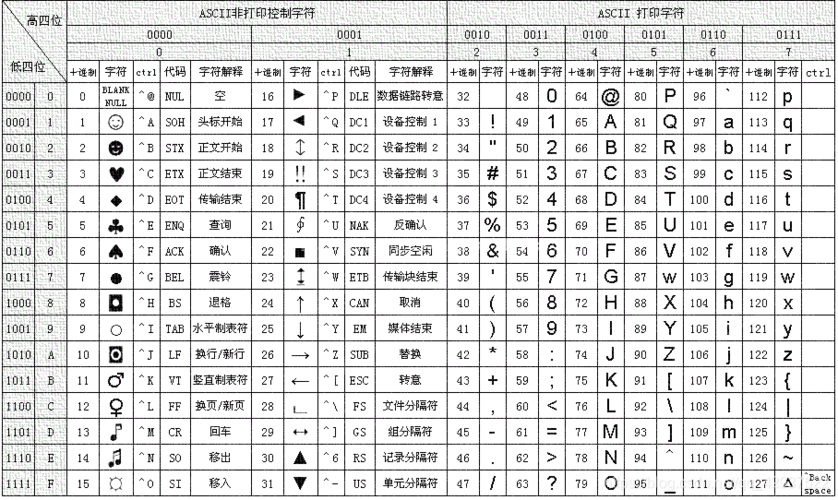
ASCII (American Standard Code for Information Interchange) is a character encoding standard. It defines a unique numeric value for 128 characters, including:
- Digits:
0to9 - Uppercase Letters:
AtoZ - Lowercase Letters:
atoz - Control Characters: Newline
\n, Carriage Return\r, Tab\t, etc. - Special Characters: , , , ,
&, , etc.
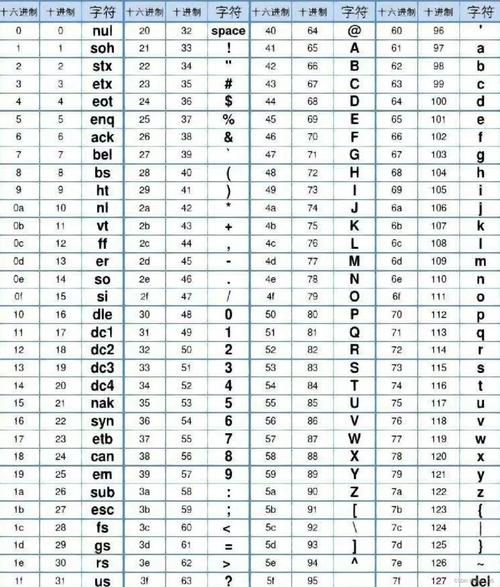
The numeric value for 'A' is 65, for 'a' is 97, and for '0' is 48. In Java, the char data type is a 16-bit unsigned value that represents a single character, and it is based on the Unicode standard, which is a much larger and more comprehensive character set than ASCII.
Key Methods for ASCII Conversion
Here are the primary ways to convert between a Java String and its ASCII values.
Getting the ASCII Value of a Single Character
To get the numeric (ASCII) value of a single character, you simply cast the char to an int.
public class AsciiExample {
    public static void main(String[] args) {
        char charA = 'A';
        char char0 = '0';
        char charHash = '#';
        // Cast char to int to get its ASCII value
        int asciiValueA = (int) charA;
        int asciiValue0 = (int) char0;
        int asciiValueHash = (int) charHash;
        System.out.println("The ASCII value of '" + charA + "' is: " + asciiValueA); // Output: 65
        System.out.println("The ASCII value of '" + char0 + "' is: " + asciiValue0); // Output: 48
        System.out.println("The ASCII value of '" + charHash + "' is: " + asciiValueHash); // Output: 35
    }
}
Converting a String to an Array of ASCII Values
The most common task is to convert an entire string into an array of integers, where each integer is the ASCII value of the corresponding character.
You can do this by iterating through the string's characters.
public class StringToAscii {
    public static void main(String[] args) {
        String text = "Hello";
        // Method 1: Using a traditional for loop
        int[] asciiArray1 = new int[text.length()];
        for (int i = 0; i < text.length(); i++) {
            asciiArray1[i] = (int) text.charAt(i);
        }
        System.out.println("Using for loop: " + Arrays.toString(asciiArray1));
        // Output: Using for loop: [72, 101, 108, 108, 111]
        // Method 2: Using Java 8 Streams (more concise)
        int[] asciiArray2 = text.chars().toArray();
        System.out.println("Using stream: " + Arrays.toString(asciiArray2));
        // Output: Using stream: [72, 101, 108, 108, 111]
    }
}
text.charAt(i): Gets the character at a specific index.text.chars(): This is a streamint-valuedStreamwhere each element is the ASCII value of a character. It's a very modern and efficient way to perform this conversion.
Converting an Array of ASCII Values Back to a String
To reverse the process, you convert each integer back to a char and build a new string.
import java.util.Arrays;
public class AsciiToString {
    public static void main(String[] args) {
        int[] asciiValues = {72, 101, 108, 108, 111};
        // Method 1: Using a StringBuilder (most efficient)
        StringBuilder sb = new StringBuilder();
        for (int ascii : asciiValues) {
            sb.append((char) ascii);
        }
        String result1 = sb.toString();
        System.out.println("Using StringBuilder: " + result1); // Output: Hello
        // Method 2: Using Java 8 Streams
        String result2 = new String(asciiValues, 0, asciiValues.length);
        System.out.println("Using String constructor: " + result2); // Output: Hello
    }
}
(char) ascii: Casts the integer back to a character.new String(charArray...): TheStringconstructor can directly create a string from a character array.
Important Considerations: ASCII vs. Unicode
This is a critical point to understand. Java's char type is based on Unicode, not ASCII.
- ASCII is a subset of Unicode. All standard ASCII characters (values 0-127) have the same code point in Unicode.
- The Problem: What happens when a character is not in the ASCII range? For example, the Euro symbol '€' or a Chinese character '字'.
public class AsciiVsUnicode {
    public static void main(String[] args) {
        // This is fine. 'A' is in the ASCII range.
        char charA = 'A';
        System.out.println("ASCII value of 'A': " + (int) charA); // 65
        // This is also fine. 'é' is outside the basic ASCII range but is a valid char.
        char charEacute = 'é';
        System.out.println("Unicode code point of 'é': " + (int) charEacute); // 233
        // This is a non-Latin character.
        char charChinese = '字';
        System.out.println("Unicode code point of '字': " + (int) charChinese); // 23383
        // If you use a method that assumes ASCII, you might get unexpected results.
        // For example, converting '字' to a byte using a simple cast will lose data.
        byte byteValue = (byte) charChinese;
        System.out.println("Byte value of '字' (data is lost): " + byteValue); // -23
    }
}
Key Takeaway: The methods (int) myChar and myString.chars() work for all Unicode characters, giving you their Unicode code point. If you are certain your string only contains ASCII characters, these methods are perfectly safe. If not, be aware that you are working with Unicode code points, which can be larger than 127.
Practical Example: Checking if a String is "ASCII-Only"
Here's a common task: verifying that a string contains only characters from the standard ASCII set (code points 0-127).
import java.util.Arrays;
public class IsAsciiString {
    public static boolean isPureAscii(String str) {
        // The chars() stream returns an IntStream of code points.
        // We check if all code points are less than or equal to 127.
        return str.chars().allMatch(c -> c <= 127);
    }
    public static void main(String[] args) {
        String asciiString = "Hello World 123!";
        String nonAsciiString = "Café au lait";
        String anotherNonAsciiString = "你好"; // "Hello" in Chinese
        System.out.println("Is \"" + asciiString + "\" pure ASCII? " + isPureAscii(asciiString)); // true
        System.out.println("Is \"" + nonAsciiString + "\" pure ASCII? " + isPureAscii(nonAsciiString)); // false
        System.out.println("Is \"" + anotherNonAsciiString + "\" pure ASCII? " + isPureAscii(anotherNonAsciiString)); // false
    }
}
Summary
| Task | Method | Example Code |
|---|---|---|
| Get ASCII value of a char | Cast char to int |
int val = (int) 'A'; |
| Convert String to ASCII array | Loop with charAt(i) or use text.chars().toArray() |
int[] arr = "Hi".chars().toArray(); |
| Convert ASCII array to String | Loop with StringBuilder or use new String(charArray...) |
String s = new String(asciiValues, 0, asciiValues.length); |
| Check if a string is ASCII-only | Use str.chars().allMatch(c -> c <= 127) |
boolean isAscii = myString.chars().allMatch(c -> c <= 127); |
| Handle encoding (e.g., to bytes) | Use String.getBytes("US-ASCII") (throws exception for non-ASCII) |
byte[] bytes = myString.getBytes("US-ASCII"); |