Of course! Here's a comprehensive guide to using Python with Redis Sorted Sets, covering the fundamental concepts, Python library options, and practical code examples.
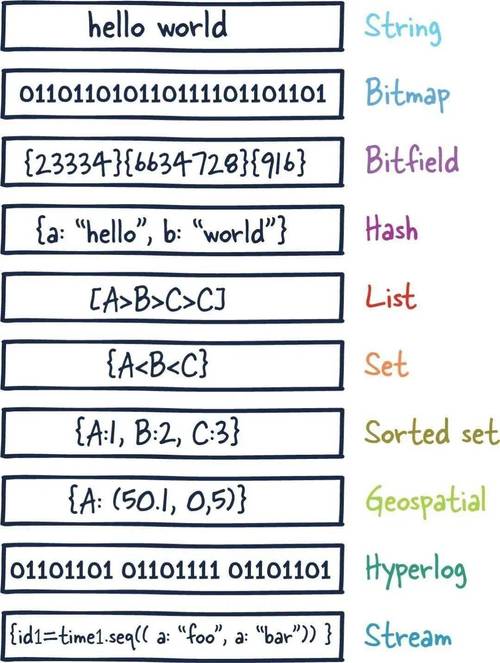
What is a Redis Sorted Set (ZSET)?
A Sorted Set (or ZSET - Z stands for "Sorted" in Italian) is a collection of unique strings (called members) where each member is associated with a score (a floating-point number).
The key feature is that the members are always kept in order based on their scores. This makes it incredibly efficient for tasks like leaderboards, priority queues, and time-series data.
Key Characteristics:
- Unique Members: Each member can only exist once in a set.
- Scores: Each member has an associated score. Scores can be repeated, but the members cannot.
- Ordered: Members are automatically sorted from the lowest score to the highest score.
Step 1: Prerequisites
You need to have a Redis server running. The easiest way to get one is with Docker:
docker run -d -p 6379:6379 redis
This command starts a Redis container and exposes it on port 6379, which is the default.
Step 2: Choosing a Python Redis Client
The most popular and recommended library for interacting with Redis in Python is redis-py. It's well-maintained, feature-rich, and has an excellent async interface.
Installation:
pip install redis
Step 3: Basic Operations with redis-py
Let's connect to Redis and explore the most common Sorted Set operations.

Connection
import redis
# Connect to your Redis server
# By default, it connects to localhost on port 6379
r = redis.Redis(host='localhost', port=6379, decode_responses=True)
# Use a try-except block for robustness
try:
    r.ping()
    print("Successfully connected to Redis!")
except redis.exceptions.ConnectionError as e:
    print(f"Could not connect to Redis: {e}")
    exit()
Note: decode_responses=True is very useful as it makes Redis return strings instead of bytes, which is more convenient for Python 3.
Adding and Updating Members (ZADD)
You add members to a sorted set using the zadd() method. It takes the set name, a dictionary of member: score pairs.
# Add members to a sorted set named 'game_leaderboard'
# If a member already exists, its score will be updated.
r.zadd('game_leaderboard', {'player1': 1500, 'player2': 2500, 'player3': 900})
# Add another player and update an existing one
r.zadd('game_leaderboard', {'player4': 1800, 'player1': 1600}) # player1's score is updated
print("Added players to the leaderboard.")
Getting All Members with Scores (ZRANGE with WITHSCORES)
To retrieve members in their sorted order, use zrange(). By default, it gets members from the lowest score to the highest.
# Get all members and their scores, ordered from lowest to highest score
# The 'withscores=True' argument is crucial
leaderboard_asc = r.zrange('game_leaderboard', 0, -1, withscores=True)
print("\nLeaderboard (Lowest to Highest Score):")
for member, score in leaderboard_asc:
    print(f"{member}: {score}")
# Output:
# Leaderboard (Lowest to Highest Score):
# player3: 900.0
# player1: 1600.0
# player4: 1800.0
# player2: 2500.0
Getting All Members with Scores in Reverse (ZREVRANGE)
To get members from the highest score to the lowest (perfect for a top 10 list!), use zrevrange().
# Get all members and their scores, ordered from highest to lowest score
leaderboard_desc = r.zrevrange('game_leaderboard', 0, -1, withscores=True)
print("\nLeaderboard (Highest to Lowest Score):")
for member, score in leaderboard_desc:
    print(f"{member}: {score}")
# Output:
# Leaderboard (Highest to Lowest Score):
# player2: 2500.0
# player4: 1800.0
# player1: 1600.0
# player3: 900.0
Getting a Range by Rank (ZRANGE with start and stop)
You can get a slice of the leaderboard, for example, the top 3 players.
# Get the top 3 players (highest scores)
top_3 = r.zrevrange('game_leaderboard', 0, 2, withscores=True)
print("\nTop 3 Players:")
for member, score in top_3:
    print(f"{member}: {score}")
# Output:
# Top 3 Players:
# player2: 2500.0
# player4: 1800.0
# player1: 1600.0
Getting a Range by Score (ZRANGEBYSCORE)
This is a powerful feature. You can get all members within a specific score range.
# Get all players with a score between 1000 and 2000 (inclusive)
mid_rank_players = r.zrangebyscore('game_leaderboard', 1000, 2000, withscores=True)
print("\nPlayers with scores between 1000 and 2000:")
for member, score in mid_rank_players:
    print(f"{member}: {score}")
# Output:
# Players with scores between 1000 and 2000:
# player1: 1600.0
# player4: 1800.0
Getting a Member's Score (ZSCORE)
Find the score of a specific member.
player1_score = r.zscore('game_leaderboard', 'player1')
print(f"\nplayer1's score is: {player1_score}") # Output: player1's score is: 1600.0
Getting a Member's Rank (ZRANK / ZREVRANK)
Find the rank (position) of a member. Rank starts from 0.
zrank(): Rank from lowest score (0 is the lowest).zrevrank(): Rank from highest score (0 is the highest).
# Get player1's rank from the bottom (lowest score)
player1_rank_asc = r.zrank('game_leaderboard', 'player1')
print(f"player1's rank (from bottom): {player1_rank_asc}") # Output: player1's rank (from bottom): 1
# Get player1's rank from the top (highest score)
player1_rank_desc = r.zrevrank('game_leaderboard', 'player1')
print(f"player1's rank (from top): {player1_rank_desc}") # Output: player1's rank (from top): 2
Removing Members (ZREM)
Remove a specific member from the set.
# Remove player3 from the leaderboard
r.zrem('game_leaderboard', 'player3')
print("\nRemoved player3.")
# Verify the new state
updated_leaderboard = r.zrevrange('game_leaderboard', 0, -1, withscores=True)
print("\nUpdated Leaderboard:")
for member, score in updated_leaderboard:
    print(f"{member}: {score}")
Step 4: Advanced Operations
Incrementing a Member's Score (ZINCRBY)
This is a classic operation for leaderboards. When a player wins a game, you increment their score.
# Player1 wins a game, so their score increases by 100
r.zincrby('game_leaderboard', 100, 'player1')
print("\nAfter player1 won a game (+100 points):")
updated_leaderboard = r.zrevrange('game_leaderboard', 0, -1, withscores=True)
for member, score in updated_leaderboard:
    print(f"{member}: {score}")
# Output:
# After player1 won a game (+100 points):
# player2: 2500.0
# player1: 1700.0
# player4: 1800.0
Note: The score can also be negative to decrement.
Getting the Cardinality (Count of Members) (ZCARD)
num_players = r.zcard('game_leaderboard')
print(f"\nTotal number of players: {num_players}") # Output: Total number of players: 3
Getting the Score Range (ZSCORE and ZRANGEBYSCORE)
You can also get the minimum and maximum scores in the set.
min_score = r.zrange('game_leaderboard', 0, 0, withscores=True)[0][1]
max_score = r.zrevrange('game_leaderboard', 0, 0, withscores=True)[0][1]
print(f"\