Of course! Let's dive deep into java.util.Date. This is a fundamental class in Java's history, but it's crucial to understand its role, its flaws, and why it has been largely superseded by the modern java.time package.
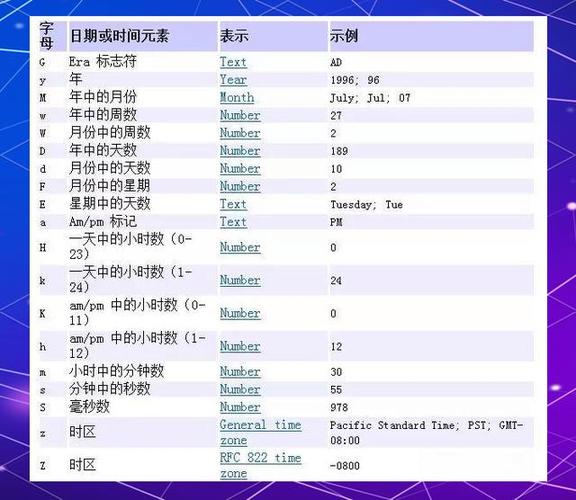
The java.util.Date Class: An Overview
java.util.Date was one of the original classes for handling dates and times in Java (since JDK 1.0). Its core purpose is to represent a specific, instantaneous point in time, with millisecond precision.
Key Characteristics:
- Point in Time: It represents a moment, not a date or a time of day in a specific timezone. It's an offset from a fixed point, called the "epoch."
- Epoch: The epoch for
java.util.Dateis January 1, 1970, 00:00:00 GMT (Greenwich Mean Time). The value stored in aDateobject is the number of milliseconds that have elapsed since this epoch. - Timezone Agnostic (but with a catch): While it stores a point in time, many of its methods, especially older ones like
getHours(),getMinutes(), etc., operate as if the time is in the local timezone of the system where the code is running. This is a major source of confusion and bugs. - Mutable:
Dateobjects are mutable. You can change their internal state using methods likesetTime().
Common Constructors and Methods
Constructors
-
Date(): Creates aDateobject initialized to the current date and time.Date now = new Date(); // Represents the current moment System.out.println(now); // Outputs something like: Wed Oct 26 10:30:55 EDT 2025
-
Date(long date): Creates aDateobject initialized to the number of milliseconds since the epoch. (图片来源网络,侵删)
// Create a Date for the epoch itself Date epoch = new Date(0); System.out.println(epoch); // Outputs: Thu Jan 01 00:00:00 GMT 1970 // Create a Date for 1 day after the epoch Date oneDayAfterEpoch = new Date(24L * 60 * 60 * 1000); System.out.println(oneDayAfterEpoch); // Outputs: Fri Jan 02 00:00:00 GMT 1970
Important Methods
-
getTime(): Returns the number of milliseconds since the epoch. This is the most reliable way to get the raw value from aDateobject.Date now = new Date(); long millisecondsSinceEpoch = now.getTime(); System.out.println("Milliseconds since epoch: " + millisecondsSinceEpoch); -
setTime(long time): Sets theDateobject to a specified number of milliseconds since the epoch.Date myDate = new Date(); myDate.setTime(1000L * 60 * 60 * 24); // Set to one day after epoch
-
Deprecated Methods: Be very cautious with these. They are considered obsolete because they don't handle timezones correctly.
getYear(),getMonth(),getDate(),getDay(),getHours(),getMinutes(),getSeconds()setYear(int),setMonth(int), etc.
The Major Problems with java.util.Date
Despite its long history, java.util.Date has significant design flaws that make it difficult and error-prone to use correctly.
-
Poor API Design: The class is named
Date, but it represents both a date and a time. This is confusing. Furthermore, the naming is inconsistent with other Java classes (e.g.,java.sql.Dateis only a date,java.sql.Timeis only a time). -
Confusing Timezone Handling: This is the biggest pitfall.
- The internal storage is timezone-agnostic (milliseconds since epoch).
- However, methods like
toString()implicitly use the system's default timezone to format the string. - The deprecated getter methods (
getHours(), etc.) also use the local timezone. - This leads to unpredictable behavior. A
Dateobject created on a server in New York will display a different time string when viewed on a client in London, even though it represents the exact same moment in time.
-
Mutability:
Dateobjects can be changed after creation. This can lead to bugs if aDateobject is shared across different parts of an application and is unexpectedly modified. -
Inadequate Formatting and Parsing: The
SimpleDateFormatclass (often used withDate) is:- Not Thread-Safe: You cannot share a single instance of
SimpleDateFormatacross multiple threads. This forces you to create a new instance for every parse/format operation, which is inefficient. - Error-Prone: Its parsing behavior can be lenient or strict, and it's easy to create subtle bugs.
- Not Thread-Safe: You cannot share a single instance of
The Modern Replacement: java.time Package
Recognizing the problems with java.util.Date and its related classes, Java 8 introduced a completely new and well-designed API for date and time in the java.time package. This is the API you should be using for all new Java development.
Here's a quick comparison:
| Feature | java.util.Date |
java.time (Modern) |
|---|---|---|
| Core Concept | A point in time (with baggage) | Clear separation: Instant, LocalDate, LocalTime, ZonedDateTime |
| Immutability | Mutable | Immutable (Thread-safe) |
| Timezone | Confusing, implicit use of default | Explicit. ZonedDateTime and OffsetDateTime are first-class citizens. |
| API Design | Poor, confusing method names | Clear, consistent, and fluent API (e.g., plusDays(1), withHour(12)) |
| Formatting | Relies on non-thread-safe SimpleDateFormat |
Uses DateTimeFormatter, which is both thread-safe and more powerful. |
| Recommendation | Legacy. Use only for interoperating with old code. | Standard. Use for all new code. |
Key java.time Classes
-
java.time.Instant: The direct replacement forjava.util.Date. Represents a point on the timeline in UTC, with nanosecond precision.// Modern equivalent of new Date() Instant now = Instant.now(); System.out.println(now); // Outputs: 2025-10-26T14:30:55.123456789Z (Z for Zulu/UTC)
-
java.time.LocalDate: Represents a date (year, month, day) without a time or timezone. Perfect for birthdays, anniversaries, etc.LocalDate today = LocalDate.now(); System.out.println(today); // Outputs: 2025-10-26
-
java.time.LocalDateTime: Represents a date and time, but without a timezone. Useful for representing events that happen in a specific local context, like a meeting schedule.LocalDateTime meetingTime = LocalDateTime.of(2025, 10, 31, 15, 0); System.out.println(meetingTime); // Outputs: 2025-10-31T15:00
-
java.time.ZonedDateTime: Represents a date, time, and a specific timezone. This is what you need for global events, scheduling, and logging.ZonedDateTime meetingInNewYork = ZonedDateTime.of(2025, 10, 31, 15, 0, 0, 0, ZoneId.of("America/New_York")); System.out.println(meetingInNewYork); // Outputs: 2025-10-31T15:00-04:00[America/New_York]
When to Use java.util.Date Today?
You should avoid creating new java.util.Date objects. However, you will still encounter it in two main scenarios:
- Legacy Codebases: You will be maintaining old applications that use
java.util.Dateextensively. - Interoperability: Some APIs, particularly older ones or those from the Java EE ecosystem (like
java.sql), still usejava.util.Date.
In these cases, you need to convert between the old and new APIs.
Conversion Examples
java.util.Date to java.time.Instant
This is a straightforward conversion because both represent a point in time.
java.util.Date oldDate = new Date(); // Get an old Date object
// Convert to Instant
Instant instant = oldDate.toInstant();
System.out.println("Converted to Instant: " + instant);
java.time.Instant to java.util.Date
This conversion is also simple.
Instant now