
Of course! Let's dive deep into Java NIO's Selector. It's a fundamental and powerful component for building high-performance, scalable network applications.

What is a Selector? The Core Concept
In traditional I/O (blocking I/O), if you want to manage multiple connections (e.g., multiple clients talking to a server), you typically need one thread per connection. This is highly inefficient and doesn't scale well, as creating and managing thousands of threads is resource-intensive.
A Selector solves this problem by allowing a single thread to monitor multiple Channel instances for events like "new connection is ready," "data is ready to be read," or "channel is ready to be written."
This pattern is known as I/O Multiplexing. The operating system does the heavy lifting of watching all the channels, and the Java Selector acts as a gateway to this OS-level functionality.
How Selector Works: The Key Ingredients
To understand Selector, you need to understand its three main components:
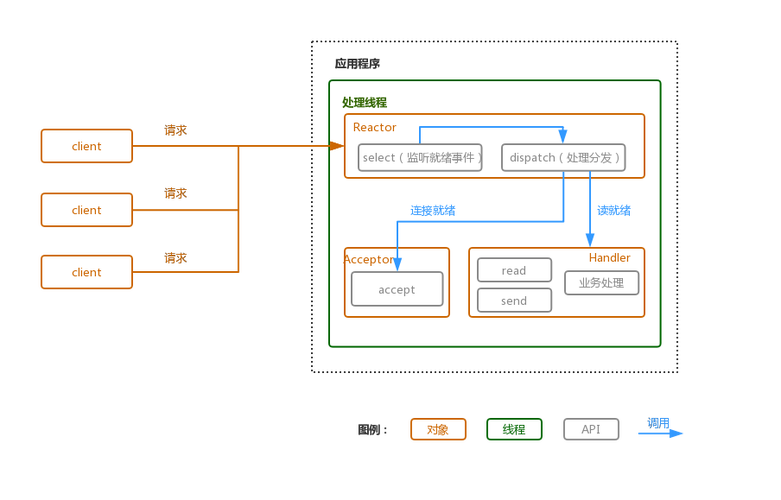
a) Selector
The main object that manages the channels. You register channels with it and ask it which channels are ready for I/O operations.
b) SelectableChannel
Not all channels can be used with a Selector. Only channels that are "selectable" can be registered. The most common examples are:
SocketChannel(for TCP clients/servers)ServerSocketChannel(for TCP servers)DatagramChannel(for UDP)
A SelectableChannel must be placed into non-blocking mode before it can be registered with a Selector. This is a critical step.
c) SelectionKey
When you register a SelectableChannel with a Selector, you get back a SelectionKey. This key represents the registration. It contains:
- The
SelectableChannelit's associated with. - The
Selectorit's registered with. - A set of "interest operations": The I/O events you are interested in for this channel (e.g.,
SelectionKey.OP_ACCEPT,SelectionKey.OP_READ). - A set of "ready operations": The I/O events that the channel is actually ready for. This is what the
Selectortells you.
The Selector Workflow: A Step-by-Step Guide
Here is the typical lifecycle of using a Selector.
Step 1: Create a Selector
Selector selector = Selector.open();
Step 2: Create and Configure a ServerSocketChannel
Create a ServerSocketChannel and, most importantly, configure it to be non-blocking.
ServerSocketChannel serverSocketChannel = ServerSocketChannel.open();
serverSocketChannel.bind(new InetSocketAddress(8080));
serverSocketChannel.configureBlocking(false); // MUST be non-blocking
Step 3: Register the Channel with the Selector
Register the channel with the Selector, telling it which events you're interested in. For a server, the primary interest is accepting new connections (OP_ACCEPT).
The register() method returns a SelectionKey, which you can save if needed.
// We are interested in new connections being ready to accept
SelectionKey selectionKey = serverSocketChannel.register(selector, SelectionKey.OP_ACCEPT);
Step 4: The Main Loop: select()
This is the heart of the selector pattern. Your application's main thread will enter a loop that calls selector.select().
selector.select(): This is a blocking call. It pauses the thread and asks the operating system to check all the registered channels. It will only return when at least one channel is ready for one of the operations it's interested in.selector.select(long timeout): A non-blocking version that waits for a specified amount of time.selector.selectNow(): A completely non-blocking version that returns immediately, even if no channels are ready.
Step 5: Process the "Selected Keys"
When select() returns, you get a Set of SelectionKey objects representing all channels that are ready. You then iterate through this set and perform the appropriate action for each ready channel.
Set<SelectionKey> selectedKeys = selector.selectedKeys();
Iterator<SelectionKey> keyIterator = selectedKeys.iterator();
while (keyIterator.hasNext()) {
    SelectionKey key = keyIterator.next();
    // IMPORTANT: You must remove the key from the set when you are done with it
    keyIterator.remove();
    if (key.isAcceptable()) {
        // A new connection is ready to be accepted
        // ... handle accept logic
    }
    if (key.isReadable()) {
        // Data is ready to be read from a channel
        // ... handle read logic
    }
    if (key.isWritable()) {
        // The channel is ready to have data written to it
        // ... handle write logic
    }
}
Step 6: Close the Selector
When your application is shutting down, don't forget to close the Selector to release its resources.
selector.close();
Code Example: A Simple Echo Server
This example demonstrates a server that can handle multiple client connections concurrently using a single thread.
import java.io.IOException;
import java.net.InetSocketAddress;
import java.nio.ByteBuffer;
import java.nio.channels.*;
import java.util.Iterator;
import java.util.Set;
public class NioEchoServer {
    public static void main(String[] args) throws IOException {
        // 1. Create a Selector
        Selector selector = Selector.open();
        // 2. Create a ServerSocketChannel and bind it to a port
        ServerSocketChannel serverSocketChannel = ServerSocketChannel.open();
        serverSocketChannel.bind(new InetSocketAddress("localhost", 8080));
        serverSocketChannel.configureBlocking(false); // Set to non-blocking
        // 3. Register the ServerSocketChannel with the Selector for OP_ACCEPT
        serverSocketChannel.register(selector, SelectionKey.OP_ACCEPT);
        System.out.println("Server started on port 8080...");
        ByteBuffer buffer = ByteBuffer.allocate(1024);
        // 4. Main loop
        while (true) {
            // Wait for events (blocking call)
            selector.select();
            // Get the selected keys
            Set<SelectionKey> selectedKeys = selector.selectedKeys();
            Iterator<SelectionKey> iter = selectedKeys.iterator();
            while (iter.hasNext()) {
                SelectionKey key = iter.next();
                // Remove the key to avoid processing it again
                iter.remove();
                if (key.isAcceptable()) {
                    // 5. Accept a new connection
                    SocketChannel clientChannel = serverSocketChannel.accept();
                    if (clientChannel != null) {
                        clientChannel.configureBlocking(false);
                        // Register the client channel for reading
                        clientChannel.register(selector, SelectionKey.OP_READ);
                        System.out.println("Accepted new connection from " + clientChannel.getRemoteAddress());
                    }
                }
                if (key.isReadable()) {
                    // 6. Read data from a client
                    SocketChannel clientChannel = (SocketChannel) key.channel();
                    try {
                        buffer.clear();
                        int bytesRead = clientChannel.read(buffer);
                        if (bytesRead == -1) {
                            // Client closed connection
                            System.out.println("Client disconnected: " + clientChannel.getRemoteAddress());
                            key.cancel();
                            clientChannel.close();
                        } else {
                            buffer.flip();
                            // Echo the data back to the client
                            clientChannel.write(buffer);
                            System.out.println("Echoed " + bytesRead + " bytes from " + clientChannel.getRemoteAddress());
                        }
                    } catch (IOException e) {
                        // Client abruptly closed connection
                        System.out.println("Client disconnected abruptly: " + clientChannel.getRemoteAddress());
                        key.cancel();
                        clientChannel.close();
                    }
                }
            }
        }
    }
}
Key Advantages and Disadvantages
Advantages
- Scalability: A single thread can handle thousands of connections, making your application highly scalable.
- Efficiency: Drastically reduces the number of threads compared to the traditional one-thread-per-connection model. This saves memory and reduces CPU context-switching overhead.
- Responsiveness: The application can react to I/O events on any connection immediately, preventing a slow connection from blocking the entire application.
Disadvantages
- Complexity: The code is more complex and harder to reason about than simple blocking I/O. You have to manage state, buffers, and the event loop manually.
- CPU Usage: While it saves threads, a busy
Selectorloop can consume a lot of CPU cycles, constantly checking for ready channels. This is less of an issue for network-bound applications but can be for CPU-bound ones. - All-or-Nothing Operations: With a
SocketChannel, you can't read just one byte. You must read whatever data the OS has buffered for you (up to the size of yourByteBuffer). This requires careful buffer management.
Selector vs. Traditional Blocking I/O
| Feature | Traditional Blocking I/O | NIO with Selector |
|---|---|---|
| Model | One thread per connection | One thread (or a small pool) for many connections |
| Blocking | I/O operations (read(), accept()) block the thread until complete. |
select() blocks the thread, but individual channel operations do not. |
| Scalability | Poor. Limited by OS thread count. | Excellent. Can handle thousands of connections. |
| Complexity | Simple and straightforward. | More complex. Requires manual state and buffer management. |
| Use Case | Simple applications, low-traffic servers. | High-performance, high-concurrency servers (e.g., chat servers, proxies). |
Modern Alternatives
While Selector is powerful and foundational, modern Java has introduced higher-level abstractions that simplify its use:
- Netty: A very popular, asynchronous event-driven network application framework built on top of NIO. It hides the complexities of
Selector,ByteBuffer, andSelectionKeybehind a clean API. - Java N.2 (AsynchronousFileChannel, AsynchronousSocketChannel): Provides an alternative asynchronous model based on
FutureandCompletionHandler, which can be more intuitive than theSelectorevent loop for some use cases. - Project Loom (Virtual Threads): A newer Java feature that allows you to have millions of lightweight threads. With virtual threads, the "one thread per connection" model becomes viable again, but with vastly reduced overhead, often simplifying code compared to NIO's manual event loop. This is a significant evolution in Java concurrency.


