Of course! Converting a java.util.Date object to a String is a common task in Java. The modern and recommended approach is to use the java.time package, introduced in Java 8. However, I'll also cover the older SimpleDateFormat class for maintaining legacy code.
The Modern Approach (Java 8+): java.time
The java.time package is the standard for date and time in modern Java. It's immutable, thread-safe, and much easier to use correctly.
Key Classes:
java.time.LocalDate: Represents a date (year, month, day) without a time.java.time.LocalDateTime: Represents a date and time.java.time.ZonedDateTime: Represents a date and time with a time zone.java.time.format.DateTimeFormatter: The class used to format dates and times into strings.
Since you asked about java.util.Date, you'll first need to convert it to a java.time object.
Step-by-Step Example:
Let's convert a java.util.Date to a formatted String.
import java.time.Instant;
import java.time.LocalDate;
import java.time.ZoneId;
import java.time.format.DateTimeFormatter;
import java.util.Date;
public class DateToStringModern {
    public static void main(String[] args) {
        // 1. Get a java.util.Date object (could be from an old API or database)
        Date utilDate = new Date();
        // 2. Convert java.util.Date to java.time.LocalDate
        //    - First, convert to an Instant (a point on the timeline)
        //    - Then, convert the Instant to a LocalDate in a specific time zone
        LocalDate localDate = utilDate.toInstant()
                                      .atZone(ZoneId.systemDefault())
                                      .toLocalDate();
        // 3. Define the desired output format
        //    - M: Month as a number (1-12)
        //    - d: Day of the month
        //    - yyyy: Year
        //    - MM: Month as a number (01-12)
        //    - dd: Day of the month (01-31)
        DateTimeFormatter formatter = DateTimeFormatter.ofPattern("MM-dd-yyyy");
        // 4. Format the LocalDate to a String
        String formattedDate = localDate.format(formatter);
        // Print the results
        System.out.println("Original java.util.Date: " + utilDate);
        System.out.println("Converted LocalDate: " + localDate);
        System.out.println("Formatted String: " + formattedDate); // Output: 10-26-2025 (example)
    }
}
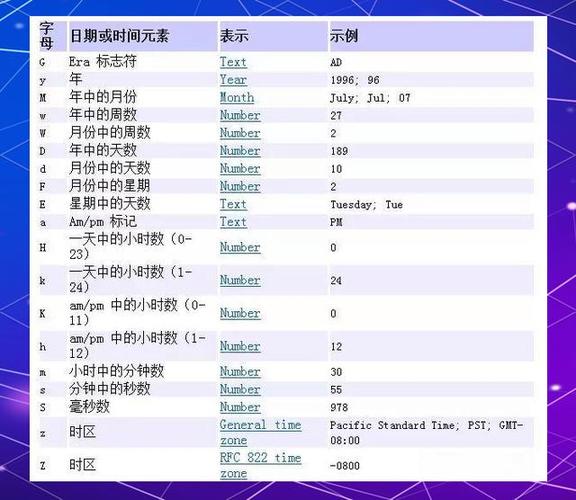
Common DateTimeFormatter Patterns:
| Pattern | Meaning | Example |
|---|---|---|
yyyy |
Year | 2025 |
MM |
Month in year (01-12) | 10 |
dd |
Day in month (01-31) | 26 |
HH |
Hour in day (00-23) | 14 |
mm |
Minute in hour (00-59) | 30 |
ss |
Second in minute (00-60) | 55 |
a |
AM/PM marker | PM |
E |
Day name in week | Thu |
z |
Time zone name | PDT |
The Legacy Approach: SimpleDateFormat
Before Java 8, java.text.SimpleDateFormat was the standard. It is important to know that SimpleDateFormat is not thread-safe. You should never use a shared instance in a multi-threaded environment. Create a new instance for each use.
Example:
import java.text.SimpleDateFormat;
import java.util.Date;
public class DateToStringLegacy {
    public static void main(String[] args) {
        // 1. Get a java.util.Date object
        Date utilDate = new Date();
        // 2. Create a new SimpleDateFormat instance for each use
        //    The pattern "yyyy-MM-dd HH:mm:ss" is very common for logging and databases
        SimpleDateFormat formatter = new SimpleDateFormat("yyyy-MM-dd HH:mm:ss");
        // 3. Format the date to a string
        String formattedDate = formatter.format(utilDate);
        // Print the result
        System.out.println("Original java.util.Date: " + utilDate);
        System.out.println("Formatted String: " + formattedDate); // Output: 2025-10-26 14:30:55 (example)
    }
}
Why SimpleDateFormat is Discouraged:
- Not Thread-Safe: If you create a single
SimpleDateFormatobject and try to use it from multiple threads, it can lead to incorrect dates, exceptions, and unpredictable behavior. - Error-Prone: The API is clumsy and has confusing quirks.
- Legacy API: It's part of the old
java.utilandjava.textpackages.
Comparison and Best Practices
| Feature | java.time (Modern) |
SimpleDateFormat (Legacy) |
|---|---|---|
| Thread Safety | Immutable and thread-safe. Can be shared freely. | Not thread-safe. Must create a new instance per use. |
| API Design | Fluent, intuitive, and immutable. | Clumsy, stateful, and error-prone. |
| Functionality | Rich API for dates, times, durations, periods, and time zones. | Limited to basic date/time formatting and parsing. |
| Recommendation | Highly Recommended for all new Java 8+ code. | Only for maintaining legacy code on older Java versions. |
Summary: Which one should you use?
- For any new project (Java 8 or later): Use
java.time. It's the future-proof, safer, and more powerful choice. - For maintaining old code (Java 7 or earlier): You'll have to use
SimpleDateFormat, but be extremely careful about thread safety. - For converting a
java.util.Datein a modern app: Convert it to ajava.timeobject first, then format it. This gives you the best of both worlds.