Of course! Let's dive deep into java.util.Timer.
Overview
java.util.Timer is a utility class in Java that can be used to schedule tasks for future execution in a background thread. It's part of the Java Standard Library (java.util package) and has been available since Java 1.3.
In simple terms, a Timer is like a task scheduler. You tell it what task (a piece of code) you want to run and when you want it to run. The Timer then takes care of executing that task at the specified time, without blocking your main application thread.
Core Components
To use java.util.Timer, you primarily work with two classes:
java.util.Timer: The scheduler itself. It creates a single background thread (the "timer thread") to execute all scheduled tasks.java.util.TimerTask: An abstract class that implements theRunnableinterface. You extend this class to define the actual task you want the timer to perform.
The typical workflow is:
- Create a class that extends
TimerTaskand override itsrun()method with your task's logic. - Create an instance of
Timer. - Call one of the
schedule()methods on theTimerinstance, passing it yourTimerTaskand the scheduling details.
How to Use java.util.Timer: A Practical Example
Let's look at a complete, runnable example to see how it works.
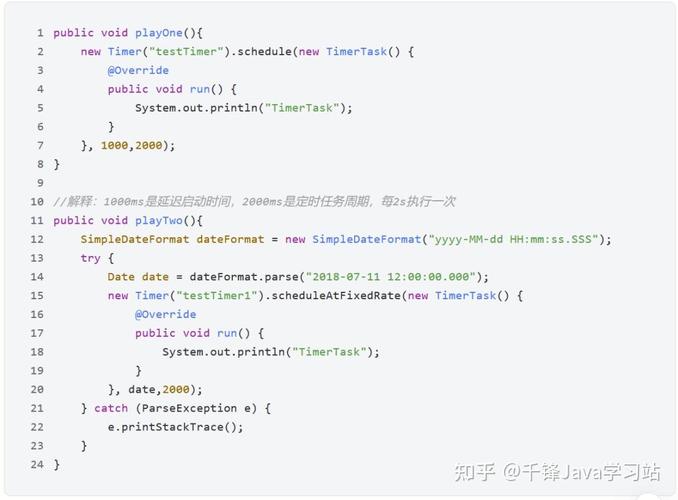
Example 1: Scheduling a Task for a Single Future Execution
This example schedules a task to print a message to the console after a 5-second delay.
import java.util.Timer;
import java.util.TimerTask;
public class TimerExample {
    public static void main(String[] args) {
        // 1. Create a Timer object
        Timer timer = new Timer();
        // 2. Create a TimerTask (our job to do)
        TimerTask task = new TimerTask() {
            @Override
            public void run() {
                // This code will be executed by the timer thread
                System.out.println("Task executed! Time: " + System.currentTimeMillis());
            }
        };
        System.out.println("Scheduling task to run after 5 seconds...");
        long delay = 5000; // 5 seconds in milliseconds
        // 3. Schedule the task to run once after the delay
        timer.schedule(task, delay);
        System.out.println("Main thread continues its work...");
        // To prevent the main thread from exiting before the timer runs,
        // we'll sleep for a bit. In a real application, the main thread
        // would likely be doing other things or waiting for user input.
        try {
            Thread.sleep(10000); // Sleep for 10 seconds
        } catch (InterruptedException e) {
            e.printStackTrace();
        }
        // It's good practice to cancel the timer when it's no longer needed
        // to free up resources and prevent the timer thread from running indefinitely.
        timer.cancel();
        System.out.println("Timer has been cancelled.");
    }
}
Output:
Scheduling task to run after 5 seconds...
Main thread continues its work...
Task executed! Time <some large number>
Timer has been cancelled.
Explanation:
- We create a
Timerand aTimerTask. timer.schedule(task, 5000)tells the timer: "In 5000 milliseconds, execute therun()method of mytask."- Notice that the
mainthread continues immediately after callingschedule(). It is not blocked. This is a key feature ofTimer. - The
Timermanages its own background thread to execute the task after the delay. - Finally,
timer.cancel()shuts down the timer thread and prevents any scheduled tasks from running.
Scheduling Options
The Timer class provides several schedule and scheduleAtFixedRate methods to give you flexibility.
One-Time Execution
schedule(TimerTask task, long delay): Executes the task once after a specified delay.
Repeated Execution (Fixed Delay)
This is useful for tasks that need to run periodically, but the interval is measured from the end of the last execution.
schedule(TimerTask task, long delay, long period): Executes the task for the first time after adelay, and then repeatedly after aperiod(in milliseconds) has elapsed since the previous execution finished.
Example:
Timer timer = new Timer();
TimerTask task = new TimerTask() {
    @Override
    public void run() {
        System.out.println("Repeating task with fixed delay. Time: " + System.currentTimeMillis());
        // Simulate a task that takes 2 seconds
        try { Thread.sleep(2000); } catch (InterruptedException e) {}
    }
};
// First run after 1 second, then run again 3 seconds after the *previous run finishes*.
// So the actual interval between start times will be 3s (wait) + 2s (work) = 5s.
timer.schedule(task, 1000, 3000);
Repeated Execution (Fixed Rate)
This is useful for tasks that need to run at a relatively constant rate, like a heartbeat or a game tick.
scheduleAtFixedRate(TimerTask task, long delay, long period): Executes the task for the first time after adelay, and then repeatedly after aperiod(in milliseconds) has elapsed. If a run is delayed for any reason, subsequent executions will "catch up" by executing multiple times in quick succession to get back on schedule.
Example:
Timer timer = new Timer();
TimerTask task = new TimerTask() {
    @Override
    public void run() {
        System.out.println("Repeating task with fixed rate. Time: " + System.currentTimeMillis());
        // Simulate a task that takes 2 seconds
        try { Thread.sleep(2000); } catch (InterruptedException e) {}
    }
};
// First run after 1 second, then try to run again every 3 seconds.
// If the task takes 2 seconds, the next run will start 1 second after the previous one finishes.
timer.scheduleAtFixedRate(task, 1000, 3000);
Key Characteristics and Limitations
While java.util.Timer is simple, it has some important limitations, especially when compared to the modern java.util.concurrent.ScheduledExecutorService.
-
Single Threaded: All tasks are executed by a single, non-daemon background thread. If one task takes a long time to run (e.g., it gets stuck in an infinite loop or a long network call), it will delay all other subsequent tasks. This is its biggest drawback.
-
No Exception Handling: If a
TimerTask'srun()method throws an uncaughtRuntimeException, it will terminate the single timer thread. This will cause all other scheduled tasks to be cancelled silently and never run. -
State Management: It's difficult to manage the state of a
TimerTaskif you want to cancel it or reschedule it dynamically.
java.util.Timer vs. java.util.concurrent.ScheduledExecutorService
For any new development, ScheduledExecutorService is strongly recommended over java.util.Timer. It was introduced in Java 5 as part of the java.util.concurrent framework and addresses all of Timer's limitations.
| Feature | java.util.Timer |
ScheduledExecutorService |
|---|---|---|
| Thread Management | Single background thread. | Uses a thread pool (configurable size). |
| Task Failure | A single failed task can cancel all other tasks. | Failure of one task does not affect others. |
| Flexibility | Limited scheduling options. | More flexible (e.g., scheduleWithFixedDelay, scheduleAtFixedRate). |
| Modern Features | Lacks features like Future for results. |
Integrates with Future objects for better control and results. |
| Best For | Simple, quick scripts or legacy code. | All modern, robust applications. |
When to use ScheduledExecutorService (The Modern Way)
Here's how you'd rewrite the first example using ScheduledExecutorService.
import java.util.concurrent.Executors;
import java.util.concurrent.ScheduledExecutorService;
import java.util.concurrent.TimeUnit;
public class ScheduledExecutorExample {
    public static void main(String[] args) {
        // 1. Create a ScheduledExecutorService with a thread pool of size 1
        ScheduledExecutorService scheduler = Executors.newScheduledThreadPool(1);
        // 2. Define the task (can be a simple lambda)
        Runnable task = () -> {
            System.out.println("Task executed by ScheduledExecutorService! Time: " + System.currentTimeMillis());
        };
        System.out.println("Scheduling task to run after 5 seconds...");
        long delay = 5;
        // 3. Schedule the task
        scheduler.schedule(task, delay, TimeUnit.SECONDS);
        // Shutdown the scheduler gracefully after some time
        try {
            Thread.sleep(10000);
        } catch (InterruptedException e) {
            e.printStackTrace();
        }
// This will shut down the executor, preventing new