
Of course! Working with Base64 encoded images in Java is a common task, especially for scenarios like embedding images directly into HTML/CSS, JSON, or XML documents, or for simple data transport.

Here’s a comprehensive guide covering:
- Encoding: Converting a
BufferedImageto a Base64String. - Decoding: Converting a Base64
Stringback to aBufferedImage. - Handling Different Image Formats: (JPEG, PNG).
- A Complete, Runnable Example.
- Important Considerations (Performance, Data URLs).
Prerequisites
You'll need the Java Development Kit (JDK) installed. The core logic uses the standard Java libraries (java.util.Base64, java.awt.image, javax.imageio), so no external libraries (like Apache Commons) are required for basic operations.
Core Concepts
BufferedImage: This is the class in Java that represents an image in memory with an accessible buffer of image data. It's the central object for image manipulation.java.util.Base64: This utility class provides methods to encode and decode Base64. We'll use itsEncoderandDecoder.javax.imageio.ImageIO: This utility class is used to read and write images in various formats (JPEG, PNG, GIF, etc.).
Encoding an Image to a Base64 String
This process involves three main steps:
- Create a
BufferedImage(either by creating a new one or loading from a file). - Write the image to an in-memory
ByteArrayOutputStream. - Encode the byte array from the stream into a Base64 string.
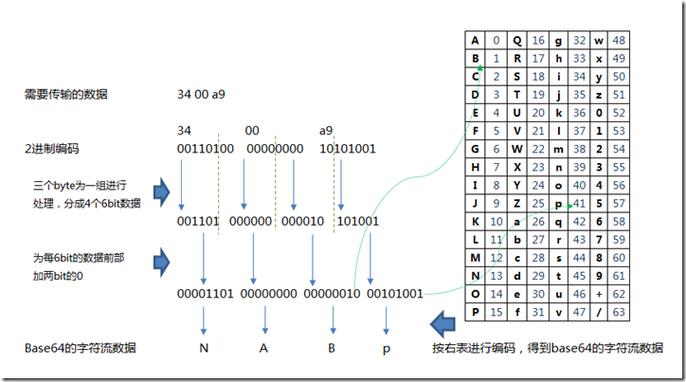
Here is a method that takes a BufferedImage and returns a Base64 encoded String.
import java.awt.image.BufferedImage;
import java.io.ByteArrayOutputStream;
import java.io.IOException;
import java.util.Base64;
import javax.imageio.ImageIO;
public class ImageToBase64 {
    /**
     * Encodes a BufferedImage to a Base64 String.
     * @param image The BufferedImage to encode.
     * @param formatName The image format (e.g., "png", "jpeg").
     * @return A Base64 encoded String of the image.
     * @throws IOException if an error occurs during writing or encoding.
     */
    public static String encodeBufferedImageToBase64(BufferedImage image, String formatName) throws IOException {
        // 1. Write the image to an in-memory byte stream
        ByteArrayOutputStream byteArrayOutputStream = new ByteArrayOutputStream();
        ImageIO.write(image, formatName, byteArrayOutputStream);
        // 2. Get the byte array from the stream
        byte[] imageBytes = byteArrayOutputStream.toByteArray();
        // 3. Encode the byte array to Base64
        Base64.Encoder encoder = Base64.getEncoder();
        return encoder.encodeToString(imageBytes);
    }
}
Decoding a Base64 String to an Image
This is the reverse process:
- Get the
Base64.Decoder. - Decode the Base64
Stringback into a byte array. - Read the byte array into a
BufferedImageusingImageIO.
Here is the corresponding decoding method.
import java.awt.image.BufferedImage;
import java.io.ByteArrayInputStream;
import java.io.IOException;
import java.util.Base64;
import javax.imageio.ImageIO;
public class Base64ToImage {
    /**
     * Decodes a Base64 String to a BufferedImage.
     * @param base64Image The Base64 encoded String of the image.
     * @return The decoded BufferedImage.
     * @throws IOException if an error occurs during reading or decoding.
     */
    public static BufferedImage decodeBase64ToBufferedImage(String base64Image) throws IOException {
        // 1. Get the Base64 decoder
        Base64.Decoder decoder = Base64.getDecoder();
        // 2. Decode the Base64 string into a byte array
        byte[] imageBytes = decoder.decode(base64Image);
        // 3. Read the byte array into a BufferedImage
        try (ByteArrayInputStream byteArrayInputStream = new ByteArrayInputStream(imageBytes)) {
            return ImageIO.read(byteArrayInputStream);
        }
    }
}
Complete, Runnable Example
This class puts everything together. It creates a simple image, encodes it to Base64, decodes it back, and saves the result to a new file to verify it worked.
import java.awt.Color;
import java.awt.Graphics2D;
import java.awt.image.BufferedImage;
import java.io.File;
import java.io.IOException;
import javax.imageio.ImageIO;
public class Main {
    public static void main(String[] args) {
        try {
            // --- 1. Create a sample BufferedImage ---
            int width = 500;
            int height = 200;
            BufferedImage originalImage = new BufferedImage(width, height, BufferedImage.TYPE_INT_RGB);
            Graphics2D g2d = originalImage.createGraphics();
            g2d.setColor(Color.YELLOW);
            g2d.fillRect(0, 0, width, height);
            g2d.setColor(Color.BLACK);
            g2d.drawString("Hello, Base64 World!", 50, 100);
            g2d.dispose();
            System.out.println("Created a sample image.");
            // --- 2. Encode the image to Base64 (as PNG) ---
            String base64Png = ImageToBase64.encodeBufferedImageToBase64(originalImage, "png");
            System.out.println("\nEncoded Image (PNG) to Base64:");
            // System.out.println(base64Png); // This will be a very long string
            System.out.println("Length of Base64 string: " + base64Png.length());
            // --- 3. Decode the Base64 string back to an image ---
            BufferedImage decodedImagePng = Base64ToImage.decodeBase64ToBufferedImage(base64Png);
            System.out.println("\nDecoded Base64 back to a BufferedImage.");
            // --- 4. Save the decoded image to a file to verify ---
            File outputPngFile = new File("decoded_image.png");
            ImageIO.write(decodedImagePng, "png", outputPngFile);
            System.out.println("Saved decoded image to: " + outputPngFile.getAbsolutePath());
            // --- Example with JPEG ---
            System.out.println("\n--- Now trying with JPEG ---");
            String base64Jpeg = ImageToBase64.encodeBufferedImageToBase64(originalImage, "jpeg");
            BufferedImage decodedImageJpeg = Base64ToImage.decodeBase64ToBufferedImage(base64Jpeg);
            File outputJpegFile = new File("decoded_image.jpg");
            ImageIO.write(decodedImageJpeg, "jpeg", outputJpegFile);
            System.out.println("Saved decoded JPEG image to: " + outputJpegFile.getAbsolutePath());
        } catch (IOException e) {
            System.err.println("An error occurred: " + e.getMessage());
            e.printStackTrace();
        }
    }
}
How to Run:

- Save the code as
Main.java. - Compile it:
javac Main.java - Run it:
java Main - You will see two new files in your directory:
decoded_image.pnganddecoded_image.jpg, which should look identical to the original generated image.
Important Considerations
A. Performance and Memory
- Large Images: Be very careful with large images. Encoding/decoding and especially holding the entire image data in a byte array in memory can consume a lot of RAM and cause
OutOfMemoryErrorfor high-resolution images. - Streams: For very large images, you would need to use streaming APIs, which are more complex. The
ImageIOclass has methods that can take anInputStreamorOutputStream, butBase64.getEncoder()requires the full byte array. For truly large-scale processing, consider a library that supports streaming Base64 encoding.
B. Data URLs (Embedding in HTML)
A very common use case for Base64 images is to embed them directly into HTML documents using Data URLs. The format is:
data:[<MIME-type>];base64,<data>
You can easily modify the encoding method to include the prefix.
public static String encodeToDataUrl(BufferedImage image, String formatName) throws IOException {
    String base64 = encodeBufferedImageToBase64(image, formatName);
    String mimeType = "image/" + formatName.toLowerCase(); // e.g., image/png
    return "data:" + mimeType + ";base64," + base64;
}
// Usage in main():
String dataUrl = encodeToDataUrl(originalImage, "png");
System.out.println("\nData URL (first 80 chars):");
System.out.println(dataUrl.substring(0, 80) + "...");
C. Choosing the Right Format
- PNG (
image/png): Lossless compression. Good for images with text, sharp lines, or transparency. The Base64 string will be larger than for JPEG. - JPEG (
image/jpeg): Lossy compression. Much smaller file sizes for photographs, but not suitable for images with sharp edges or transparency.











