
Of course! Let's dive deep into the docker Python client, which is the official and most popular library for interacting with a Docker daemon from Python.

What is the docker Python Client?
It's a powerful library that allows you to control Docker from your Python scripts. You can use it to:
- Manage Containers: Create, start, stop, remove, and inspect containers.
- Manage Images: Build, pull, push, and inspect Docker images.
- Manage Volumes: Create and manage named volumes.
- Manage Networks: Create and manage Docker networks.
- Stream Logs: Get real-time logs from running containers.
- Execute Commands: Run commands inside a container.
It acts as a Python wrapper around the Docker Engine API, making it much easier to work with than manually crafting HTTP requests.
Installation
First, you need to install the library using pip.
pip install docker
Prerequisite: You must have a Docker daemon running. This could be on your local machine (like Docker Desktop for Mac/Windows) or on a remote server. The client communicates with this daemon.
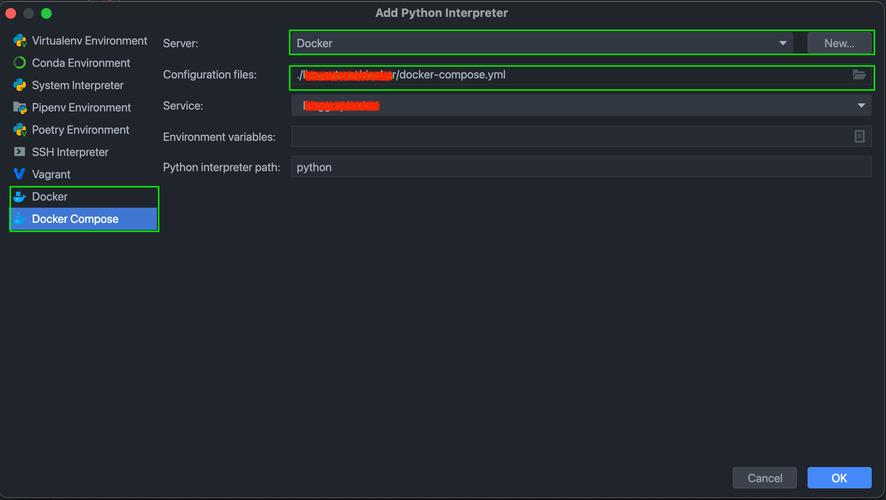
Connecting to the Docker Daemon
The client object is your entry point to everything. How you create it depends on where your Docker daemon is running.
a) Local Docker Daemon (Most Common)
If you have Docker installed locally and running, the client will automatically connect to it using the default Unix socket or TCP socket.
import docker
# The client will automatically try to connect to the local daemon
client = docker.from_env()
# You can also create the client explicitly
# client = docker.DockerClient(base_url='unix://var/run/docker.sock')
b) Remote Docker Daemon
If your Docker daemon is running on a remote server (e.g., a Linux VM), you need to connect to it over its TCP socket. You'll need to enable the Docker daemon to listen on a network interface and ensure it's secure (e.g., using TLS or a firewall).
import docker
# Replace with your remote host's IP and port
# It's highly recommended to use TLS for remote connections
client = docker.DockerClient(base_url='tcp://192.168.1.100:2375')
# For a secure TLS connection, you would provide certificates
# client = docker.DockerClient(
#     base_url='tcp://192.168.1.100:2376',
#     tls=True, # or pass a docker.tls.TLSConfig object
# )
Core Concepts: High-Level vs. Low-Level API
The library provides two main ways to interact with Docker:
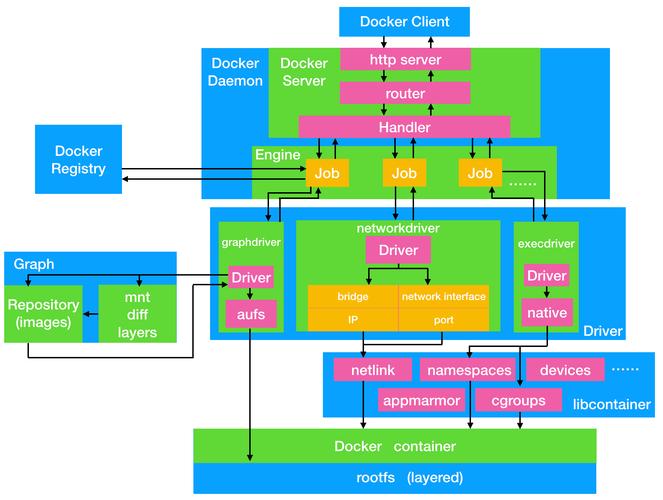
a) High-Level API (docker.from_env())
This is the recommended and easiest way to start. It returns a "low-level" client but provides convenient, Pythonic methods that often map directly to Docker CLI commands.
- Pros: Simple, readable, great for common tasks.
- Cons: Less flexible for complex, one-off API calls.
import docker
# Use the high-level client
client = docker.from_env()
# List all containers (including stopped ones)
containers = client.containers.list(all=True)
print(f"Found {len(containers)} containers.")
# Get a specific container by name or ID
my_container = client.containers.get('my-running-app')
print(f"Container status: {my_container.status}")
# Stop the container
my_container.stop()
print("Container stopped.")
b) Low-Level API (docker.APIClient() or docker.DockerClient().api)
This gives you direct access to the underlying Docker Engine API. Every method corresponds to a specific API endpoint. This is more verbose but offers maximum control and access to all API features.
- Pros: Full control, access to every API feature, more efficient for bulk operations.
- Cons: More verbose, requires knowledge of the Docker API.
import docker
# Get the low-level API client
api_client = docker.APIClient(base_url='unix://var/run/docker.sock')
# List all container IDs
container_ids = api_client.containers(all=True, quiet=True)
print(f"Found {len(container_ids)} container IDs: {container_ids}")
# Inspect a specific container
# Note: You use the container ID here
container_info = api_client.inspect_container(container_ids[0])
print(f"Image of first container: {container_info['Config']['Image']}")
# You can also get the low-level client from the high-level one
# api_client = client.api
Recommendation: Start with the High-Level API. If you find you need a feature that isn't available or need to optimize for performance, switch to the Low-Level API.
Practical Examples with the High-Level API
Let's walk through some common tasks.
Example 1: Running a Container
This is the Python equivalent of docker run -d -p 8080:80 --name my-web-server nginx.
import docker
import time
client = docker.from_env()
try:
    # Run a container in detached mode (-d)
    # The `ports` argument maps host:container
    # The `name` argument gives it a name
    container = client.containers.run(
        "nginx:latest",
        detach=True,
        ports={'80/tcp': 8080},
        name="my-web-server"
    )
    print(f"Container started with ID: {container.short_id}")
    print(f"You can access it at http://localhost:8080")
    # Let it run for a bit
    time.sleep(10)
finally:
    # Clean up the container
    print("Stopping and removing the container...")
    container.remove(force=True)
    print("Done.")
Example 2: Building an Image
This is the Python equivalent of docker build -t my-python-app ..
import docker
import io
client = docker.from_env()
print("Building image...")
# The `path` is the build context directory
# `fileobj` can be a file-like object for the Dockerfile
# `rm=True` is equivalent to `--rm` to clean up intermediate containers
# `nocache=True` is equivalent to `--no-cache`
image, build_logs = client.images.build(
    path=".",  # Assumes the Dockerfile is in the current directory
    tag="my-python-app:latest",
    rm=True,
    nocache=True
)
print(f"Image built successfully with ID: {image.id}")
print("Build logs:")
for log in build_logs:
    if 'stream' in log:
        print(log['stream'].strip())
Example 3: Working with a Running Container
Let's start a container and then interact with it.
import docker
import time
client = docker.from_env()
# Start a simple alpine container that sleeps
container = client.containers.run(
    "alpine:latest",
    command="sleep 60",
    detach=True,
    name="my-sleeper"
)
print(f"Started container: {container.name} (ID: {container.short_id})")
# Inspect the container to see its details
print("\n--- Container Info ---")
info = container.attrs
print(f"Image: {info['Config']['Image']}")
print(f"Status: {info['State']['Status']}")
# Execute a command inside the container
print("\n--- Executing command ---")
# exec_run returns a tuple (exit_code, output)
exit_code, output = container.exec_run("ps aux")
print(f"Exit Code: {exit_code}")
print("Output:")
print(output.decode('utf-8'))
# Stop and remove the container
print("\nStopping container...")
container.stop()
container.remove()
print("Container removed.")
Error Handling
Docker operations can fail (e.g., container not found, image build error). The library raises specific exceptions.
import docker
from docker.errors import APIError, NotFound
client = docker.from_env()
try:
    # Try to get a container that doesn't exist
    non_existent_container = client.containers.get("this-container-does-not-exist")
    print("This will not be printed.")
except NotFound as e:
    print(f"Error: {e}")
    print("The container was not found. This is expected.")
except APIError as e:
    print(f"An API error occurred: {e}")
except Exception as e:
    print(f"An unexpected error occurred: {e}")
Summary
| Feature | High-Level API (docker.from_env()) |
Low-Level API (docker.APIClient()) |
|---|---|---|
| Purpose | Common, everyday tasks | Full control, advanced scripting |
| Syntax | Pythonic, object-oriented (e.g., container.stop()) |
Maps directly to Docker API (e.g., api_client.stop(container_id)) |
| Use Case | Automating workflows, simple CI/CD tasks | Complex build processes, bulk operations, integrating with specific API features |
| Recommendation | Start here. | Use when you need more power or flexibility. |
The docker Python client is an indispensable tool for anyone looking to automate their Docker workflows, build CI/CD pipelines, or create sophisticated applications that interact with containers.


