Of course! Here is a comprehensive guide on how to create a Python Dubbo service, covering the concepts, popular frameworks, a step-by-step tutorial, and advanced topics.
What is Dubbo and Why Use it with Python?
Apache Dubbo is a high-performance, open-source RPC (Remote Procedure Call) framework. It provides three core capabilities:
- Remote Communication: Transparently invoke methods on remote services as if they were local objects.
- Service Governance: Advanced features like load balancing, service discovery, fault tolerance, and routing.
- High Performance & Extensibility: Designed for high throughput and low latency, with a pluggable architecture.
Why use Python with Dubbo?
- Microservices: You can build Python microservices that communicate efficiently with services written in other languages (Java, Go, etc.) that also use Dubbo.
- Leverage Existing Java Ecosystem: Many large enterprises have a mature Java-based Dubbo service mesh. Python services can be integrated into this ecosystem seamlessly.
- High Performance: Dubbo's binary protocol is much more efficient than REST/JSON for internal service-to-service communication.
Key Concepts in Dubbo
Before we code, let's understand the main components:
- Provider (服务提供者): The application that exposes a service, making it available for remote calls.
- Consumer (服务消费者): The application that calls a remote service provided by another application.
- Registry (注册中心): A service discovery component. Providers register their services with the registry, and consumers subscribe to discover available providers. ZooKeeper and Nacos are the most popular choices.
- Protocol (协议): The underlying communication protocol. Dubbo Protocol (a custom binary protocol) is the default and most performant. HTTP/2 is also supported.
- Interface (接口): The service contract, usually defined in a shared library (a
.jaror.pyfile) that both the Provider and Consumer depend on. The Consumer only knows about the interface, not the concrete implementation. - Container (容器): An environment for running the Dubbo Provider. It's responsible for service registration and lifecycle management.
Popular Python Dubbo Frameworks
The Dubbo community is primarily Java-based, but several Python implementations exist. Here are the most prominent ones:
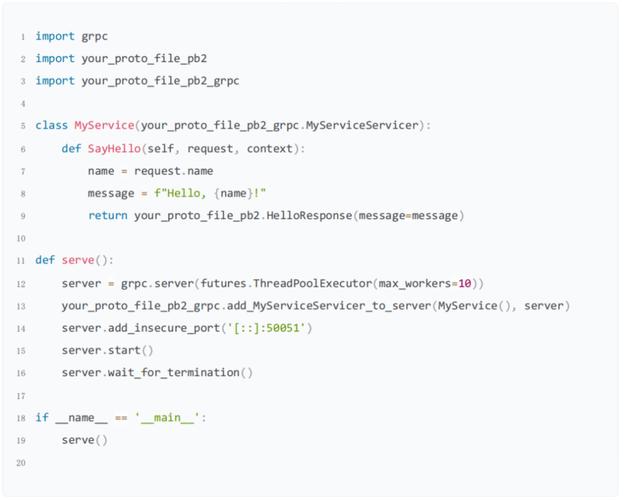
| Framework | Language | Status | Key Features |
|---|---|---|---|
| PyDubbo | Python | Active | Pure Python implementation. Good for learning and lightweight use cases. |
| Apache Dubbo Python | Python | Active (Official) | The official Python implementation from the Apache Dubbo PMC. Uses a gRPC bridge. This is the recommended choice for new projects. |
| Double | Python | Less Active | A Python RPC framework inspired by Dubbo. Uses a custom protocol. |
For this guide, we will focus on Apache Dubbo Python, as it's the official and most future-proof solution.
Tutorial: Creating a Python Dubbo Service with Apache Dubbo Python
This tutorial will guide you through creating a simple "Greeter" service with a Provider and a Consumer.
Prerequisites
- Python 3.7+
- Java 8+ and Maven: The Python Dubbo implementation uses a gRPC bridge, which requires a Java runtime to build the necessary gRPC artifacts.
- A Service Registry: We'll use Nacos as it's modern and easy to set up. You can run it locally with Docker:
docker run -d --name nacos -p 8848:8848 nacos/nacos-server
Nacos will be available at
http://127.0.0.1:8848. The default username/password isnacos/nacos.
Step 1: Project Setup
Create a project directory and a virtual environment.
mkdir python-dubbo-example
cd python-dubbo-example
python -m venv venv
source venv/bin/activate  # On Windows: venv\Scripts\activate
pip install apache-dubbo
Step 2: Define the Service Interface
The interface is the contract between the Provider and Consumer. We'll define it in a Python file.
greeter_interface.py
# This file defines the service interface that both provider and consumer will use.
from apache_dubbo import Service
# The @Service decorator marks this class as a Dubbo service interface.
# The name "Greeter" will be the service name registered in Nacos.
@Service(name="Greeter")
class IGreeter:
    """
    The interface for the Greeter service.
    The provider must implement all methods defined here.
    """
    def say_hello(self, name: str) -> str:
        """
        Says hello to the given name.
        :param name: The name to greet.
        :return: A greeting string.
        """
        raise NotImplementedError("Provider must implement this method")
Step 3: Implement the Service Provider
The Provider implements the interface and registers it with the Dubbo framework.
provider.py
import time
from apache_dubbo import DubboApplication
from greeter_interface import IGreeter
# 1. Implement the service interface
class GreeterService(IGreeter):
    def say_hello(self, name: str) -> str:
        print(f"[Provider] Received request to greet: {name}")
        time.sleep(1) # Simulate some work
        return f"Hello, {name}! From Python Dubbo Provider."
# 2. Configure and start the Dubbo application
if __name__ == "__main__":
    # Define the application configuration
    config = {
        "application": {
            "name": "python-greeter-provider" # Name of this application
        },
        "registry": {
            # Address of the Nacos registry
            "address": "nacos://127.0.0.1:8848",
            "username": "nacos",
            "password": "nacos"
        },
        "protocol": {
            # The protocol this service exposes
            "name": "dubbo",
            "port": 50051
        },
        # Enable the Dubbo gRPC bridge
        "dubbo.grpc.enabled": "true"
    }
    # Create a Dubbo application instance
    app = DubboApplication(config)
    # Register the service implementation
    # The first argument is the instance of our implementation
    app.service(GreeterService())
    # Start the application, which will register the service and start listening
    print("Python Dubbo Provider is starting...")
    app.start()
Step 4: Create the Service Consumer
The Consumer discovers the "Greeter" service from the registry and calls its methods.
consumer.py
import asyncio
from apache_dubbo import DubboApplication, Reference
from greeter_interface import IGreeter
# 1. Configure the Dubbo application for the consumer
config = {
    "application": {
        "name": "python-greeter-consumer" # Name of this application
    },
    "registry": {
        # Address of the Nacos registry
        "address": "nacos://127.0.0.1:8848",
        "username": "nacos",
        "password": "nacos"
    },
    # Enable the Dubbo gRPC bridge
    "dubbo.grpc.enabled": "true"
}
# 2. Create a Dubbo application instance
app = DubboApplication(config)
# 3. Reference the remote service
# This creates a proxy object that looks like a local instance of IGreeter
# but will make calls to the remote provider.
greeter_proxy: IGreeter = Reference(IGreeter)
async def call_greeter(name: str):
    """Asynchronously calls the remote greeter service."""
    print(f"\n[Consumer] Calling Greeter service for name: {name}")
    try:
        # The call is made just like a local method call
        response = await greeter_proxy.say_hello(name)
        print(f"[Consumer] Received response: {response}")
    except Exception as e:
        print(f"[Consumer] An error occurred: {e}")
async def main():
    """Main function to run the consumer demo."""
    # Start the consumer application
    app.start()
    print("Python Dubbo Consumer is running.")
    # Make a few calls
    await call_greeter("Alice")
    await call_greeter("Bob")
    await call_greeter("Charlie")
    # Wait a bit to see the provider logs
    await asyncio.sleep(2)
if __name__ == "__main__":
    asyncio.run(main())
Step 5: Run the Example
-
Start the Provider: Open a terminal and run:
python provider.py
You should see:
Python Dubbo Provider is starting...and it will wait. Check your Nacos console athttp://127.0.0.1:8848(login withnacos/nacos) and you should see a service namedpython-greeter-providerregistered.