Of course! The java.util.Map interface is one of the most fundamental and widely used collections in Java. It's crucial for understanding how to store and retrieve data in a key-value pair format.
(图片来源网络,侵删)
Let's break it down comprehensively.
What is a Map?
A Map is a collection that stores data as key-value pairs. It's like a real-world dictionary:
- Key: The word you look up (must be unique).
- Value: The definition of that word.
This structure provides efficient lookup, insertion, and deletion based on the key.
Core Characteristics:
(图片来源网络,侵删)
- Unique Keys: Each key in a
Mapmust be unique. If you try to add a key that already exists, the old value associated with that key will be replaced by the new value. - Values Can Be Duplicated: Multiple keys can map to the same value.
- Unordered (Historically): Before Java 8, there was no guarantee on the order of elements. Since Java 8, many implementations maintain insertion order, but this is not a strict requirement of the
Mapinterface itself.
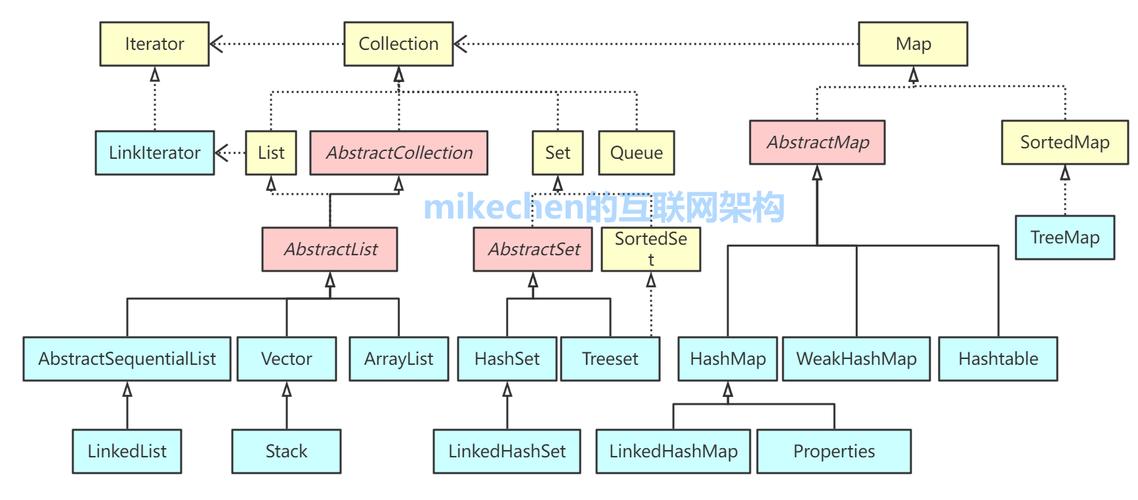
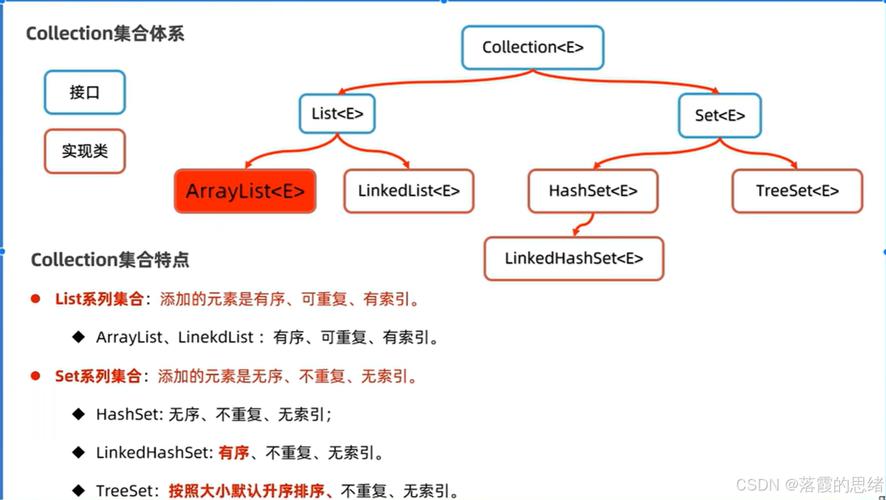
The Map Interface Hierarchy
Here's the hierarchy of the most common Map implementations you'll use.
graph TD
    A[Map] --> B[AbstractMap];
    B --> C[HashMap];
    B --> D[LinkedHashMap];
    A --> E[SortedMap];
    E --> F[TreeMap];
    A --> G[ConcurrentHashMap];
    A --> H[EnumMap];
    A --> I[WeakHashMap];
Common Map Implementations
HashMap (The Workhorse)
- Internal Structure: Uses a hash table (array of buckets) to store key-value pairs.
- Performance: Offers constant time complexity, O(1), for basic operations like
put(),get(), andremove(), on average. This makes it extremely fast. - Order: Does not maintain any order of insertion. The order is based on the hash codes of the keys.
- Nulls: Allows one null key and multiple null values.
- When to use: This is your default choice. Use it when you need fast key-value lookups and you don't care about the order of elements.
LinkedHashMap (Ordered HashMap)
- Internal Structure: Extends
HashMapand uses a doubly-linked list to maintain the insertion order of entries. - Performance: Slightly slower than
HashMapbecause it has to maintain the linked list. Still has an average time complexity of O(1) for basic operations. - Order: Maintains insertion order. You can also configure it to maintain access order (e.g., used in LRU - Least Recently Used - caches).
- Nulls: Same as
HashMap: one null key, multiple null values. - When to use: When you need the fast performance of a
HashMapbut also need to preserve the order in which elements were added.
TreeMap (Sorted Map)
- Internal Structure: Uses a Red-Black tree (a self-balancing binary search tree).
- Performance: Has a time complexity of O(log n) for basic operations (
put,get,remove) because it has to traverse the tree. - Order: Maintains elements in natural order (e.g., alphabetical for Strings, numerical for Integers) or a custom
Comparatororder you provide. - Nulls: Does not allow
nullkeys (as it can't compare them), but allowsnullvalues. - When to use: When you need the
Mapto be sorted. The performance cost is worth it for ordered data.
ConcurrentHashMap (Thread-Safe)
- Internal Structure: Highly optimized for concurrent access. It uses fine-grained locking (lock striping) to allow multiple threads to read and write without blocking each other.
- Performance: Excellent for multi-threaded applications. It's much faster than synchronizing a
HashMapwithCollections.synchronizedMap(). - Order: From Java 8 onwards, it maintains insertion order.
- Nulls: Does not allow
nullkeys ornullvalues (to distinguish a failedputfrom a successful one that stored anull). - When to use: In any concurrent (multi-threaded) application where you need a shared
Map.
Core Methods of the Map Interface
Here are the most important methods you'll use:
| Method | Description |
|---|---|
V put(K key, V value) |
Associates the specified value with the specified key. Returns the previous value, or null if there was none. |
V get(Object key) |
Returns the value to which the specified key is mapped, or null if the map contains no mapping for the key. |
V remove(Object key) |
Removes the mapping for the specified key if present. Returns the previous value, or null if there was none. |
boolean containsKey(Object key) |
Returns true if the map contains a mapping for the specified key. |
boolean containsValue(Object value) |
Returns true if the map maps one or more keys to the specified value. |
int size() |
Returns the number of key-value mappings in the map. |
boolean isEmpty() |
Returns true if the map contains no key-value mappings. |
void clear() |
Removes all of the mappings from the map. |
Set<K> keySet() |
Returns a Set view of the keys contained in the map. |
Collection<V> values() |
Returns a Collection view of the values contained in the map. |
Set<Map.Entry<K, V>> entrySet() |
Returns a Set view of the mappings (Map.Entry) contained in the map. This is very useful for iteration. |
How to Use a Map: Code Examples
Basic Operations with HashMap
import java.util.HashMap;
import java.util.Map;
public class MapExample {
    public static void main(String[] args) {
        // 1. Create a HashMap
        Map<String, Integer> ages = new HashMap<>();
        // 2. Add key-value pairs using put()
        ages.put("Alice", 30);
        ages.put("Bob", 25);
        ages.put("Charlie", 35);
        // 3. Print the map
        System.out.println("Initial Map: " + ages);
        // Output: Initial Map: {Charlie=35, Alice=30, Bob=25} (Order is not guaranteed)
        // 4. Get a value by key
        int aliceAge = ages.get("Alice");
        System.out.println("Alice's age: " + aliceAge); // Output: Alice's age: 30
        // 5. Check if a key exists
        System.out.println("Contains key 'Bob'? " + ages.containsKey("Bob")); // Output: true
        // 6. Check if a value exists
        System.out.println("Contains age 25? " + ages.containsValue(25)); // Output: true
        // 7. Update a value (put with an existing key)
        ages.put("Alice", 31); // Alice had a birthday
        System.out.println("Updated Map: " + ages);
        // Output: Updated Map: {Charlie=35, Alice=31, Bob=25}
        // 8. Remove an entry
        ages.remove("Bob");
        System.out.println("Map after removing Bob: " + ages);
        // Output: Map after removing Bob: {Charlie=35, Alice=31}
        // 9. Get the size
        System.out.println("Size of the map: " + ages.size()); // Output: 2
    }
}
Iterating Over a Map
There are three common ways to iterate.
import java.util.HashMap;
import java.util.Map;
public class MapIteration {
    public static void main(String[] args) {
        Map<String, String> countries = new HashMap<>();
        countries.put("USA", "United States");
        countries.put("UK", "United Kingdom");
        countries.put("IN", "India");
        countries.put("DE", "Germany");
        System.out.println("--- Method 1: Using keySet() ---");
        for (String countryCode : countries.keySet()) {
            System.out.println("Code: " + countryCode + ", Country: " + countries.get(countryCode));
        }
        System.out.println("\n--- Method 2: Using entrySet() (Recommended) ---");
        // More efficient as it avoids the second lookup with .get()
        for (Map.Entry<String, String> entry : countries.entrySet()) {
            System.out.println("Code: " + entry.getKey() + ", Country: " + entry.getValue());
        }
        System.out.println("\n--- Method 3: Using Java 8 forEach with Lambda ---");
        countries.forEach((code, name) -> System.out.println("Code: " + code + ", Country: " + name));
    }
}
Choosing the Right `
(图片来源网络,侵删)