Of course! You're likely asking about the axis parameter in Python's Matplotlib library (not "matlib"). The axis parameter is one of the most important and frequently used arguments in Matplotlib, and understanding it is key to creating effective plots.
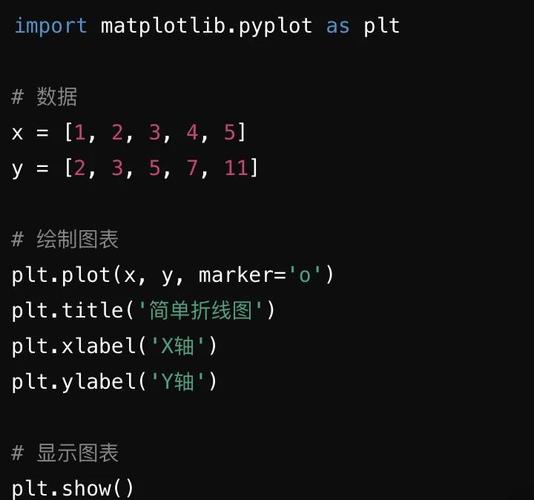
Let's break it down.
The Core Concept: What is an axis?
In a 2D plot, you have two axes:
- The x-axis (horizontal)
- The y-axis (vertical)
In a 3D plot, you add a z-axis.
The axis parameter in Matplotlib functions tells the library which of these axes to operate on.
The Golden Rule: axis=0 vs. axis=1
This is the most common point of confusion, so let's get it straight first.
Think of your data as a table (like a NumPy array or a Pandas DataFrame).
axis=0refers to operating along the rows (vertically). It's like applying a function to each column.axis=1refers to operating along the columns (horizontally). It's like applying a function to each row.
A helpful mnemonic: "0 is down, 1 is across".
| Operation | axis=0 (Rows / Columns) |
axis=1 (Columns / Rows) |
|---|---|---|
Aggregation (e.g., sum, mean, max) |
Calculates the statistic for each column. | Calculates the statistic for each row. |
Plotting (e.g., bar, plot) |
Groups data by the x-axis. | Groups data by the y-axis. |
Common Use Cases with Examples
Let's use a sample dataset to see this in action.
import matplotlib.pyplot as plt
import numpy as np
# Sample data: 3 categories (A, B, C) with 2 values for each (e.g., sales in 2025, 2025)
categories = ['A', 'B', 'C']
sales_2025 = [10, 20, 15]
sales_2025 = [15, 18, 25]
# We'll often use NumPy arrays for plotting
data = np.array([sales_2025, sales_2025])
print("Data array:\n", data)
# [[10 20 15]
#  [15 18 25]]
Bar Plots (plt.bar)
A bar plot's job is to create a bar for each category.
Scenario A: Plotting sales for each category in 2025
- We want to plot the values
[10, 20, 15]. - The categories
['A', 'B', 'C']will be on the x-axis. - The values will be on the y-axis.
- We are grouping by the columns of our data. This corresponds to
axis=0.
plt.figure(figsize=(8, 4))
# Plotting along axis=0 (default for bar)
# This takes the first element of each row to form the bar heights
plt.bar(categories, data[0], label='2025 Sales (axis=0 logic)')"Bar Plot: Grouping by Columns (axis=0)")
plt.xlabel("Category")
plt.ylabel("Sales")
plt.legend()
plt.show()
What axis=0 does here: It implicitly groups the data by the first dimension (rows), allowing plt.bar to iterate through the columns to create bars for 'A', 'B', and 'C'.
Scenario B: Plotting years on the x-axis
This is less common but demonstrates the point. What if we want '2025' and '2025' to be our categories on the x-axis? We need to transpose our data so that the years become the columns.
# Transpose the data so rows become columns and vice versa
data_transposed = data.T
print("Transposed data:\n", data_transposed)
# [[10 15]
#  [20 18]
#  [15 25]]
plt.figure(figsize=(8, 4))
# Now we plot the transposed data
plt.bar(categories, data_transposed[:, 0], label='2025 Sales (from transposed data)')"Bar Plot: Using Transposed Data")
plt.xlabel("Category")
plt.ylabel("Sales")
plt.legend()
plt.show()
This shows that the orientation of your data array directly relates to how axis will be interpreted.
Line/Area Plots (plt.plot, plt.fill_between)
Line plots are similar to bar plots in their use of axis.
plt.figure(figsize=(8, 4))
# Plotting two lines, one for each year
# We pass the x-axis (categories) and then the y-data for each line
plt.plot(categories, data[0], 'o-', label='2025')
plt.plot(categories, data[1], 's--', label='2025')
"Line Plot: Comparing Years")
plt.xlabel("Category")
plt.ylabel("Sales")
plt.legend()
plt.grid(True)
plt.show()
Here, Matplotlib automatically plots each row of the data array as a separate line against the common categories x-axis.
Aggregation Functions (.sum(), .mean(), etc.)
This is where the "rows vs. columns" rule is most obvious.
# Sum along axis=0 (sum of each column)
sum_per_category = data.sum(axis=0)
print(f"Sum per category (axis=0): {sum_per_category}")
# Output: Sum per category (axis=0): [25 38 40]
# Sum along axis=1 (sum of each row)
sum_per_year = data.sum(axis=1)
print(f"Sum per year (axis=1): {sum_per_year}")
# Output: Sum per year (axis=1): [45 58]
axis=0gave us the total sales for Category A, B, and C across both years.axis=1gave us the total sales for the year 2025 and 2025 across all categories.
Histograms (plt.hist)
Histograms show the distribution of a single dataset. The axis parameter here is less common but can be used to plot distributions of different columns of a 2D array side-by-side.
# Generate some sample data for a histogram
# data will have 2 rows (distributions) and 1000 columns (data points)
np.random.seed(42)
hist_data = np.random.randn(2, 1000) # 2 distributions, 1000 points each
plt.figure(figsize=(8, 4))
# Plot both distributions on the same axes
plt.hist(hist_data, bins=30, alpha=0.7, label=['Dist 1', 'Dist 2'])"Histogram of Two Distributions")
plt.legend()
plt.show()
In this case, Matplotlib treats the first dimension (axis=0) as different datasets to plot.
The plt.axis() Function (A Different Topic!)
It's crucial not to confuse the axis parameter with the plt.axis() function.
axis(parameter): An argument passed to plotting functions likeplt.bar(),plt.plot(),np.sum(), etc. It tells the function how to operate on your data.plt.axis()(function): A function used to control the properties of the plot's axes after they have been created.
Common uses of plt.axis():
# Get the current axis limits [xmin, xmax, ymin, ymax]
current_limits = plt.axis()
print(current_limits)
# Set the axis limits
plt.axis([0, 2, 0, 30]) # xmin=0, xmax=2, ymin=0, ymax=30
# Turn the grid on or off
plt.axis('on') # or 'off'
# Equal aspect ratio
plt.axis('equal') # Ensures that one unit on the x-axis is the same length as one unit on the y-axis
Summary Table
| Concept | What it Does | Key Functions |
|---|---|---|
axis Parameter |
Tells a function which dimension of your data to operate on. | plt.bar, plt.plot, np.sum, np.mean, np.max, df.groupby().sum() |
axis=0 |
Operates along rows. Calculates stats per column. Groups by x-axis. | data.sum(axis=0) |
axis=1 |
Operates along columns. Calculates stats per row. | data.sum(axis=1) |
plt.axis() Function |
Controls the appearance and limits of the plot's axes. | plt.axis(), plt.xlim(), plt.ylim() |
Mastering the axis parameter will make you much more proficient in using Matplotlib and other data science libraries like NumPy and Pandas.