
Of course! Here is a comprehensive guide to creating a Python socket client, starting with a simple, working example and then building up to a more robust, threaded version.
The Core Concept
A socket is like an endpoint for sending or receiving data across a computer network. When you browse the web, send an email, or play an online game, your computer is using sockets.
- Server: A program that "listens" for incoming connections on a specific IP address and port.
- Client: A program that initiates a connection to a server.
The client is what we'll be building today.
A Simple, Blocking Socket Client
This is the most basic example. It connects to a server, sends a message, receives a reply, and then closes the connection. It's "blocking" because the program will pause and wait (recv()) until it receives data from the server.
The Code
# simple_client.py
import socket
# --- Configuration ---
# The server's hostname or IP address. 'localhost' means the same machine.
# Use the server's actual IP address if running on a different machine.
HOST = '127.0.0.1'  # Standard loopback interface address (localhost)
PORT = 65432        # Port to listen on (non-privileged ports are > 1023)
# --- Main Logic ---
with socket.socket(socket.AF_INET, socket.SOCK_STREAM) as s:
    # 1. Connect to the server
    # The 'with' statement ensures the socket is automatically closed
    print(f"Connecting to {HOST}:{PORT}...")
    s.connect((HOST, PORT))
    print("Connected.")
    # 2. Send data to the server
    # sendall() sends all the data, looping if necessary
    message = b"Hello, server! This is the client."
    print(f"Sending: {message.decode()}")
    s.sendall(message)
    # 3. Receive data from the server
    # The '1024' is the buffer size, meaning we'll read up to 1024 bytes at a time.
    data = s.recv(1024)
print(f"Received from server: {data.decode()}")
How to Run This
-
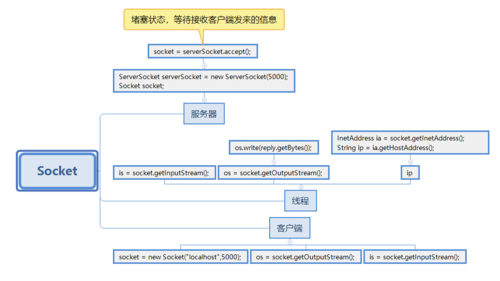
You need a server to connect to! This client won't work on its own.
 (图片来源网络,侵删)
- Quick Option: Open a terminal and run a simple command like
nc -l -p 65432(on macOS/Linux) orncat -l -p 65432(on Windows, from the Nmap for Windows package). This creates a basic listener. - Python Server Option: Use the simple server from the next section.
- Quick Option: Open a terminal and run a simple command like
-
Run the client:
python simple_client.py
Expected Output:
Connecting to 127.0.0.1:65432...
Connected.
Sending: Hello, server! This is the client.
Received from server: Hello, client! Message received.
A Simple Socket Server (To Test the Client)
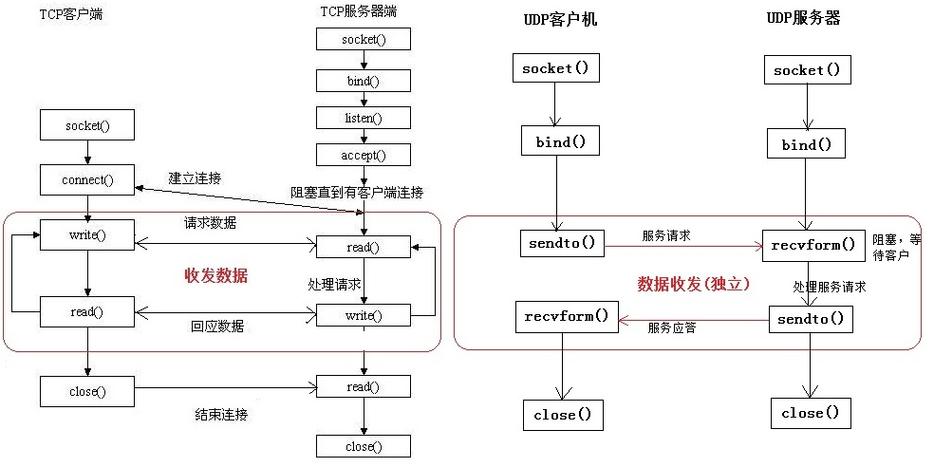
To see the client in action, you need a server. Here is a minimal server that echoes back any message it receives.
Save this as simple_server.py and run it in a separate terminal before running the client.
# simple_server.py
import socket
HOST = '127.0.0.1'  # Standard loopback interface address (localhost)
PORT = 65432        # Port to listen on (non-privileged ports are > 1023)
with socket.socket(socket.AF_INET, socket.SOCK_STREAM) as s:
    s.bind((HOST, PORT))
    s.listen()
    print(f"Server listening on {HOST}:{PORT}")
    conn, addr = s.accept()
    with conn:
        print(f"Connected by {addr}")
        while True:
            data = conn.recv(1024)
            if not data:
                # If recv() returns an empty object, the client has closed the connection
                break
            print(f"Received from client: {data.decode()}")
            # Echo the data back to the client
            conn.sendall(data)
print("Connection closed.")
How to Run:
- Terminal 1:
python simple_server.py - Terminal 2:
python simple_client.py
You'll see the communication happen in both terminals!
A More Robust, Interactive Client
The first client is very basic. It sends one message and exits. A more useful client can:
- Connect once and stay connected.
- Allow the user to type messages in the terminal.
- Handle disconnections gracefully.
This requires a loop to handle sending and receiving. A common pattern is to have one thread for sending data and another for receiving, so the program doesn't get stuck waiting for one or the other.
The Code
This version uses threading to handle sending and receiving concurrently.
# robust_client.py
import socket
import threading
# --- Configuration ---
HOST = '127.0.0.1'  # The server's hostname or IP address
PORT = 65432        # The port used by the server
# --- Functions for handling send/receive ---
def receive_messages(client_socket):
    """Listens for messages from the server and prints them."""
    while True:
        try:
            data = client_socket.recv(1024)
            if not data:
                # Server has closed the connection
                print("\nServer disconnected.")
                break
            print(f"\nServer: {data.decode('utf-8')}")
            print("You: ", end="", flush=True) # Show the prompt again
        except ConnectionResetError:
            print("\nConnection lost.")
            break
def send_messages(client_socket):
    """Gets user input and sends it to the server."""
    while True:
        message = input("You: ")
        if message.lower() == 'exit':
            print("Disconnecting...")
            client_socket.close()
            break
        client_socket.sendall(message.encode('utf-8'))
# --- Main Logic ---
def start_client():
    # Create a socket object
    # AF_INET for IPv4, SOCK_STREAM for TCP
    client = socket.socket(socket.AF_INET, socket.SOCK_STREAM)
    try:
        # Connect to the server
        client.connect((HOST, PORT))
        print(f"Connected to {HOST}:{PORT}")
        print("Type 'exit' to quit.")
        # Create and start threads for sending and receiving
        receive_thread = threading.Thread(target=receive_messages, args=(client,))
        send_thread = threading.Thread(target=send_messages, args=(client,))
        receive_thread.start()
        send_thread.start()
        # Wait for both threads to complete
        receive_thread.join()
        send_thread.join()
    except ConnectionRefusedError:
        print("Could not connect to the server. Is it running?")
    except Exception as e:
        print(f"An error occurred: {e}")
    finally:
        print("Client shutting down.")
        client.close()
if __name__ == "__main__":
    start_client()
How to Run
- Make sure your
simple_server.pyis running in one terminal. - In a new terminal, run the robust client:
python robust_client.py
Example Interaction:
Terminal 1 (Server):
Server listening on 127.0.0.1:65432
Connected by ('127.0.0.1', 54321)
Received from client: Hello again!
Received from client: How are you?
Terminal 2 (Client):
Connected to 127.0.0.1:65432
Type 'exit' to quit.
You: Hello again!
Server: Hello again!
You: How are you?
Server: I'm good, thanks!
You: exit
Disconnecting...
Client shutting down.
Key Concepts Explained
-
socket.socket(socket.AF_INET, socket.SOCK_STREAM)AF_INET: Specifies the address family for IPv4 addresses (e.g.,0.0.1).AF_INET6is for IPv6.SOCK_STREAM: Specifies the socket type as TCP, which is a reliable, connection-oriented protocol.SOCK_DGRAMwould be for UDP, which is connectionless and faster but less reliable.
-
s.connect((HOST, PORT))- This is a client-side method to initiate a connection to the server. It takes a tuple:
(hostname, port).
- This is a client-side method to initiate a connection to the server. It takes a tuple:
-
s.sendall(data)- Sends
datato the connected socket. It continues to send data from the buffer until all data has been sent or an error occurs. It's generally preferred overs.send().
- Sends
-
s.recv(buffer_size)- Receives data from the socket. It returns a bytes object. It will block (wait) until at least one byte is available. If the connection is closed by the other side, it will return an empty bytes object (
b''), which you can use to detect the disconnection.
- Receives data from the socket. It returns a bytes object. It will block (wait) until at least one byte is available. If the connection is closed by the other side, it will return an empty bytes object (
-
with socket.socket(...) as s:- The
withstatement is a context manager. It ensures
- The











