Of course! The replaceAll() method in Java is a powerful and commonly used String method for replacing all occurrences of a substring that matches a given regular expression.

Let's break it down thoroughly.
The Basic Syntax
The method signature is:
public String replaceAll(String regex, String replacement)
regex: This is the regular expression pattern you want to search for in the string. It's not just a simple substring; it's a full regex pattern.replacement: This is the string that will replace every match found by theregex.
Important: The regex argument is a regular expression, not a literal string. This is the most common source of confusion for beginners.
The Crucial Difference: replaceAll() vs. replace()
This is the most important concept to understand.

| Method | What it Searches For | Example | Result |
|---|---|---|---|
replace(CharSequence target, CharSequence replacement) |
Literal String | "hello world".replace("l", "z") |
"hezzo worzd" |
replaceAll(String regex, String replacement) |
Regular Expression | "hello world".replaceAll("l", "z") |
"hezzo worzd" |
replaceAll(String regex, String replacement) |
Regular Expression | "hello world".replaceAll(".", "z") |
"zzzzzzzzzzz" |
As you can see, when you use a literal string like "l", both methods behave identically. But when you use a special regex character like , they behave very differently.
replace()will only ever look for the literal character.replaceAll()will interpret as the regex wildcard for "any character".
Common Regular Expression Examples
Here are some practical examples of what you can do with replaceAll().
Example 1: Replacing a Literal Special Character
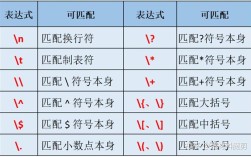
What if you want to replace a literal dot ()? You must "escape" it with a backslash (\). In a Java string, a backslash is also an escape character, so you need to use two backslashes (\\) to represent one literal backslash.
String sentence = "This is a sentence. And this is another one.";
// We want to replace every literal "." with an exclamation mark "!"
// The regex for a literal dot is "\\."
String result = sentence.replaceAll("\\.", "!");
System.out.println(result);
// Output: This is a sentence! And this is another one!
Example 2: Using Regex Wildcards
The dot () matches any character. Let's see it in action.

String text = "a1b2c3d4e5";
// Replace any character (.) with the character "X"
String result = text.replaceAll(".", "X");
System.out.println(result);
// Output: XXXXXXXXXX
Example 3: Replacing Digits
The \d regex pattern matches any digit (0-9).
String phone = "My phone is 123-456-7890.";
// Remove all digits by replacing them with an empty string ""
String result = phone.replaceAll("\\d", "");
System.out.println(result);
// Output: My phone is ---.
Example 4: Replacing Whitespace
The \s regex pattern matches any whitespace character (space, tab, newline, etc.).
String messyText = "This   has   extra   spaces.";
// Replace one or more whitespace characters (\s+) with a single space
String result = messyText.replaceAll("\\s+", " ");
System.out.println(result);
// Output: This has extra spaces.
(Note: \s+ is "one or more" of the whitespace character, which is perfect for collapsing multiple spaces into one.)
Example 5: Replacing Based on Character Sets
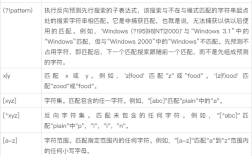
[abc]matches any single charactera,b, orc.[^abc]matches any single character that is nota,b, orc.
String data = "a,b,c,d,e,f";
// Replace any character that is NOT a comma with an empty string
// This will leave only the commas.
String result = data.replaceAll("[^,]", "");
System.out.println(result);
// Output: ,,,,
Advanced: Using Back-References in the Replacement
This is where replaceAll() truly shines. You can refer to groups captured by parentheses in your regex.
$1refers to the first group.$2refers to the second group.$0refers to the entire matched text.
Example: Swapping Words
Let's say we want to swap two words separated by a space.
String phrase = "John Doe";
// Regex: (\w+) (\w+)
//   - (\w+)  : Group 1, one or more word characters
//   -   " "  : A literal space
//   - (\w+)  : Group 2, one or more word characters
//
// Replacement: $2 $1
//   - $2     : Replace with the content of Group 2 ("Doe")
//   - " "    : A literal space
//   - $1     : Replace with the content of Group 1 ("John")
String result = phrase.replaceAll("(\\w+) (\\w+)", "$2 $1");
System.out.println(result);
// Output: Doe John
When to Use replaceAll()
- Use
replaceAll()when: Your search pattern is complex and requires regular expressions (e.g., "find all 3-digit numbers," "remove all punctuation," "replace multiple spaces with one"). - Use
replace()when: You are searching for a simple, literal string. It's slightly more efficient and avoids the complexity of regex if you don't need it.
Summary Table
| Method | Purpose | Key Characteristic |
|---|---|---|
replace() |
Replace literal substrings. | The first argument is treated as a plain string. |
replaceAll() |
Replace substrings matching a regular expression. | The first argument is a regex pattern. |
replaceFirst() |
Replace the first substring matching a regular expression. | Like replaceAll(), but stops after the first match. |