Of course! Let's break down what "python coding utf-8" means. It's a fundamental concept for writing robust, internationalized applications in Python.
Here's a complete guide, from the basics to best practices.
What is "UTF-8"?
UTF-8 (Unicode Transformation Format - 8-bit) is a character encoding standard. Think of it as a universal dictionary that maps every character from every language in the world (like A, B, 你, 我, , , ) to a unique number (a code point) and then to a sequence of bytes.
Why is it so important?
- Universality: It can represent any character in the Unicode standard, covering all living languages, symbols, and emojis.
- Backward Compatibility: It's an ASCII superset. The first 128 characters in UTF-8 are identical to ASCII. This means text files that are only in English will look exactly the same in both encodings.
- Efficiency: For ASCII characters, it uses only one byte per character. For characters with larger code points (like Chinese or emojis), it uses more bytes (2, 3, or 4 bytes), making it very space-efficient for Western text.
The # -*- coding: utf-8 -*- Shebang Line
This is the line you're asking about.
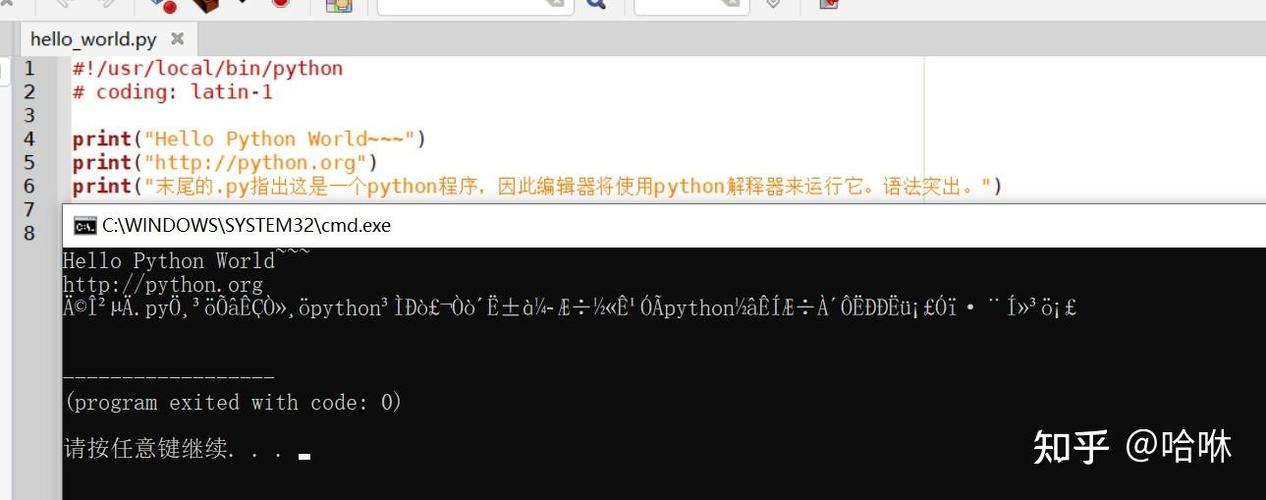
# -*- coding: utf-8 -*-
What does it do?
This line is a declaration at the very top of your Python script. It tells the Python interpreter, "Please, read the source code of this file using the UTF-8 character encoding."
Where does it go?
It must be one of the first two lines in your file, and it cannot come after any other code or even a blank line. It's often placed in a "shebang" line for Unix-like systems.
Example 1: Simple declaration
# -*- coding: utf-8 -*-
print("Hello, world!")
print("你好,世界!") # This is Chinese for "Hello, world!"
print("This costs €10.") # This is the Euro symbol
Example 2: Combined with a shebang for Unix/Linux/macOS
#!/usr/bin/env python3
# -*- coding: utf-8 -*-
print("This file can be executed directly on Unix-like systems.")
print("Привет, мир!") # This is Russian for "Hello, world!"
Is it always necessary?
In Python 3, for most cases, NO.
This is a crucial point that often confuses developers.
-
Python 3 Default: Starting with Python 3, the default source code encoding is UTF-8. This means that if you write a script without the
# -*- coding: utf-8 -*-line, Python 3 will assume your file is UTF-8 encoded anyway. -
When you still need it: You only need to explicitly add this line if:
- You are using an encoding other than UTF-8 for your source file (e.g., Latin-1, GBK).
- You are on a system where the default encoding is not UTF-8 (this is rare on modern systems).
- Your code contains non-ASCII characters and you want to be absolutely explicit and ensure compatibility across all Python 3 environments.
Best Practice for Python 3: While not strictly required for UTF-8 files, adding # -*- coding: utf-8 -*- is still considered good practice by many because it makes your intention explicit and self-documenting. It prevents any ambiguity.
The Real World: Handling Input and Output
The # -*- coding: utf-8 -*- line only tells Python how to read your .py file. It doesn't handle text coming from other sources, like user input, reading from a file, or making a network request. For that, you need to be mindful of encodings at all stages.
The Golden Rule of Python 3 Text Handling
In Python 3, there are two main types for representing text:
str: A sequence of Unicode characters. This is for in-memory text processing. It has no encoding.bytes: A sequence of raw bytes. This is what you get from the network or disk. It has an encoding.
You must encode a str to bytes before sending it out (writing to a file, sending over a network), and you must decode bytes to a str after receiving it (reading from a file, receiving from a network).
Key Functions: .encode() and .decode()
my_string.encode('utf-8'): Converts astrobject into abytesobject using the specified encoding.my_bytes_object.decode('utf-8'): Converts abytesobject into astrobject.
Practical Examples
Example 1: Reading and Writing Files
Let's create a file with non-ASCII characters and then read it back.
# -*- coding: utf-8 -*-
# --- WRITING TO A FILE ---
# Use a 'with' block for safe file handling.
# The 'w' mode means write.
# The 'encoding="utf-8"' argument is the most important part!
# It tells Python to encode the str content into UTF-8 bytes before writing.
text_to_write = "This is English.\n这是中文,\nThis is Español.\nThis is an emoji: 😂"
try:
    with open("my_file.txt", "w", encoding="utf-8") as f:
        f.write(text_to_write)
    print("File 'my_file.txt' written successfully.")
except Exception as e:
    print(f"An error occurred: {e}")
# --- READING FROM A FILE ---
# The 'r' mode means read.
# Again, specify 'encoding="utf-8"' to tell Python to decode the bytes
# from the file into a str object as it reads.
print("\n--- Reading file content ---")
try:
    with open("my_file.txt", "r", encoding="utf-8") as f:
        content = f.read()
        print(content)
        print(f"Type of content: {type(content)}") # This will be <class 'str'>
except Exception as e:
    print(f"An error occurred: {e}")
# --- DEMONSTRATING WHAT HAPPENS WITHOUT ENCODING ---
# This will likely cause an error or show 'mojibake' (garbled text)
# if the system's default encoding is not UTF-8.
print("\n--- Attempting to read without encoding (risky) ---")
try:
    with open("my_file.txt", "r") as f: # No encoding specified!
        content_no_encoding = f.read()
        print(content_no_encoding)
except UnicodeDecodeError as e:
    print(f"Failed as expected: {e}")
Example 2: Handling User Input
When you get input from the user, it's already a str object, because Python 3 handles the decoding for you using the system's standard encoding (which is usually UTF-8).
# -*- coding: utf-8 -*-
# User input is already a 'str' in Python 3
user_name = input("Please enter your name: ")
user_city = input("Please enter your city: ")
# You can process it directly
message = f"Hello, {user_name} from {user_city}!"
# When you want to send this data somewhere (e.g., save to a database,
# send in an HTTP request), you encode it.
message_bytes = message.encode('utf-8')
print(f"\nOriginal message (str): {message}")
print(f"Encoded message (bytes): {message_bytes}")
print(f"Type of original message: {type(message)}")
print(f"Type of encoded message: {type(message_bytes)}")
Summary and Best Practices
-
For Python 3 Source Code:
- Save your
.pyfiles using UTF-8 in your code editor. - Adding
# -*- coding: utf-8 -*-to the top is good practice for clarity, even though it's the default.
- Save your
-
For File I/O:
- Always specify
encoding="utf-8"when opening files withopen().open("file.txt", "r", encoding="utf-8")for reading.open("file.txt", "w", encoding="utf-8")for writing.
- This is the most common place where encoding errors occur.
- Always specify
-
For Network I/O:
- When sending data (e.g., with the
requestslibrary), ensure you are sendingbytesor that the library handles encoding for you. Most modern libraries default to UTF-8. - When receiving data, decode the response body from
bytestostrusing.decode('utf-8')or specify the encoding if it's different.
- When sending data (e.g., with the
-
The Golden Rule: Keep
strandbytesseparate. Usestrfor all your internal text processing and only convert tobytesat the very edge of your application (when I/O is necessary).