Of course! It looks like you're starting to learn about creating (or "instantiating") String objects in Java.
Let's break down the correct syntax and the different ways to do it.
The Correct Syntax
The general syntax to create a new object in Java is:
ClassName objectName = new Constructor();
For a String, this looks like:
String myString = new String("Hello, World!");
Let's break that down:

String: This is the class name.Stringis a special class in Java used to represent a sequence of characters.myString: This is the variable name (or reference). It's a name you give to hold the String object.new: This is a Java keyword that tells the JVM (Java Virtual Machine) to create a new instance (a new object) of the class.String("Hello, World!"): This is the constructor. It's a special method that's called when you create an object. TheStringclass has several constructors, and this one takes a piece of text (aString literal) as an argument to initialize the new object with that content.
The Two Main Ways to Create a String
While the new keyword works, there's a much more common and often better way to create strings in Java.
Method 1: Using the new Keyword (The Object-Oriented Way)
This explicitly creates a new String object in memory.
// Explicitly creating a new String object
String str1 = new String("Hello");
// Another object is created, even with the same content
String str2 = new String("Hello");
// Are they the same object? (Are they referencing the same memory location?)
// The answer is NO.
System.out.println(str1 == str2); // Output: false
// Do they have the same value?
// The answer is YES.
System.out.println(str1.equals(str2)); // Output: true
Key Point: Using new almost always guarantees a new object is created in memory, even if the content is identical to another string.
Method 2: Using String Literals (The Common & Efficient Way)
This is the most frequent way you'll see strings created in Java.

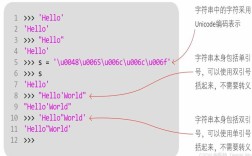
// Using a string literal
String str3 = "Hello";
String str4 = "Hello";
// Are they the same object? (Are they referencing the same memory location?)
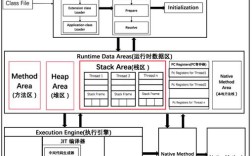
// In most cases, YES. Java optimizes this by storing literals in a special area of memory called the "String Pool".
System.out.println(str3 == str4); // Output: true
// Do they have the same value?
// The answer is YES.
System.out.println(str3.equals(str4)); // Output: true
Key Point: When you create a string using a literal (), Java first checks the "String Pool" for an existing string with the same content. If found, it reuses that object instead of creating a new one. This saves memory and is faster.
The Most Important Distinction: vs .equals()
This is a fundamental concept in Java and a very common point of confusion for beginners.
- (Equality Operator): Checks if two variables refer to the exact same object in memory (i.e., they point to the same memory address).
.equals()(Method): Checks if the content of two objects is the same. ForString, it compares the sequence of characters.
Here’s a summary table:
| Code | Result | .equals() Result |
Why? |
|---|---|---|---|
String s1 = new String("hi");String s2 = new String("hi"); |
false |
true |
s1 and s2 are two different objects in memory ( is false), but they contain the same characters (.equals() is true). |
String s3 = "hi";String s4 = "hi"; |
true |
true |
Java reuses the same object from the String Pool for both literals ( is true), and the content is the same (.equals() is true). |
String s5 = "hi";String s6 = new String("hi"); |
false |
true |
s5 is from the pool, s6 is a new object in the main heap. They are different objects ( is false), but have the same content (.equals() is true). |
Best Practices
- Use String Literals () by default. It's more readable, more efficient, and is the standard convention in Java.
- Use
new String(...)only when you specifically need a new, separate object. This is rare but can be useful in certain scenarios, like when you want to ensure you have a copy that is independent of any other string references. - Always use
.equals()to compare the content of two strings. Using for string content comparison is a very common bug.
A Quick Note on Immutability
It's also important to know that String objects are immutable. This means once a String object is created, its value cannot be changed.
String myName = "Alice";
myName = "Bob"; // This does NOT change the "Alice" object.
// Instead, it creates a new "Bob" object and makes myName point to it.
// The original "Alice" object still exists in memory until it's no longer referenced.