Of course! Scikit-learn (often abbreviated as sklearn) is the most popular and widely used machine learning library in Python. It's built on top of NumPy, SciPy, and matplotlib, providing a clean, consistent, and efficient interface for a vast range of machine learning algorithms.
Here’s a comprehensive guide to getting started with scikit-learn, broken down into key concepts, a step-by-step workflow, and code examples.
What is Scikit-learn?
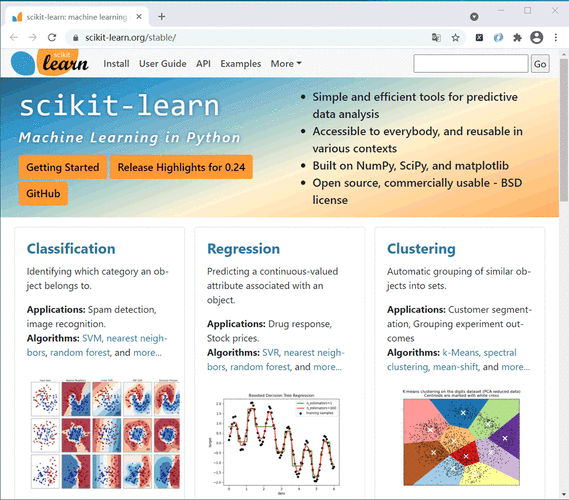
Scikit-learn is an open-source, BSD-licensed library that provides simple and efficient tools for data mining and data analysis. Its main strengths are:
- Simple and Consistent API: All its estimators (the models) follow the same interface:
.fit(),.predict(), and.transform(). This makes it incredibly easy to swap algorithms. - Comprehensive: It covers almost all standard machine learning tasks:
- Classification: Identifying which category an item belongs to (e.g., spam/not spam).
- Regression: Predicting a continuous value (e.g., house price, temperature).
- Clustering: Grouping similar items together (e.g., customer segmentation).
- Dimensionality Reduction: Reducing the number of features while preserving information.
- Model Selection: Tools for evaluating and choosing the best model (e.g., cross-validation, grid search).
- Preprocessing: Tools for preparing data for modeling (e.g., scaling, encoding).
- Well-Integrated: It works seamlessly with other data science libraries like Pandas, NumPy, and Matplotlib.
Core Concepts in Scikit-learn
To use scikit-learn effectively, you need to understand a few key terms:
- Estimator: Any object that learns from data. In practice, this is your model (e.g.,
LinearRegression,RandomForestClassifier). An estimator implements thefit()and, if applicable,predict()methods. - Features (
X): The input variables or predictors used to make a prediction. In a Pandas DataFrame, these are typically the columns you use to predict the target. They are usually represented as a 2D array or DataFrame. - Target (
y): The output variable or the value you want to predict. It's what you're trying to model. It's usually represented as a 1D array or Series. .fit(X, y): The "training" step. The estimator learns the relationship between the features (X) and the target (y)..predict(X): The "prediction" step. The fitted estimator uses what it learned to make predictions on new, unseen data (X)..transform(X): Used for preprocessing steps (like scaling or encoding) that convert data into a format suitable for a model. It returns the transformed data without learning any parameters from the target (y).
The Standard Machine Learning Workflow with Scikit-learn
This is the typical pipeline for any supervised learning project in scikit-learn.
Step 0: Installation
If you don't have it installed, open your terminal or command prompt and run:
pip install scikit-learn
It's highly recommended to install it alongside other key libraries:
pip install numpy pandas matplotlib seaborn
Step 1: Import Libraries and Load Data
We'll use the famous Iris dataset, which is conveniently built into scikit-learn. We'll also use Pandas for easier data manipulation.
import pandas as pd
import numpy as np
from sklearn.datasets import load_iris
# Load the dataset
iris = load_iris()
# Create a Pandas DataFrame for easier inspection
# X contains the features (sepal length, sepal width, petal length, petal width)
# y contains the target (species of iris)
df = pd.DataFrame(data=iris.data, columns=iris.feature_names)
df['target'] = iris.target
print("First 5 rows of the dataset:")
print(df.head())
print("\nTarget names:", iris.target_names)
Step 2: Split Data into Training and Testing Sets
This is a crucial step. We train the model on the training set and evaluate its performance on the testing set, which it has never seen before. This helps us check for overfitting.
from sklearn.model_selection import train_test_split
# Define features (X) and target (y)
X = iris.data
y = iris.target
# Split the data: 80% for training, 20% for testing
# random_state ensures that the splits are the same every time you run the code
X_train, X_test, y_train, y_test = train_test_split(X, y, test_size=0.2, random_state=42)
print(f"X_train shape: {X_train.shape}")
print(f"X_test shape: {X_test.shape}")
Step 3: Choose and Train a Model (The fit step)
Let's start with a simple and powerful classifier: K-Nearest Neighbors (KNN).
from sklearn.neighbors import KNeighborsClassifier
# 1. Instantiate the model
# n_neighbors is a "hyperparameter" that you can tune
knn = KNeighborsClassifier(n_neighbors=3)
# 2. Train the model on the training data
knn.fit(X_train, y_train)
print("\nModel has been trained successfully!")
Step 4: Make Predictions (The predict step)
Now we use our trained model to predict the species for the test set.
# Make predictions on the test data
predictions = knn.predict(X_test)
print("\nPredictions on the test set:")
print(predictions)
Step 5: Evaluate the Model's Performance
How good are our predictions? We compare them to the actual true labels (y_test).
from sklearn.metrics import accuracy_score, classification_report, confusion_matrix
# Calculate accuracy
accuracy = accuracy_score(y_test, predictions)
print(f"\nAccuracy: {accuracy:.2f}")
# Display a detailed classification report
print("\nClassification Report:")
print(classification_report(y_test, predictions, target_names=iris.target_names))
# Display the confusion matrix
print("\nConfusion Matrix:")
print(confusion_matrix(y_test, predictions))
A Complete, Runnable Example (Classification)
Here is the full code from the workflow above, all in one block.
# 1. IMPORT LIBRARIES AND LOAD DATA
import pandas as pd
from sklearn.datasets import load_iris
from sklearn.model_selection import train_test_split
from sklearn.neighbors import KNeighborsClassifier
from sklearn.metrics import accuracy_score, classification_report
# Load the Iris dataset
iris = load_iris()
X = iris.data
y = iris.target
# 2. SPLIT DATA
X_train, X_test, y_train, y_test = train_test_split(X, y, test_size=0.2, random_state=42)
# 3. CHOOSE AND TRAIN MODEL
# Instantiate the K-Nearest Neighbors classifier
knn = KNeighborsClassifier(n_neighbors=3)
# Train the model using the training data
knn.fit(X_train, y_train)
print("Model training complete.")
# 4. MAKE PREDICTIONS
# Use the trained model to make predictions on the test set
y_pred = knn.predict(X_test)
# 5. EVALUATE PERFORMANCE
# Calculate the accuracy of the model
accuracy = accuracy_score(y_test, y_pred)
print(f"\nModel Accuracy: {accuracy * 100:.2f}%")
# Display a more detailed report
print("\nClassification Report:")
print(classification_report(y_test, y_pred, target_names=iris.target_names))
# To see the actual predictions vs. true values
print("\n--- Sample Predictions ---")
for i in range(len(y_test)):
    print(f"Actual: {iris.target_names[y_test[i]]}, Predicted: {iris.target_names[y_pred[i]]}")
Preprocessing: A Critical Step
Real-world data is messy. Scikit-learn provides excellent tools for preprocessing. A common task is feature scaling, where you standardize the range of your features.
Let's see how to use a Pipeline to chain preprocessing and modeling together. This is a best practice.
from sklearn.preprocessing import StandardScaler
from sklearn.pipeline import Pipeline
# Create a pipeline that first scales the data and then applies the KNN model
# This prevents data leakage from the test set into the training process
pipeline = Pipeline([
    ('scaler', StandardScaler()),  # Step 1: Scale features
    ('knn', KNeighborsClassifier(n_neighbors=3)) # Step 2: Apply model
])
# Now you can fit the entire pipeline on the training data
pipeline.fit(X_train, y_train)
# And predict using the entire pipeline
y_pred_pipeline = pipeline.predict(X_test)
# Evaluate the pipeline's performance
accuracy_pipeline = accuracy_score(y_test, y_pred_pipeline)
print(f"\nPipeline Model Accuracy: {accuracy_pipeline * 100:.2f}%")
Other Key Scikit-learn Modules
sklearn.linear_model: For linear and logistic regression.sklearn.ensemble: For powerful ensemble methods likeRandomForestClassifierandGradientBoostingRegressor.sklearn.svm: For Support Vector Machines.sklearn.cluster: For clustering algorithms likeKMeans.sklearn.decomposition: For dimensionality reduction likePCA.sklearn.model_selection: Fortrain_test_split,GridSearchCV(for hyperparameter tuning), andcross_val_score.sklearn.metrics: For all evaluation metrics (accuracy, precision, recall, F1-score, etc.).
Resources for Learning
- Official Documentation: The best resource. It's comprehensive and has excellent examples: scikit-learn.org
- Scikit-learn Tutorials: Official tutorials that walk you through different concepts: Tutorials
- An Introduction to Statistical Learning (ISLR): A fantastic free book with R examples, but the concepts are universal and the companion Python labs use scikit-learn. ISLR Python Labs
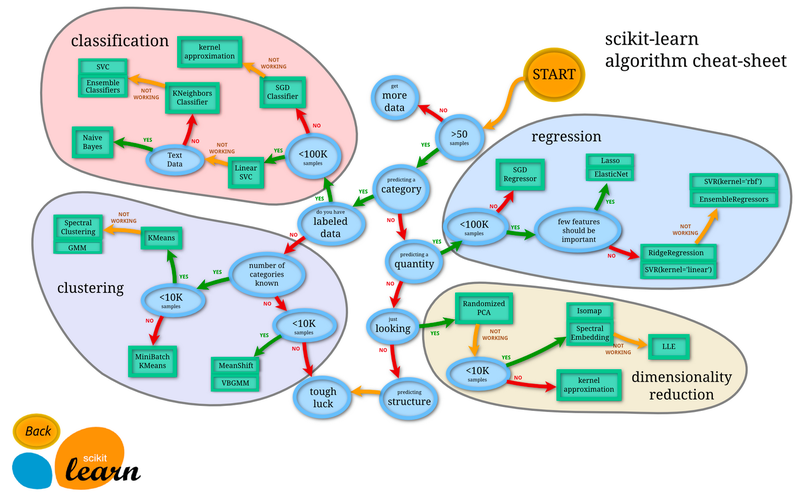
- Scikit-learn Cheat Sheet: A quick reference for choosing the right algorithm: Scikit-learn Algorithm Cheat Sheet