Of course! This is a very common task. Connecting to a MySQL database from a Python script on Linux is a fundamental skill for many developers and system administrators.
Here’s a comprehensive guide covering everything from installation to best practices, including a crucial section on the modern replacement for MySQLdb.
The Big Picture: Choosing the Right Library
There are two main libraries you'll encounter:
-
mysqlclient(The RecommendedMySQLdbfor Modern Python):- What it is: This is a fork of the original
MySQLdblibrary. The originalMySQLdbis outdated and difficult to install on modern systems because it requires compiling C code against the MySQL C client library. - Why use it?
mysqlclientis a drop-in replacement forMySQLdb. It's actively maintained and much easier to install, especially on systems with package managers likeaptoryum. - Conclusion: For all new projects, use
mysqlclient. When people say "install MySQLdb on Linux," they almost always meanmysqlclient.
- What it is: This is a fork of the original
-
mysql-connector-python(Oracle's Official Driver): (图片来源网络,侵删)
- What it is: This is the pure Python driver provided by Oracle, the company behind MySQL.
- Why use it? It's pure Python, so no compilation is needed. It's very easy to install with
pip(pip install mysql-connector-python). It's an excellent, robust choice. - Conclusion: A great alternative, especially if you want to avoid system-level dependencies.
Step-by-Step Guide using mysqlclient (Recommended)
This is the most common and robust method for Linux systems.
Step 1: Install System Dependencies (Crucial!)
Before you can install the Python library, you need the C development libraries and headers that it depends on. Open your terminal and run the command for your specific Linux distribution.
For Debian/Ubuntu/Mint:
sudo apt-get update
sudo apt-get install python3-dev default-libmysqlclient-dev build-essential
python3-dev: Headers for compiling Python extensions.default-libmysqlclient-dev: The MySQL client library (libmysqlclient).build-essential: Containsgcc,make, and other essential build tools.
For RHEL/CentOS/Fedora:
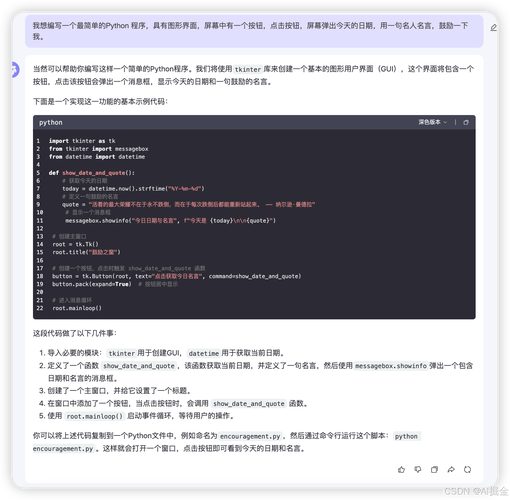
sudo yum install python3-devel mysql-devel gcc
python3-devel: Headers for Python 3.mysql-devel: The MySQL client library and headers.gcc: The GNU C Compiler.
For Arch Linux:
sudo pacman -S python mysql-libs
Step 2: Install the Python Library with pip
Now that the system dependencies are in place, you can easily install the Python library.
# It's best practice to use a virtual environment
python3 -m venv myproject_env
source myproject_env/bin/activate
# Install the library
pip install mysqlclient
Step 3: Write the Python Script
Create a Python file (e.g., db_connect.py) and use the following code. Remember to replace the placeholder values with your actual database credentials.
import MySQLdb
# --- Database Connection Details ---
# Replace with your actual database credentials
DB_HOST = 'localhost'
DB_USER = 'your_username'
DB_PASSWORD = 'your_password'
DB_NAME = 'your_database_name'
try:
    # Establish a connection to the database
    print("Connecting to the database...")
    conn = MySQLdb.connect(
        host=DB_HOST,
        user=DB_USER,
        passwd=DB_PASSWORD,
        db=DB_NAME
    )
    # Create a cursor object to execute queries
    cursor = conn.cursor()
    # --- Example 1: Execute a simple SELECT query ---
    print("Executing a simple SELECT query...")
    cursor.execute("SELECT VERSION()")
    # Fetch one result
    version = cursor.fetchone()
    print(f"Database version: {version[0]}")
    # --- Example 2: Execute a query with parameters (Prevents SQL Injection!) ---
    print("\nExecuting a query with a parameter...")
    # IMPORTANT: Use the %s placeholder. Never use f-strings or % formatting for user input.
    table_name = 'users'
    cursor.execute(f"SELECT * FROM {table_name} LIMIT 5") # This is okay for table names, but not for values
    # For values, always use %s
    user_id_to_find = 1
    cursor.execute("SELECT name, email FROM users WHERE id = %s", (user_id_to_find,))
    # Fetch all the results
    results = cursor.fetchall()
    print(f"Found user with ID {user_id_to_find}:")
    for row in results:
        print(f"  Name: {row[0]}, Email: {row[1]}")
except MySQLdb.Error as e:
    # Handle potential errors
    print(f"Error connecting to MySQL or executing query: {e}")
finally:
    # Ensure the connection is closed
    if 'conn' in locals() and conn.open:
        print("\nClosing the database connection.")
        cursor.close()
        conn.close()
Step 4: Run the Script
Execute the script from your terminal:
python3 db_connect.py
If everything is configured correctly, you should see the output from your script.
Best Practices
a) Using Environment Variables for Credentials
Never hardcode passwords in your scripts! Use environment variables to keep your credentials secure.
-
Set the variable in your terminal:
export DB_PASSWORD="your_super_secret_password"
-
Modify your Python script to read it:
import os
import MySQLdb
DB_HOST = 'localhost'
DB_USER = 'your_username'
DB_PASSWORD = os.getenv('DB_PASSWORD') # Get password from environment variable
DB_NAME = 'your_database_name'
if DB_PASSWORD is None:
    print("Error: DB_PASSWORD environment variable not set.")
    exit(1)
# ... rest of your connection code ...
b) Using a try...finally Block
As shown in the example, always use a try...finally block. This guarantees that your database connection (conn.close()) is closed, even if an error occurs during execution. This prevents "too many connections" errors on your database server.
c) Preventing SQL Injection
This is the most important security concept in database programming. NEVER use Python's string formatting (f-strings or ) to insert values directly into a query.
Vulnerable Code (DO NOT DO THIS):
user_input = "admin'; DROP TABLE users; --"
query = f"SELECT * FROM users WHERE name = '{user_input}'"
# This could delete your entire users table!
Secure Code (ALWAYS DO THIS):
Use the %s placeholder in your query and pass the values as a tuple to the execute() method. The mysqlclient library will safely escape the values for you.
user_input = "admin'; DROP TABLE users; --"
# The query uses a placeholder
query = "SELECT * FROM users WHERE name = %s"
# The value is passed separately as a tuple
cursor.execute(query, (user_input,))
The Modern Alternative: mysql-connector-python
If you prefer a pure Python solution that avoids system dependencies, this is an excellent choice.
Installation
# No need for system dependencies like libmysqlclient-dev
pip install mysql-connector-python
Example Script
The API is slightly different but very similar.
import mysql.connector
from mysql.connector import Error
# --- Database Connection Details ---
DB_HOST = 'localhost'
DB_USER = 'your_username'
DB_PASSWORD = os.getenv('DB_PASSWORD') # Use environment variables!
DB_NAME = 'your_database_name'
try:
    print("Connecting to the database...")
    conn = mysql.connector.connect(
        host=DB_HOST,
        user=DB_USER,
        password=DB_PASSWORD,
        database=DB_NAME
    )
    if conn.is_connected():
        cursor = conn.cursor(dictionary=True) # dictionary=True gives you rows as dicts
        cursor.execute("SELECT * FROM users LIMIT 5")
        # Fetch all results
        results = cursor.fetchall()
        print("Users in the database:")
        for row in results:
            print(f"  ID: {row['id']}, Name: {row['name']}, Email: {row['email']}")
except Error as e:
    print(f"Error while connecting to MySQL: {e}")
finally:
    if conn.is_connected():
        cursor.close()
        conn.close()
        print("MySQL connection is closed.")
Summary
| Feature | mysqlclient (Recommended) |
mysql-connector-python (Official) |
|---|---|---|
| Type | C extension (requires compilation) | Pure Python |
| Installation | pip install mysqlclient (requires system deps) |
pip install mysql-connector-python (no system deps) |
| Performance | Faster due to C implementation | Slower, but usually negligible for most apps |
| Ease of Install | Moderate (requires apt-get/yum first) |
Very Easy |
| API | Classic DB-API 2.0 | Modern DB-API 2.0 with extra features |
| Best For | Performance-critical applications, existing MySQLdb code |
Quick scripts, avoiding system dependencies, beginners |
For most Linux users, starting with mysqlclient is the recommended path as it provides the best performance and is a direct, modern replacement for the old MySQLdb.