
Of course! The urllib.parse module in Python is a powerful and essential part of the standard library for handling URLs. It's used for breaking down (parsing), building up, and manipulating URLs.
Here’s a comprehensive guide covering its main functions with clear examples.
What is urllib.parse?
It's a module that provides functions to:
- Parse a URL string into its component parts (scheme, netloc, path, etc.).
- Unparse those components back into a URL string.
- Encode and decode special characters in URLs to make them safe for web requests.
- Parse query strings (the
?key=value&...part) into dictionaries.
Parsing a URL: urlparse()
This is the most common function. It takes a URL string and breaks it down into a named tuple called ParseResult.
The components are: (scheme, netloc, path, params, query, fragment)
scheme: The protocol (e.g.,http,https,ftp).netloc: The network location (e.g.,www.example.com:8080). This includes the domain and optionally the port.path: The hierarchical path on the server (e.g.,/articles/python/).params: Parameters for the last path element (rarely used). Note: This is different from the query string.query: The query string, which comes after the (e.g.,id=123&page=2).fragment: The identifier that comes after the , used to navigate to a specific part of a page (e.g.,section1).
Example: urlparse()
from urllib.parse import urlparse
url = "https://www.example.com:8080/path/to/page;params?query_id=value1&sort=asc#section1"
parsed_url = urlparse(url)
print(f"Original URL: {url}\n")
print(f"Scheme:    {parsed_url.scheme}")
print(f"Netloc:    {parsed_url.netloc}")
print(f"Path:      {parsed_url.path}")
print(f"Params:    {parsed_url.params}") # Note the semicolon
print(f"Query:     {parsed_url.query}")
print(f"Fragment:  {parsed_url.fragment}")
# You can also access components by index like a tuple
print(f"\nDomain (from netloc): {parsed_url.netloc.split(':')[0]}")
Output:
Original URL: https://www.example.com:8080/path/to/page;params?query_id=value1&sort=asc#section1
Scheme:    https
Netloc:    www.example.com:8080
Path:      /path/to/page
Params:    params
Query:     query_id=value1&sort=asc
Fragment:  section1
Domain (from netloc): www.example.com
Unparsing a URL: urlunparse()
This function does the reverse of urlparse(). It takes a ParseResult tuple (or a sequence of 6 elements) and reconstructs a URL string.
Example: urlunparse()
from urllib.parse import urlunparse
# Create a ParseResult object
# (scheme, netloc, path, params, query, fragment)
parsed_components = (
    'https',
    'www.example.com',
    '/search',
    '',      # params (empty)
    'q=python&source=lnms', # query
    'top'    # fragment
)
# Reconstruct the URL
reconstructed_url = urlunparse(parsed_components)
print(reconstructed_url)
Output:
https://www.example.com/search?q=python&source=lnms#topParsing Query Strings: parse_qs() and parse_qsl()
The query part of a URL is often a series of key=value pairs. These two functions help you parse them.
parse_qs(query_string): Parses the query into a dictionary of lists. Each key maps to a list of values because a key can appear multiple times (e.g.,?q=python&q=django).parse_qsl(query_string): Parses the query into a list of (key, value) tuples. This is useful if you need to preserve the order of parameters.
Example: parse_qs() and parse_qsl()
from urllib.parse import parse_qs, parse_qsl
query_string = "name=John+Doe&age=30&name=Jane+Doe&city=New+York"
# parse_qs: Returns a dictionary of lists
query_dict = parse_qs(query_string)
print("--- parse_qs (Dictionary of Lists) ---")
print(query_dict)
print(f"Name values: {query_dict['name']}") # Access values by key
print(f"Age value: {query_dict['age'][0]}") # Note the [0] for single-value items
print("\n" + "="*40 + "\n")
# parse_qsl: Returns a list of tuples
query_list = parse_qsl(query_string)
print("--- parse_qsl (List of Tuples) ---")
print(query_list)
# To get the first name, you can access the tuple
print(f"First name in list: {query_list[0][1]}")
Output:
--- parse_qs (Dictionary of Lists) ---
{'name': ['John Doe', 'Jane Doe'], 'age': ['30'], 'city': ['New York']}
Name values: ['John Doe', 'Jane Doe']
Age value: 30
========================================
--- parse_qsl (List of Tuples) ---
[('name', 'John Doe'), ('age', '30'), ('name', 'Jane Doe'), ('city', 'New York')]
First name in list: John Doe
Building Query Strings: urlencode()
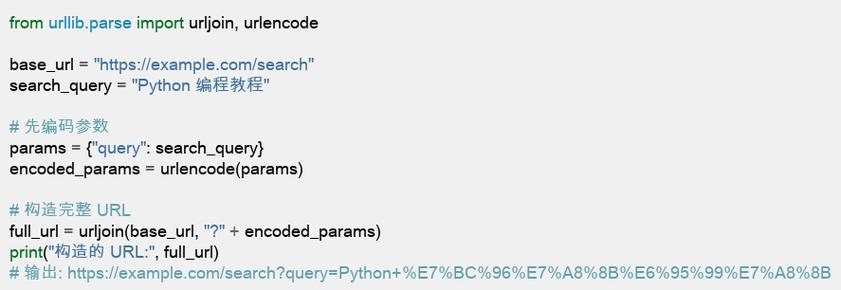
This is the perfect counterpart to parse_qs and parse_qsl. It takes a dictionary (or a list of tuples) and turns it into a properly formatted query string.
Example: urlencode()
from urllib.parse import urlencode
# Using a dictionary of lists (output from parse_qs)
data_dict = {
    'q': ['python', 'tutorial'],
    'source': ['web'],
    'tbs': 'qdr:y'  # qdr:y means search from the past year
}
query_string_from_dict = urlencode(data_dict)
print("--- urlencode from Dictionary ---")
print(query_string_from_dict)
# Output: q=python&q=tutorial&source=web&tbs=qdr:y
print("\n" + "="*40 + "\n")
# Using a list of tuples
data_list = [('user_id', '123'), ('action', 'delete'), ('confirm', 'true')]
query_string_from_list = urlencode(data_list)
print("--- urlencode from List of Tuples ---")
print(query_string_from_list)
# Output: user_id=123&action=delete&confirm=true
URL Encoding and Decoding: quote() and unquote()
URLs can only contain a limited set of characters. Special characters (like spaces, &, , ) must be encoded. For example, a space becomes %20 or .
quote(string, safe=''): Encodes a string for a URL component. Thesafeparameter specifies characters that should not be encoded (e.g., for a path).unquote(string): Decodes a URL-encoded string back to its original form.
Example: quote() and unquote()
from urllib.parse import quote, unquote
# A string with spaces and special characters
search_term = "python & web scraping / tutorial"
# Encode the string for use in a URL path
encoded_path = quote(search_term, safe='')
print(f"Original:  {search_term}")
print(f"Encoded:   {encoded_path}")
# Output: Encoded:   python%20%26%20web%20scraping%20%2F%20tutorial
print("\n" + "="*40 + "\n")
# Encode for a query parameter (often spaces become '+')
encoded_query = quote(search_term, safe='=&?')
print(f"Encoded for query: {encoded_query}")
# Output: Encoded for query: python+%26+web+scraping+%2F+tutorial
print("\n" + "="*40 + "\n")
# Decode the string back
decoded_string = unquote(encoded_path)
print(f"Decoded:   {decoded_string}")
# Output: Decoded:   python & web scraping / tutorial
Practical Workflow Example
Let's combine these functions to build a complete, valid URL from user input.
from urllib.parse import urlparse, urlunparse, quote
def build_search_url(base_url, search_term, page_num=1):
    """
    Builds a search URL from a base, a search term, and a page number.
    """
    # 1. Parse the base URL to get its components
    parsed_base = urlparse(base_url)
    # 2. URL-encode the search term to make it safe
    # We keep '/' and '&' safe because they might be in the search term
    encoded_term = quote(search_term, safe='=&/')
    # 3. Build the new path and query string
    new_path = "/search"
    new_query = f"q={encoded_term}&page={page_num}"
    # 4. Unparse the components back into a full URL
    # We keep the original scheme and netloc from the base URL
    final_url = urlunparse((
        parsed_base.scheme,
        parsed_base.netloc,
        new_path,
        '', # params
        new_query,
        ''  # fragment
    ))
    return final_url
# --- Usage ---
base = "https://www.google.com"
user_search = "python urllib tutorial"
final_link = build_search_url(base, user_search, 3)
print(f"Final URL: {final_link}")
Output:
Final URL: https://www.google.com/search?q=python+urllib+tutorial&page=3Summary Table
| Function | Purpose | Example Input | Example Output |
|---|---|---|---|
urlparse() |
Breaks a URL into components. | "https://ex.com/path?q=1#frag" |
ParseResult(scheme='https', ...) |
urlunparse() |
Rebuilds a URL from components. | ('https', 'ex.com', '/path', ...) |
"https://ex.com/path?q=1#frag" |
parse_qs() |
Parses query string into a dict of lists. | "q=python&q=django" |
{'q': ['python', 'django']} |
parse_qsl() |
Parses query string into a list of tuples. | "q=python&q=django" |
[('q', 'python'), ('q', 'django')] |
urlencode() |
Builds a query string from a dict/list. | {'q': 'python'} |
"q=python" |
quote() |
Encodes a string for a URL. | "python & stuff" |
"python%20%26%20stuff" |
unquote() |
Decodes a URL-encoded string. | "python%20%26%20stuff" |
"python & stuff" |











