
Of course! Converting a byte to a long in Java is a common task, but it's important to understand the nuances, especially regarding sign extension.
Here’s a complete guide covering the different scenarios and methods.
The Core Concept: Sign Extension
The most critical thing to understand is that Java's byte is a signed 8-bit data type, while long is a signed 64-bit data type.
When you assign a byte to a long, Java needs to fill the new 56 empty bits in the long. If the most significant bit (the 8th bit) of the byte is 1, it means the number is negative. To preserve its negative value in the larger long type, Java performs sign extension: it fills all the new bits with 1s.
If the most significant bit of the byte is 0 (meaning the number is positive), it fills the new bits with 0s.
Let's see an example:
-
byte b = 5;- Binary (8-bit):
0000 0101 - When promoted to
long, it becomes0000 0000 0000 0000 0000 0000 0000 0000 0000 0000 0000 0000 0000 0000 0000 0101 - Resulting
long:5
- Binary (8-bit):
-
byte b = -5;- First, find the 8-bit two's complement representation of -5.
- +5 in binary:
0000 0101 - Invert bits:
1111 1010 - Add 1:
1111 1011
- +5 in binary:
- Binary (8-bit):
1111 1011 - When promoted to
long, sign extension occurs. The most significant bit is1, so all new bits are filled with1s. - Resulting
long(64-bit):1111 1111 1111 1111 1111 1111 1111 1111 1111 1111 1111 1111 1111 1111 1111 1011 - This 64-bit pattern represents the number -5.
- First, find the 8-bit two's complement representation of -5.
Method 1: Simple Widening Primitive Conversion (Implicit Casting)
This is the most common and straightforward way. When you assign a byte to a long, Java automatically performs a widening primitive conversion.
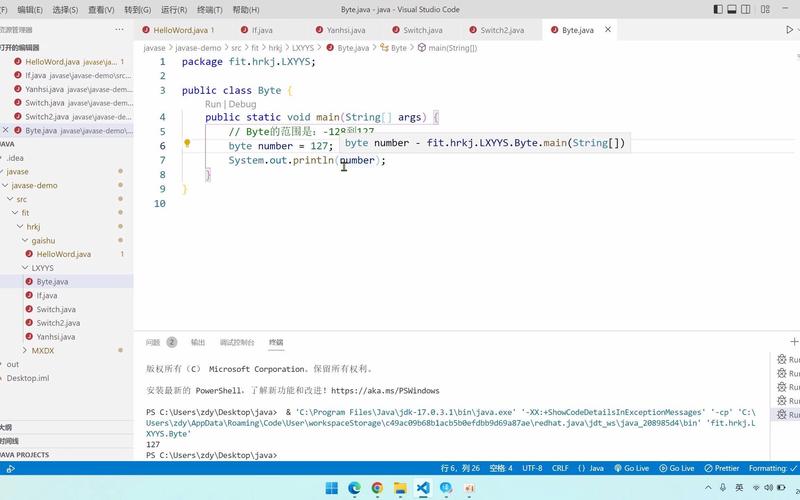
public class ByteToLong {
    public static void main(String[] args) {
        byte myByte = 100;
        long myLong = myByte; // Implicit casting
        System.out.println("Original byte value: " + myByte);
        System.out.println("Converted long value: " + myLong);
        System.out.println("Type of myLong: " + ((Object) myLong).getClass().getSimpleName());
        // Example with a negative byte
        byte negativeByte = -50;
        long negativeLong = negativeByte;
        System.out.println("\nOriginal negative byte: " + negativeByte);
        System.out.println("Converted negative long: " + negativeLong);
    }
}
Output:
Original byte value: 100
Converted long value: 100
Type of myLong: Long
Original negative byte: -50
Converted negative long: -50
As you can see, this works perfectly for both positive and negative numbers, correctly preserving the sign.
Method 2: Explicit Casting (The (long) cast)
While not necessary for a direct byte to long conversion (since it's a widening conversion), you can use an explicit cast. It's good practice for clarity or when dealing with expressions.
public class ByteToLongExplicit {
    public static void main(String[] args) {
        byte myByte = 75;
        long myLong = (long) myByte; // Explicit casting
        System.out.println("Original byte: " + myByte);
        System.out.println("Converted long: " + myLong);
    }
}
Output:
Original byte: 75
Converted long: 75
Method 3: Using the Long Wrapper Class
Sometimes you need an instance of the Long object rather than a primitive long. You can do this in two ways.
Constructor
The Long(byte) constructor correctly handles the sign extension.
public class ByteToLongObject {
    public static void main(String[] args) {
        byte myByte = -10;
        Long longObject = new Long(myByte); // Using the constructor
        System.out.println("Original byte: " + myByte);
        System.out.println("Long object value: " + longObject);
        System.out.println("Type: " + longObject.getClass().getSimpleName());
    }
}
Output:
Original byte: -10
Long object value: -10
Type: Long
Note: The
new Long(byte)constructor has been deprecated since Java 9 in favor ofvalueOf(). It's better to use the static factory method.
Long.valueOf()
This is the modern, preferred way to get a Long object from a primitive byte.
public class ByteToLongValueOf {
    public static void main(String[] args) {
        byte myByte = 120;
        Long longObject = Long.valueOf(myByte); // Preferred method
        System.out.println("Original byte: " + myByte);
        System.out.println("Long object value: " + longObject);
    }
}
Output:
Original byte: 120
Long object value: 120
Special Case: Unsigned Byte to long
What if you have a byte that you are treating as an unsigned value (i.e., a value from 0 to 255)? This is a very common scenario when reading data from a network or a file.
The simple casting methods will not work as you'd expect for values 128 to 255, because they will be interpreted as negative numbers.
// This is NOT what you want for unsigned bytes
byte unsignedByte = (byte) 200; // The literal 200 is cast to a byte, becoming -56
long wrongResult = unsignedByte; // Sign extension happens, result is -56
System.out.println("Byte value 200 as a byte is: " + unsignedByte); // Prints -56
System.out.println("Wrong conversion to long: " + wrongResult);      // Prints -56
To correctly convert an "unsigned byte" to a long, you must first widen it to an int (which also performs sign extension) and then mask out the higher bits to get the positive value.
public class UnsignedByteToLong {
    public static void main(String[] args) {
        // The value 200 in binary is 11001000. As a signed byte, this is -56.
        byte unsignedByte = (byte) 200;
        // The correct way to convert an unsigned byte to a long:
        // 1. Cast the byte to an int. This sign-extends to 32 bits.
        //    int temp = (int) unsignedByte; // temp becomes -56 (0xFFFFFFE8)
        // 2. Mask the int with 0xFF to get the last 8 bits as a positive number.
        long correctLong = ((int) unsignedByte) & 0xFFL;
        System.out.println("Original byte value: " + unsignedByte); // Prints -56
        System.out.println("Correct unsigned long value: " + correctLong); // Prints 200
        // Another example
        byte anotherByte = (byte) 255;
        long anotherLong = ((int) anotherByte) & 0xFFL;
        System.out.println("\nOriginal byte value: " + anotherByte); // Prints -1
        System.out.println("Correct unsigned long value: " + anotherLong); // Prints 255
    }
}
Why 0xFFL?
0xFFis anintliteral (..00000000000000000011111111in binary).& 0xFFmasks theintto get the last 8 bits.- Using
0xFFL(theLmakes it alongliteral) ensures the entire expression is evaluated as alongfrom the start, avoiding any potential issues withintoverflow in complex expressions.
Summary
| Your Goal | Method | Example Code | When to Use |
|---|---|---|---|
| Signed Byte to Long (value -128 to 127) | Implicit Casting | long l = myByte; |
The standard, most common case. |
| Signed Byte to Long (for clarity) | Explicit Casting | long l = (long) myByte; |
When you want to be explicit in your code. |
Get a Long Object |
Long.valueOf() |
Long l = Long.valueOf(myByte); |
When you need an object, e.g., for a collection that doesn't accept primitives. |
| Unsigned Byte to Long (value 0 to 255) | Cast to int then mask with 0xFF |
long l = ((int) myByte) & 0xFFL; |
When reading binary data where a byte represents a value from 0-255. |










