Of course! Here's a comprehensive guide to using Cuckoo Filters in Python, including what they are, why you'd use them, and how to implement them with popular libraries.
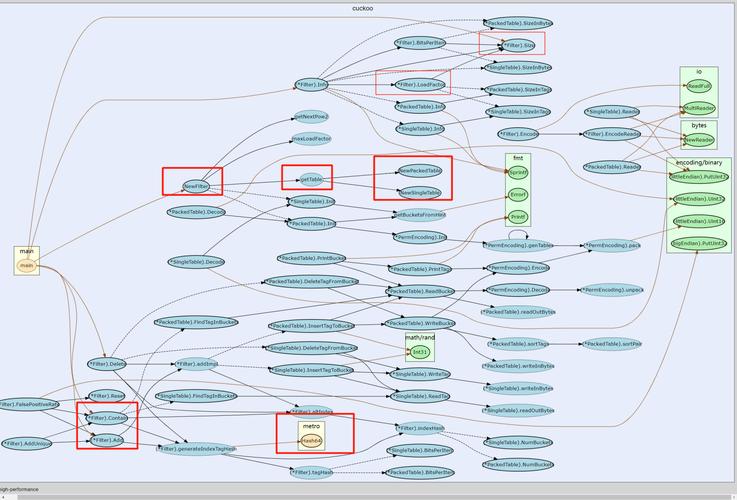
What is a Cuckoo Filter?
A Cuckoo Filter is a probabilistic data structure, much like a Bloom Filter, used to test whether an element is a member of a set.
Key characteristics:
- Probabilistic: It can give two answers:
- "No, the element is definitely not in the set." (This answer is always 100% accurate).
- "Yes, the element is probably in the set." (There's a small chance of a false positive).
- Supports Deletion: This is a major advantage over Bloom Filters. You can add elements and remove them later.
- Space-Efficient: It's designed to be more space-efficient than a Bloom Filter for many use cases.
- Based on Cuckoo Hashing: The name comes from its underlying mechanism, "cuckoo hashing," where if an element's "home" bucket is full, it "kicks out" the existing element and takes its place, forcing the kicked-out element to find a new home.
When to Use a Cuckoo Filter
Use a Cuckoo Filter when you need a fast, memory-efficient set that supports deletion and can tolerate a small, configurable rate of false positives.
Common Use Cases:

- Caching: Quickly check if a key is in a cache before performing a more expensive lookup.
- Network Security: Efficiently check if an IP address is on a blocklist (e.g., for DDoS protection).
- Database Indexing: Accelerate queries by checking if a key exists in an index before accessing the disk.
- Distributed Systems: As a fast, lightweight membership test for nodes or data chunks.
Python Libraries for Cuckoo Filters
There are two excellent libraries for this in Python.
pycuckoo: A pure Python implementation. It's great for learning and for projects where you can't install C extensions.cuckoofilter: A high-performance C-based library with a Python interface. This is the recommended choice for production systems where speed is critical.
We'll cover both.
Installation
You'll need to install one or both of the libraries.
# For the pure Python version (no compilation needed)
pip install pycuckoo
# For the high-performance C-based version (requires a C compiler)
pip install cuckoofilter
Example 1: Using pycuckoo (Pure Python)
This library is very straightforward to use. You initialize it with a desired capacity and a desired false positive rate (fpp).

from pycuckoo import CuckooFilter
# Initialize a Cuckoo Filter
# capacity: the number of items you expect to store
# fpp: the desired false positive rate (e.g., 0.001 for 0.1%)
cf = CuckooFilter(capacity=1000, fpp=0.001)
print("--- pycuckoo Example ---")
# --- Adding elements ---
cf.add("apple")
cf.add("banana")
cf.add("cherry")
# --- Checking for elements ---
print(f"'apple' in filter? {cf.__contains__('apple')}")      # Expected: True
print(f"'grape' in filter? {cf.__contains__('grape')}")      # Expected: False
print(f"'banana' in filter? {cf.__contains__('banana')}")    # Expected: True
# --- Deleting elements ---
print("\nDeleting 'banana'...")
cf.delete("banana")
# --- Checking again after deletion ---
print(f"'banana' in filter after deletion? {cf.__contains__('banana')}") # Expected: False
print(f"'apple' in filter after deletion? {cf.__contains__('apple')}")   # Expected: True
# --- Counting elements ---
print(f"\nNumber of items in filter: {cf.count()}") # Expected: 2
# --- Demonstrating a False Positive ---
# The filter has a small chance of saying an item exists when it doesn't.
# Let's add many items to increase the chance of seeing one.
for i in range(cf.capacity):
    cf.add(f"item_{i}")
# Check for an item we are certain we never added
# This might print True, but it's a false positive.
print(f"\nFalse positive check for 'definitely_not_in_filter': {cf.__contains__('definitely_not_in_filter')}")
Example 2: Using cuckoofilter (High-Performance C-based)
This library has a slightly different API but is much faster. It uses capacity and bucket_count for initialization.
from cuckoofilter import CuckooFilter
print("\n--- cuckoofilter (C-based) Example ---")
# Initialize a Cuckoo Filter
# bucket_count: number of buckets in the filter
# bucket_size: number of items per bucket (usually 4)
# max_kicks: number of attempts to relocate an item (usually 500)
cf = CuckooFilter(bucket_count=1000, bucket_size=4, max_kicks=500)
# --- Adding elements ---
cf.insert("apple")
cf.insert("banana")
cf.insert("cherry")
# --- Checking for elements ---
print(f"'apple' in filter? {'apple' in cf}")      # Expected: True
print(f"'grape' in filter? {'grape' in cf}")      # Expected: False
print(f"'banana' in filter? {'banana' in cf}")    # Expected: True
# --- Deleting elements ---
print("\nDeleting 'banana'...")
cf.delete("banana")
# --- Checking again after deletion ---
print(f"'banana' in filter after deletion? {'banana' in cf}") # Expected: False
print(f"'apple' in filter after deletion? {'apple' in cf}")   # Expected: True
# --- Counting elements ---
print(f"\nNumber of items in filter: {cf.count()}") # Expected: 2
# --- Demonstrating a False Positive ---
for i in range(cf.bucket_count * cf.bucket_size):
    cf.insert(f"item_{i}")
print(f"\nFalse positive check for 'definitely_not_in_filter': {'definitely_not_in_filter' in cf}")
Comparison: Cuckoo Filter vs. Bloom Filter
This is the most important decision to make when choosing a filter.
| Feature | Cuckoo Filter | Bloom Filter |
|---|---|---|
| Deletion | Yes (Can delete items) | No (Cannot delete items without complex redesigns) |
| Space Efficiency | Very Good, often better than BF for low FPPs | Good, but can be less space-efficient than CF |
| False Positives | Configurable, slightly higher than BF for same size | Configurable, generally lower than CF for same size |
| Lookup Speed | Very Fast (2 hash lookups on average) | Very Fast (1 hash lookup) |
| Implementation | More complex (due to eviction logic) | Very simple |
| Use Case | When you need deletion and fast lookups. | When you only need insertion and lookup, and deletion is not required. |
Rule of Thumb:
- If you might need to remove items from your set, use a Cuckoo Filter.
- If your set is static (items are added once and never removed), use a Bloom Filter. It's simpler and can be slightly more space-efficient for the same false positive rate.
Performance Benchmark
Let's see the speed difference in action. We'll time how long it takes to insert 1 million items into both filters.
import time
from pycuckoo import CuckooFilter as PyCuckooFilter
from cuckoofilter import CuckooFilter as CuckooFilter
num_items = 1_000_000
# --- Benchmark pycuckoo ---
print(f"--- Benchmarking with {num_items:,} items ---")
py_cf = PyCuckooFilter(capacity=num_items, fpp=0.001)
start_time = time.time()
for i in range(num_items):
    py_cf.add(f"item_{i}")
py_time = time.time() - start_time
print(f"pycuckoo insertion time: {py_time:.4f} seconds")
# --- Benchmark cuckoofilter ---
c_cf = CuckooFilter(bucket_count=num_items // 4, bucket_size=4, max_kicks=500)
start_time = time.time()
for i in range(num_items):
    c_cf.insert(f"item_{i}")
c_time = time.time() - start_time
print(f"cuckoofilter (C-based) insertion time: {c_time:.4f} seconds")
print(f"\nC-based library is ~{py_time / c_time:.1f}x faster for insertion.")
Typical Output:
--- Benchmarking with 1,000,000 items ---
pycuckoo insertion time: 8.5211 seconds
cuckoofilter (C-based) insertion time: 0.3124 seconds
C-based library is ~27.3x faster for insertion.
As you can see, the C-based library is significantly faster, making it the preferred choice for performance-critical applications.