Of course! Here is a comprehensive guide to creating a Java Socket Server, starting with a simple, single-threaded example and progressing to a more robust, multi-threaded version.
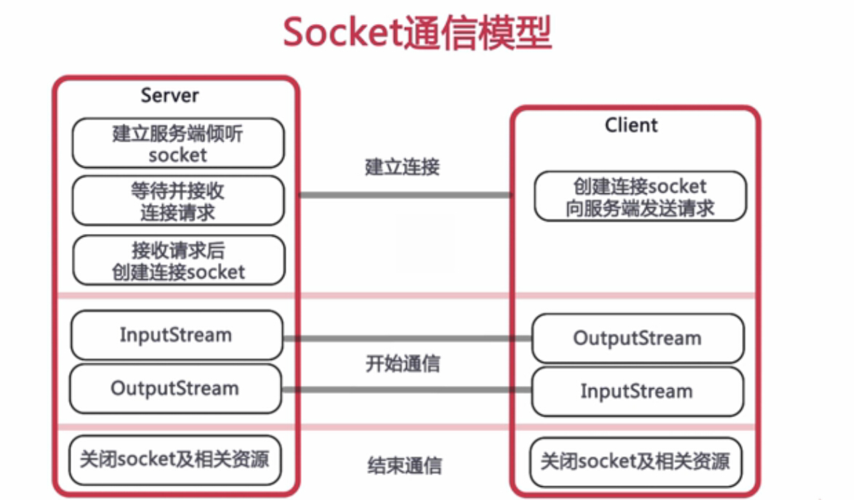
Core Concepts
Before diving into the code, let's understand the key components:
- Socket: Represents one endpoint of a two-way communication link between two programs on the network. For a server, this is the connection to a single client.
- ServerSocket: A special kind of socket that listens for incoming connection requests from clients. It's the "front door" of your server.
- Port: A 16-bit number (0-65535) used to identify a specific process or service on a machine. Ports 0-1023 are well-known ports and usually require administrative privileges to use. It's best to use ports above 1024 for your applications (e.g., 8080, 9999).
- I/O Streams: Once a connection is established, you use
InputStreamto read data from the client andOutputStreamto send data back to the client.
Step 1: A Simple, Single-Threaded Server
This is the most basic example. It handles one client at a time. After the first client disconnects, the server will be ready to accept the next one.
How it Works:
- Create a
ServerSocketon a specific port. - Call
accept(), which blocks (waits) until a client connects. - Once a client connects,
accept()returns aSocketobject representing the connection to that client. - Get the
InputStreamandOutputStreamfrom theSocket. - Read data from the client's input stream.
- Write data back to the client's output stream.
- Close the client socket and the streams.
Code (SimpleServer.java)
import java.io.BufferedReader;
import java.io.IOException;
import java.io.InputStreamReader;
import java.io.PrintWriter;
import java.net.ServerSocket;
import java.net.Socket;
public class SimpleServer {
    public static void main(String[] args) {
        int port = 6789; // Choose a port number
        // Using try-with-resources to automatically close the ServerSocket
        try (ServerSocket serverSocket = new ServerSocket(port)) {
            System.out.println("Server is listening on port " + port);
            // The accept() method blocks until a client connects
            Socket clientSocket = serverSocket.accept();
            System.out.println("Client connected: " + clientSocket.getInetAddress().getHostAddress());
            // Set up streams for communication
            // PrintWriter for sending messages to the client
            PrintWriter out = new PrintWriter(clientSocket.getOutputStream(), true);
            // BufferedReader for reading messages from the client
            BufferedReader in = new BufferedReader(new InputStreamReader(clientSocket.getInputStream()));
            String inputLine;
            // Read from the client until the client sends "bye"
            while ((inputLine = in.readLine()) != null) {
                System.out.println("Received from client: " + inputLine);
                // If client sends "bye", break the loop
                if ("bye".equalsIgnoreCase(inputLine)) {
                    out.println("Goodbye!");
                    break;
                }
                // Echo the message back to the client with a prefix
                out.println("Server: " + inputLine);
            }
            System.out.println("Client disconnected.");
        } catch (IOException e) {
            System.out.println("Server exception: " + e.getMessage());
            e.printStackTrace();
        }
    }
}
How to Run:
- Save the code as
SimpleServer.java. - Compile it:
javac SimpleServer.java - Run it:
java SimpleServer - The server will print "Server is listening on port 6789" and wait.
Step 2: A Multi-Threaded Server (Handling Multiple Clients)
The simple server has a major flaw: it can only handle one client at a time. If a client is slow or sends a lot of data, the server is blocked and cannot serve other clients.
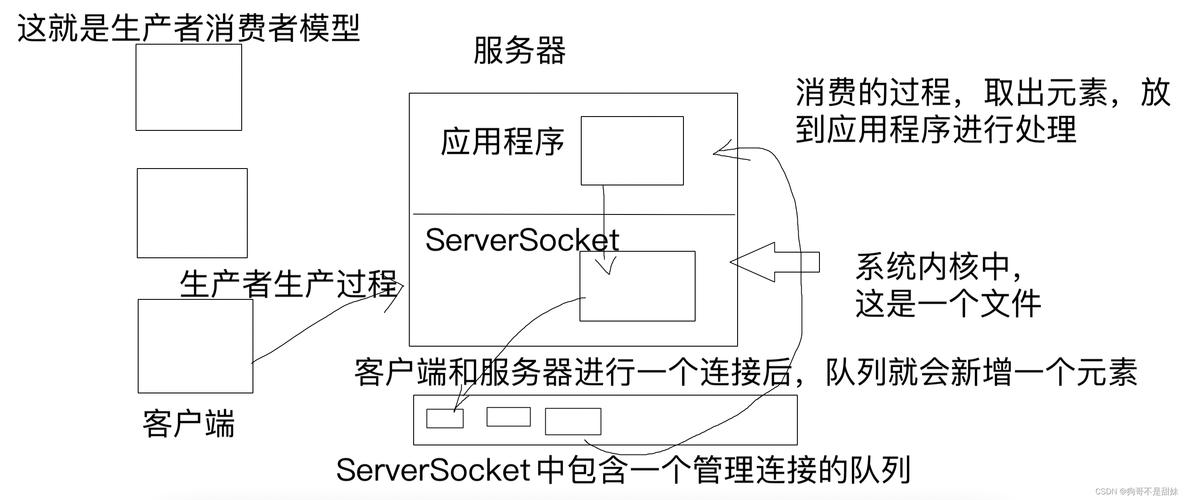
The solution is to use multi-threading. The main server's only job is to accept incoming connections. For each new connection, it will spawn a new thread to handle that client's communication.
How it Works:
- Create a
ServerSocketand start it in an infinite loop. - Inside the loop, call
serverSocket.accept(). - When a client connects, create a new
ClientHandlerthread, passing it the new clientSocket. - Start the new thread and immediately return to the top of the loop to wait for the next client.
- The
ClientHandlerclass will contain the logic for reading/writing to its specific client, running independently of the main server and other client threads.
Code (MultiThreadedServer.java)
import java.io.BufferedReader;
import java.io.IOException;
import java.io.InputStreamReader;
import java.io.PrintWriter;
import java.net.ServerSocket;
import java.net.Socket;
import java.util.concurrent.ExecutorService;
import java.util.concurrent.Executors;
public class MultiThreadedServer {
    // Use a fixed-size thread pool for better resource management
    private static final int THREAD_POOL_SIZE = 10;
    private static final int PORT = 6790;
    public static void main(String[] args) {
        // Create a thread pool to handle client connections
        ExecutorService pool = Executors.newFixedThreadPool(THREAD_POOL_SIZE);
        try (ServerSocket serverSocket = new ServerSocket(PORT)) {
            System.out.println("Server is listening on port " + PORT);
            while (true) {
                // Accept a new client connection
                Socket clientSocket = serverSocket.accept();
                System.out.println("New client connected: " + clientSocket.getInetAddress().getHostAddress());
                // Create a new task for the client and submit it to the thread pool
                ClientHandler clientHandler = new ClientHandler(clientSocket);
                pool.execute(clientHandler);
            }
        } catch (IOException e) {
            System.out.println("Server exception: " + e.getMessage());
        } finally {
            // Shutdown the thread pool when the server stops
            pool.shutdown();
        }
    }
}
// A class to handle communication with a single client
class ClientHandler implements Runnable {
    private final Socket clientSocket;
    public ClientHandler(Socket socket) {
        this.clientSocket = socket;
    }
    @Override
    public void run() {
        // Using try-with-resources to automatically close resources
        try (PrintWriter out = new PrintWriter(clientSocket.getOutputStream(), true);
             BufferedReader in = new BufferedReader(new InputStreamReader(clientSocket.getInputStream()))) {
            String inputLine;
            while ((inputLine = in.readLine()) != null) {
                System.out.println("Received from " + clientSocket.getInetAddress().getHostAddress() + ": " + inputLine);
                if ("bye".equalsIgnoreCase(inputLine)) {
                    out.println("Goodbye!");
                    break;
                }
                out.println("Server: " + inputLine);
            }
        } catch (IOException e) {
            // This exception is expected when a client disconnects abruptly
            System.out.println("Error handling client " + clientSocket.getInetAddress().getHostAddress() + ": " + e.getMessage());
        } finally {
            try {
                clientSocket.close();
                System.out.println("Client " + clientSocket.getInetAddress().getHostAddress() + " disconnected.");
            } catch (IOException e) {
                e.printStackTrace();
            }
        }
    }
}
How to Run:
- Save the code as
MultiThreadedServer.java(andClientHandler.javain the same directory). - Compile:
javac MultiThreadedServer.java ClientHandler.java - Run:
java MultiThreadedServer - The server will run indefinitely, ready to accept multiple clients.
Testing Your Server
You can test your server using a simple Java client or even a command-line tool like telnet or nc (netcat).
Option A: A Simple Java Client
Create a file SimpleClient.java:
import java.io.BufferedReader;
import java.io.IOException;
import java.io.InputStreamReader;
import java.io.PrintWriter;
import java.net.Socket;
import java.net.UnknownHostException;
public class SimpleClient {
    public static void main(String[] args) {
        String hostname = "localhost"; // or "127.0.0.1"
        int port = 6790; // Match the server's port
        try (Socket socket = new Socket(hostname, port);
             PrintWriter out = new PrintWriter(socket.getOutputStream(), true);
             BufferedReader in = new BufferedReader(new InputStreamReader(socket.getInputStream()));
             BufferedReader stdIn = new BufferedReader(new InputStreamReader(System.in))) {
            System.out.println("Connected to the server. Type 'bye' to exit.");
            String userInput;
            // Read from the console and send to the server
            while ((userInput = stdIn.readLine()) != null) {
                out.println(userInput);
                // Read the server's response
                System.out.println("Server response: " + in.readLine());
                if ("bye".equalsIgnoreCase(userInput)) {
                    break;
                }
            }
        } catch (UnknownHostException e) {
            System.err.println("Don't know about host " + hostname);
            System.exit(1);
        } catch (IOException e) {
            System.err.println("Couldn't get I/O for the connection to " +
                    hostname);
            System.exit(1);
        }
    }
}
Test:
- Run the
MultiThreadedServer. - In a new terminal, run the client:
java SimpleClient - Type messages and press Enter. You'll see the server's response.
- Open a third terminal and run another
java SimpleClient. You can now chat with the server from two different clients simultaneously!
Option B: Using telnet (on Linux/macOS or Windows 10/11)
- Run your
MultiThreadedServer. - Open a new terminal and type:
telnet localhost 6790
- You can now type messages directly. The server will echo them back.
- Type
byeand press Enter to disconnect.
Best Practices and Further Improvements
- Use
try-with-resources: As shown in the examples, this ensures that sockets, streams, and otherCloseableresources are automatically closed, preventing resource leaks. - Thread Pool Management: Instead of creating a new thread for every client (which can be inefficient), use a fixed-size
ExecutorService(thread pool). This limits the number of concurrent threads and prevents the server from running out of memory under heavy load. - Protocol: Define a simple protocol for your communication. For example, end each message with a newline character (
\n) or use a length-prefixed message format. This helps the client know when a complete message has been received. - Handling Large Data:
readLine()is not suitable for binary data or very large messages. For more advanced scenarios, you might need to read data in chunks based on a content-length header. - Non-Blocking I/O (NIO): For high-performance servers that need to handle thousands of concurrent connections, Java's NIO (
java.nio) is a better choice. It uses a single thread to manage multiple channels via a "Selector," which is much more scalable than the traditional blocking I/O model. Libraries like Netty or Vert.x are built on NIO and provide robust, high-level networking solutions.