Java 修改 Properties 文件的方法
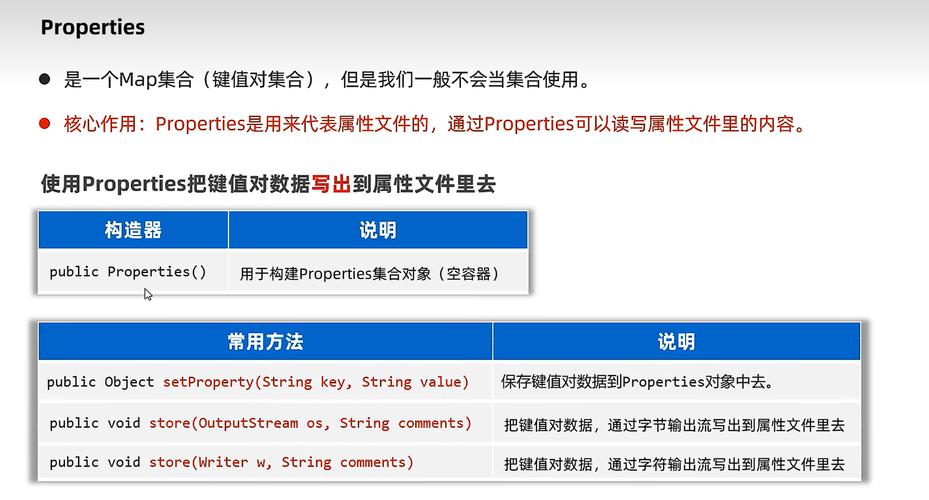
在 Java 中修改 .properties 文件通常涉及以下几个步骤:读取文件、修改内容、写回文件,以下是几种实现方法:
(图片来源网络,侵删)
使用 Properties 类(推荐)
import java.io.*;
import java.util.Properties;
public class PropertiesModifier {
    public static void main(String[] args) {
        String filePath = "config.properties"; // 文件路径
        Properties props = new Properties();
        InputStream input = null;
        OutputStream output = null;
        try {
            // 1. 加载现有 properties 文件
            input = new FileInputStream(filePath);
            props.load(input);
            // 2. 修改属性值
            props.setProperty("database.url", "jdbc:mysql://newhost:3306/newdb");
            props.setProperty("database.username", "newuser");
            props.setProperty("database.password", "newpass");
            // 3. 保存修改后的文件
            output = new FileOutputStream(filePath);
            props.store(output, "Updated database configuration");
            System.out.println("Properties file updated successfully!");
        } catch (IOException io) {
            io.printStackTrace();
        } finally {
            if (input != null) {
                try {
                    input.close();
                } catch (IOException e) {
                    e.printStackTrace();
                }
            }
            if (output != null) {
                try {
                    output.close();
                } catch (IOException e) {
                    e.printStackTrace();
                }
            }
        }
    }
}
使用 ResourceBundle(适用于只读场景)
注意:ResourceBundle 通常是只读的,不适合修改文件,但可以用于读取。
import java.util.ResourceBundle;
public class ResourceBundleExample {
    public static void main(String[] args) {
        ResourceBundle bundle = ResourceBundle.getBundle("config");
        String value = bundle.getString("key");
        System.out.println(value);
    }
}
使用 Files API (Java 7+)
import java.io.IOException;
import java.nio.file.Files;
import java.nio.file.Path;
import java.nio.file.Paths;
import java.util.List;
import java.util.stream.Collectors;
public class PropertiesFileUpdater {
    public static void main(String[] args) {
        Path path = Paths.get("config.properties");
        try {
            // 读取所有行
            List<String> lines = Files.readAllLines(path);
            // 修改特定行
            List<String> modifiedLines = lines.stream()
                .map(line -> {
                    if (line.startsWith("database.url=")) {
                        return "database.url=jdbc:mysql://newhost:3306/newdb";
                    } else if (line.startsWith("database.username=")) {
                        return "database.username=newuser";
                    }
                    return line;
                })
                .collect(Collectors.toList());
            // 写回文件
            Files.write(path, modifiedLines);
            System.out.println("Properties file updated successfully!");
        } catch (IOException e) {
            e.printStackTrace();
        }
    }
}
注意事项
- 文件锁定:在多线程环境中修改文件时,考虑使用文件锁机制
- 备份:修改前最好备份原文件
- 编码:确保使用正确的字符编码(通常为UTF-8)
- 路径问题:注意文件路径是相对路径还是绝对路径
- 异常处理:妥善处理IO异常
高级用法:使用 Apache Commons Configuration
如果项目允许使用第三方库,Apache Commons Configuration 提供了更强大的功能:
import org.apache.commons.configuration2.Configuration;
import org.apache.commons.configuration2.PropertiesConfiguration;
import org.apache.commons.configuration2.builder.FileBasedConfigurationBuilder;
import org.apache.commons.configuration2.builder.fluent.Parameters;
public class CommonsConfigExample {
    public static void main(String[] args) {
        Parameters params = new Parameters();
        FileBasedConfigurationBuilder<PropertiesConfiguration> builder =
            new FileBasedConfigurationBuilder<>(PropertiesConfiguration.class)
                .configure(params.properties().setFileName("config.properties"));
        try {
            Configuration config = builder.getConfiguration();
            config.setProperty("database.url", "jdbc:mysql://newhost:3306/newdb");
            config.setProperty("database.username", "newuser");
            builder.save();
            System.out.println("Properties file updated successfully!");
        } catch (Exception e) {
            e.printStackTrace();
        }
    }
}
方法中,第一种(使用Properties类)是最基础和常用的方式,适用于大多数场景。
(图片来源网络,侵删)