
Of course! The phrase "Java WebService C" can be interpreted in a few ways. I'll cover the most common ones, starting with the most likely scenario.
Interpretation 1: Creating a Java Web Service (the most common meaning)
This is the most probable intent. You want to create a web service using Java. There are two main standards for this in the Java ecosystem:
- JAX-WS (Java API for XML Web Services): The older, more established standard. It's primarily used for SOAP (Simple Object Access Protocol) web services.
- JAX-RS (Java API for RESTful Web Services): The modern, more popular standard, used for building REST (Representational State Transfer) APIs, which are lightweight and widely used with web and mobile applications.
Let's break down how to create a simple web service for each.
A. Creating a SOAP Web Service with JAX-WS
JAX-WS is built into the Java standard library (starting from Java 6), so you don't need any external libraries for the basic setup.
Step 1: Create a Java Interface for the Service (SEI - Service Endpoint Interface)
This interface defines the methods that will be available to your web service clients.
// src/com/example/HelloWorld.java
package com.example;
import javax.jws.WebMethod;
import javax.jws.WebService;
import javax.jws.WebParam;
// @WebService marks this class as a Web Service.
@WebService
public interface HelloWorld {
    // @WebMethod marks this method as a web service operation.
    // @WebParam specifies the name of the parameter in the SOAP message.
    @WebMethod(operationName = "getHelloMessage")
    String sayHello(@WebParam(name = "name") String name);
}
Step 2: Create a Class that Implements the Interface (SIB - Service Implementation Bean)
This class contains the actual business logic.
// src/com/example/HelloWorldImpl.java
package com.example;
import javax.jws.WebService;
// Implement the interface and specify the service name.
@WebService(endpointInterface = "com.example.HelloWorld")
public class HelloWorldImpl implements HelloWorld {
    @Override
    public String sayHello(String name) {
        return "Hello, " + name + "!";
    }
}
Step 3: Publish the Web Service
You need a main class to start a simple HTTP server and publish your service.
// src/com/example/WebServicePublisher.java
package com.example;
import javax.xml.ws.Endpoint;
public class WebServicePublisher {
    public static void main(String[] args) {
        // The URL where the service will be published.
        String url = "http://localhost:7777/ws/hello";
        // Publish the implementation class at the specified URL.
        Endpoint.publish(url, new HelloWorldImpl());
        System.out.println("SOAP Web Service is running at: " + url);
        System.out.println("To test, you can use a tool like SoapUI.");
    }
}
Step 4: Compile and Run
- Compile: Make sure your
CLASSPATHis set up correctly or use an IDE like IntelliJ/Eclipse.# Assuming you are in the root directory 'src' javac com/example/*.java
- Run:
java com.example.WebServicePublisher
You will see the message: SOAP Web Service is running at: http://localhost:7777/ws/hello
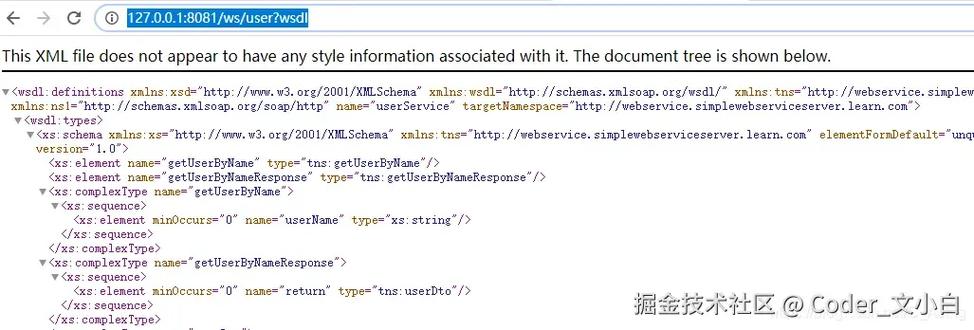
You can now use a tool like SoapUI or a web browser to access the WSDL (Web Services Description Language) file at http://localhost:7777/ws/hello?wsdl. This file describes your service to clients.
B. Creating a REST Web Service with JAX-RS (using Jersey)
JAX-RS is a standard, but you need an implementation. Jersey is the most popular one, from the Eclipse Foundation.
Step 1: Set up your Project (using Maven)
You need to add the Jersey dependency to your pom.xml.
<dependencies>
    <dependency>
        <groupId>org.glassfish.jersey.containers</groupId>
        <artifactId>jersey-container-grizzly2-http</artifactId>
        <!-- Use the version that matches your needs -->
        <version>2.41</version>
    </dependency>
</dependencies>
Step 2: Create a Resource Class
This class will handle incoming HTTP requests. The @Path annotation defines the base URL for the resource, and @GET, @POST, etc., define the HTTP methods.
// src/com/example/Resource.java
package com.example;
import javax.ws.rs.GET;
import javax.ws.rs.Path;
import javax.ws.rs.Produces;
import javax.ws.rs.core.MediaType;
// @Path defines the base path for this resource.
@Path("myresource")
public class MyResource {
    // @GET handles HTTP GET requests.
    // @Produces defines the media type the method can produce (e.g., plain text, JSON).
    @GET
    @Produces(MediaType.TEXT_PLAIN)
    public String getIt() {
        return "Got it!";
    }
}
Step 3: Create an Application Class and Start the Server
This class configures and starts the Grizzly HTTP server, which will host your REST service.
// src/com/example/Main.java
package com.example;
import org.glassfish.grizzly.http.server.HttpServer;
import org.glassfish.jersey.grizzly2.httpserver.GrizzlyHttpServerFactory;
import org.glassfish.jersey.server.ResourceConfig;
import java.io.IOException;
import java.net.URI;
public class Main {
    // Base URI the Grizzly HTTP server will listen on
    public static final String BASE_URI = "http://localhost:8080/myapp/";
    public static void main(String[] args) throws IOException {
        // Create a resource config that scans for JAX-RS resources and providers
        ResourceConfig rc = new ResourceConfig().packages("com.example");
        // Create and start a new instance of grizzly http server
        // exposing the Jersey application at BASE_URI
        HttpServer server = GrizzlyHttpServerFactory.createHttpServer(URI.create(BASE_URI), rc);
        System.out.println("Jersey app started with WADL available at "
                + BASE_URI + "application.wadl\nHit enter to stop it...");
        System.in.read();
        server.shutdownNow();
    }
}
Step 4: Compile and Run
-
Compile & Run with Maven:
mvn compile exec:java -Dexec.mainClass="com.example.Main"
-
Test with
curl: Open a new terminal and run:curl http://localhost:8080/myapp/myresource
You should get the response:
Got it!
Interpretation 2: Consuming a C# Web Service from Java
This is a more advanced but very common enterprise scenario. Your Java application needs to call a web service written in C# (likely using WCF, which produces SOAP services).
The best tool for this job is Apache CXF.
Scenario: You have a C# WCF service with a WSDL file at http://localhost:8080/MyCSharpService?wsdl.
Step 1: Generate Java Client Code from WSDL
CXF provides a tool called wsdl2java that reads the WSDL and generates all the necessary Java classes (client stubs, data objects, etc.).
- Download Apache CXF.
- Run the
wsdl2javatool:# Navigate to the 'bin' directory of your CXF installation # Or use the full path to the script ./wsdl2java -p com.example.csharp.client -d src http://localhost:8080/MyCSharpService?wsdl
-p: The target package for the generated Java code.-d: The directory where the code will be generated.
Step 2: Use the Generated Client in Your Java Code
The wsdl2java tool will create a service class and a port interface. You can use them to make calls to the C# service.
// src/com/example/csharp/client/Client.java
package com.example.csharp.client;
public class Client {
    public static void main(String[] args) {
        // Create the service object
        MyCSharpService service = new MyCSharpService();
        // Get the port (the interface for the web service operations)
        MyCSharpServicePortType port = service.getBasicHttpBindingMyCSharpService();
        // Now you can call the methods defined in the C# service
        // For example, if the C# service has a method 'GetUserInfo(string id)'
        try {
            String userInfo = port.getUserInfo("12345");
            System.out.println("User Info from C#: " + userInfo);
        } catch (Exception e) {
            e.printStackTrace();
        }
    }
}
Summary and Recommendation
| Scenario | Technology / Standard | Best Tool/Library |
|---|---|---|
| Create a new Java Web Service (SOAP) | JAX-WS | Built into Java (no extra libs needed) |
| Create a new Java Web Service (REST) | JAX-RS | Jersey (reference implementation) |
| Call a C# Web Service from Java | SOAP (from WCF) | Apache CXF or JAX-WS RI (with wsimport) |
For a beginner, start with JAX-RS (Jersey). REST APIs are the standard for new web and mobile applications and are much simpler to work with than SOAP. If you absolutely need to use SOAP (e.g., for enterprise integration), then JAX-WS is the way to go. If you need to connect to an existing .NET service, Apache CXF is your best friend.










