Of course! Converting Java JSON data to an Excel file is a common task in enterprise applications. Here’s a comprehensive guide covering the most popular and effective methods, from simple libraries to more advanced techniques.
We'll cover three main approaches:
- Apache POI + Jackson (Recommended for most cases): A powerful and flexible combination.
- EasyExcel (Recommended for high performance): Developed by Alibaba, it's extremely fast and memory-efficient.
- Using a Cloud Service (Simple, but requires an API key): Good for quick integrations without server-side dependencies.
Scenario Setup
Let's assume we have a JSON array of user objects that we want to convert into an Excel sheet.
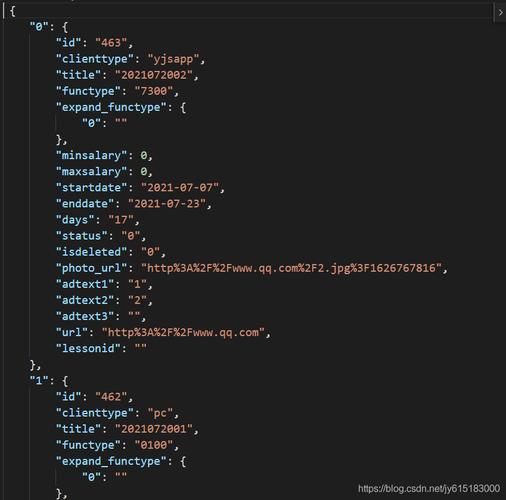
Input JSON (users.json):
[
  {
    "id": 1,
    "name": "Alice Johnson",
    "email": "alice.j@example.com",
    "age": 30,
    "isActive": true
  },
  {
    "id": 2,
    "name": "Bob Williams",
    "email": "bob.w@example.com",
    "age": 45,
    "isActive": false
  },
  {
    "id": 3,
    "name": "Charlie Brown",
    "email": "charlie.b@example.com",
    "age": 28,
    "isActive": true
  }
]
Goal: Create an Excel file (users.xlsx) with columns: ID, Name, Email, Age, Is Active.
Method 1: Apache POI + Jackson (The Classic & Powerful Combo)
This is the most popular and robust method. Jackson is used to parse the JSON, and Apache POI is used to create the Excel file.
Add Dependencies
You'll need both jackson-databind for JSON parsing and poi for Excel creation.
Maven (pom.xml):
<dependencies>
    <!-- For JSON parsing -->
    <dependency>
        <groupId>com.fasterxml.jackson.core</groupId>
        <artifactId>jackson-databind</artifactId>
        <version>2.15.2</version> <!-- Use the latest version -->
    </dependency>
    <!-- For Excel file creation (XLSX) -->
    <dependency>
        <groupId>org.apache.poi</groupId>
        <artifactId>poi-ooxml</artifactId>
        <version>5.2.3</version> <!-- Use the latest version -->
    </dependency>
</dependencies>
Gradle (build.gradle):
implementation 'com.fasterxml.jackson.core:jackson-databind:2.15.2'
implementation 'org.apache.poi:poi-ooxml:5.2.3'
Java Code
This code reads a JSON string, parses it into a List of User objects, and then writes that list to an Excel file.
Step 1: Create a POJO (Plain Old Java Object) It's best practice to create a class that mirrors the structure of your JSON.
// User.java
public class User {
    private int id;
    private String name;
    private String email;
    private int age;
    private boolean isActive;
    // Getters and Setters (Required for Jackson)
    public int getId() { return id; }
    public void setId(int id) { this.id = id; }
    public String getName() { return name; }
    public void setName(String name) { this.name = name; }
    public String getEmail() { return email; }
    public void setEmail(String email) { this.email = email; }
    public int getAge() { return age; }
    public void setAge(int age) { this.age = age; }
    public boolean getIsActive() { return isActive; }
    public void setIsActive(boolean isActive) { this.isActive = isActive; }
    // toString() is good for debugging
    @Override
    public String toString() {
        return "User{" +
                "id=" + id +
                ", name='" + name + '\'' +
                ", email='" + email + '\'' +
                ", age=" + age +
                ", isActive=" + isActive +
                '}';
    }
}
Step 2: The Main Conversion Logic
import com.fasterxml.jackson.core.type.TypeReference;
import com.fasterxml.jackson.databind.ObjectMapper;
import org.apache.poi.ss.usermodel.*;
import org.apache.poi.xssf.usermodel.XSSFWorkbook;
import java.io.File;
import java.io.FileOutputStream;
import java.io.IOException;
import java.util.List;
public class JsonToExcelConverter {
    public static void main(String[] args) {
        // 1. JSON Input
        String jsonInput = "[\n" +
                "  {\n" +
                "    \"id\": 1,\n" +
                "    \"name\": \"Alice Johnson\",\n" +
                "    \"email\": \"alice.j@example.com\",\n" +
                "    \"age\": 30,\n" +
                "    \"isActive\": true\n" +
                "  },\n" +
                "  {\n" +
                "    \"id\": 2,\n" +
                "    \"name\": \"Bob Williams\",\n" +
                "    \"email\": \"bob.w@example.com\",\n" +
                "    \"age\": 45,\n" +
                "    \"isActive\": false\n" +
                "  },\n" +
                "  {\n" +
                "    \"id\": 3,\n" +
                "    \"name\": \"Charlie Brown\",\n" +
                "    \"email\": \"charlie.b@example.com\",\n" +
                "    \"age\": 28,\n" +
                "    \"isActive\": true\n" +
                "  }\n" +
                "]";
        // 2. Parse JSON to List of User objects
        ObjectMapper objectMapper = new ObjectMapper();
        try {
            List<User> users = objectMapper.readValue(jsonInput, new TypeReference<List<User>>() {});
            System.out.println("Successfully parsed JSON. Found " + users.size() + " users.");
            // 3. Create Excel Workbook and Sheet
            Workbook workbook = new XSSFWorkbook(); // Use XSSFWorkbook for .xlsx files
            Sheet sheet = workbook.createSheet("Users");
            // 4. Create Header Row
            Row headerRow = sheet.createRow(0);
            String[] headers = {"ID", "Name", "Email", "Age", "Is Active"};
            for (int i = 0; i < headers.length; i++) {
                Cell cell = headerRow.createCell(i);
                cell.setCellValue(headers[i]);
            }
            // 5. Populate Data Rows
            int rowNum = 1;
            for (User user : users) {
                Row row = sheet.createRow(rowNum++);
                row.createCell(0).setCellValue(user.getId());
                row.createCell(1).setCellValue(user.getName());
                row.createCell(2).setCellValue(user.getEmail());
                row.createCell(3).setCellValue(user.getAge());
                row.createCell(4).setCellValue(user.getIsActive()); // Booleans are handled as TRUE/FALSE in Excel
            }
            // 6. Auto-size columns for better readability
            for (int i = 0; i < headers.length; i++) {
                sheet.autoSizeColumn(i);
            }
            // 7. Write the workbook to a file
            try (FileOutputStream fileOut = new FileOutputStream("users.xlsx")) {
                workbook.write(fileOut);
                System.out.println("Excel file 'users.xlsx' has been created successfully.");
            }
            workbook.close();
        } catch (IOException e) {
            e.printStackTrace();
        }
    }
}
Method 2: EasyExcel (High Performance & Low Memory)
EasyExcel is a modern alternative from Alibaba. Its main advantage is its streaming API, which makes it incredibly memory-efficient and fast, especially for processing large files (e.g., millions of rows).
Add Dependencies
Maven (pom.xml):
<dependencies>
    <!-- For JSON parsing -->
    <dependency>
        <groupId>com.fasterxml.jackson.core</groupId>
        <artifactId>jackson-databind</artifactId>
        <version>2.15.2</version>
    </dependency>
    <!-- For high-performance Excel file creation -->
    <dependency>
        <groupId>com.alibaba</groupId>
        <artifactId>easyexcel</artifactId>
        <version>3.3.2</version> <!-- Use the latest version -->
    </dependency>
</dependencies>
Java Code
EasyExcel simplifies the writing process with a write() builder pattern. You still need the User POJO.
import com.alibaba.excel.EasyExcel;
import com.alibaba.excel.ExcelWriter;
import com.alibaba.excel.write.metadata.WriteSheet;
import com.fasterxml.jackson.core.type.TypeReference;
import com.fasterxml.jackson.databind.ObjectMapper;
import java.io.File;
import java.io.FileOutputStream;
import java.io.IOException;
import java.util.List;
public class JsonToExcelEasyExcel {
    public static void main(String[] args) {
        // 1. JSON Input
        String jsonInput = "[\n" +
                "  {\n" +
                "    \"id\": 1,\n" +
                "    \"name\": \"Alice Johnson\",\n" +
                "    \"email\": \"alice.j@example.com\",\n" +
                "    \"age\": 30,\n" +
                "    \"isActive\": true\n" +
                "  },\n" +
                "  {\n" +
                "    \"id\": 2,\n" +
                "    \"name\": \"Bob Williams\",\n" +
                "    \"email\": \"bob.w@example.com\",\n" +
                "    \"age\": 45,\n" +
                "    \"isActive\": false\n" +
                "  },\n" +
                "  {\n" +
                "    \"id\": 3,\n" +
                "    \"name\": \"Charlie Brown\",\n" +
                "    \"email\": \"charlie.b@example.com\",\n" +
                "    \"age\": 28,\n" +
                "    \"isActive\": true\n" +
                "  }\n" +
                "]";
        // 2. Parse JSON to List of User objects
        ObjectMapper objectMapper = new ObjectMapper();
        try {
            List<User> users = objectMapper.readValue(jsonInput, new TypeReference<List<User>>() {});
            System.out.println("Successfully parsed JSON. Found " + users.size() + " users.");
            // 3. Write to Excel using EasyExcel
            // The file name
            String fileName = "users_easyexcel.xlsx";
            // EasyExcel handles the workbook, sheet, and file writing automatically.
            // It uses the field names of the User object as headers by default.
            EasyExcel.write(fileName, User.class).sheet("Users").doWrite(users);
            System.out.println("Excel file '" + fileName + "' has been created successfully using EasyExcel.");
        } catch (IOException e) {
            e.printStackTrace();
        }
    }
}
As you can see, EasyExcel's code is much more concise for this task.
Method 3: Using a Cloud API (Quick & Easy)
If you don't want to manage dependencies or server-side processing, you can use a cloud service like Apify, Zoho, or Convertio. This involves sending your JSON to a web API and receiving the Excel file.
Conceptual Workflow:
- Your Java application makes an HTTP POST request to a cloud service's endpoint.
- You send the JSON data in the request body.
- The service processes the data and returns the Excel file as a response (e.g., in the body of an HTTP 200 OK response).
Example using HttpClient (Java 11+):
import java.net.URI;
import java.net.http.HttpClient;
import java.net.http.HttpRequest;
import java.net.http.HttpResponse;
import java.nio.file.Files;
import java.nio.file.Path;
import java.nio.file.Paths;
public class CloudJsonToExcelConverter {
    public static void main(String[] args) throws Exception {
        String jsonInput = "[{\"id\":1,\"name\":\"Alice\"},{\"id\":2,\"name\":\"Bob\"}]";
        String apiUrl = "https://api.convertio.co/convert/"; // This is a FAKE URL for demonstration
        HttpClient client = HttpClient.newHttpClient();
        HttpRequest request = HttpRequest.newBuilder()
                .uri(URI.create(apiUrl))
                .header("Content-Type", "application/json")
                .header("Authorization", "Bearer YOUR_API_KEY") // Replace with your actual API key
                .POST(HttpRequest.BodyPublishers.ofString(jsonInput))
                .build();
        HttpResponse<byte[]> response = client.send(request, HttpResponse.BodyHandlers.ofByteArray());
        if (response.statusCode() == 200) {
            // Save the received byte array (Excel file) to a local file
            Path outputPath = Paths.get("users_from_cloud.xlsx");
            Files.write(outputPath, response.body());
            System.out.println("Excel file downloaded successfully.");
        } else {
            System.err.println("Error: " + response.statusCode());
            System.err.println("Response: " + new String(response.body()));
        }
    }
}
Pros:
- No server-side dependencies.
- Quick to implement.
- Scales with the cloud provider.
Cons:
- Cost: Most services charge per conversion or based on usage.
- Internet Dependency: Your application needs to be online.
- Security: You are sending your data to a third party.
Summary & Recommendation
| Feature | Apache POI + Jackson | EasyExcel | Cloud API |
|---|---|---|---|
| Performance | Good, but can be slow for very large files. | Excellent, streaming API handles huge files. | Depends on the service's server. |
| Memory Usage | High, loads entire workbook into memory. | Very Low, processes data row by row. | N/A (Processing is done on the cloud). |
| Dependencies | Two large libraries (poi, jackson). |
Two libraries (easyexcel, jackson). |
None (uses java.net.http). |
| Ease of Use | More verbose, manual control over cells/sheets. | Very Easy, concise builder API. | Very easy, just one HTTP call. |
| Flexibility | Maximum control over every aspect of the Excel. | Good control, but less low-level than POI. | Limited by the API's features. |
| Cost | Free (Open Source). | Free (Open Source). | Usually paid. |
| Best For... | General purpose, complex Excel formatting needs. | High-volume data processing, large datasets. | Quick integrations, avoiding server-side setup. |
Recommendation:
- For most standard applications, EasyExcel is the best choice due to its simplicity, performance, and low memory footprint.
- If you need very fine-grained control over Excel formatting (e.g., complex formulas, merged cells, specific styles), stick with Apache POI.
- If you're building a small app or a quick script and don't want to manage libraries, a Cloud API is a viable, though potentially costly, option.