Of course! Here is a comprehensive guide to creating a socket server in Python, starting with a simple, blocking example and moving to a more robust, threaded version that can handle multiple clients simultaneously.
What is a Socket Server?
A socket server is a program that waits for client requests over a network, processes them, and sends back a response. Think of it like a restaurant:
- The Server is the restaurant kitchen.
- The Client is a customer.
- The Socket is the order window where the customer places the order and receives the food.
- The Port is the specific order window number (e.g., "Window 5 for takeout").
The Simplest Server (Blocking)
This is the most basic example. It can only handle one client at a time. After serving a client, it shuts down. This is called a "blocking" server because it waits (blocks) for a connection.
The Code: simple_server.py
import socket
# Use '0.0.0.0' to listen on all available network interfaces
# Use '127.0.0.1' to listen only on localhost (for testing on the same machine)
HOST = '0.0.0.0'
PORT = 65432        # Port to listen on (non-privileged ports are > 1023)
# 1. Create a socket object
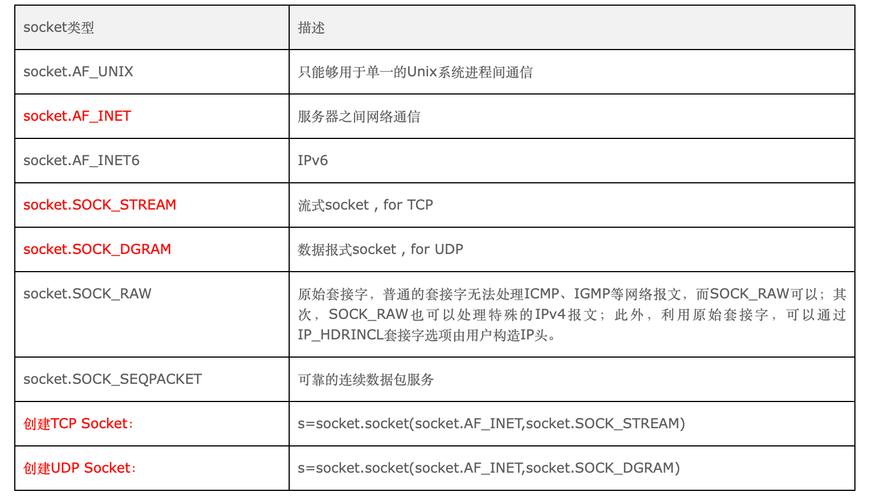
# socket.AF_INET: Use IPv4
# socket.SOCK_STREAM: Use TCP (reliable, connection-oriented)
with socket.socket(socket.AF_INET, socket.SOCK_STREAM) as s:
    # 2. Bind the socket to a specific address and port
    s.bind((HOST, PORT))
    # 3. Listen for incoming connections
    # The '1' is the backlog, the number of unaccepted connections that the system will allow before refusing new connections.
    s.listen()
    print(f"Server listening on {HOST}:{PORT}")
    # 4. Accept a connection. This is a blocking call.
    # It waits until a client connects, then returns a new socket object (conn) to communicate with the client
    # and the address of the client (addr).
    conn, addr = s.accept()
    # 'with' statement ensures the connection is closed automatically
    with conn:
        print(f"Connected by {addr}")
        while True:
            # 5. Receive data from the client (up to 1024 bytes)
            data = conn.recv(1024)
            if not data:
                # If recv() returns an empty object, the client has closed the connection
                break
            print(f"Received from {addr}: {data.decode('utf-8')}")
            # 6. Send a response back to the client
            response = f"Hello! Your message was: {data.decode('utf-8')}"
            conn.sendall(response.encode('utf-8'))
        print(f"Connection with {addr} closed.")
print("Server has shut down.")
How to Run It
- Save the code as
simple_server.py. - Open a terminal and run it:
python simple_server.py
You will see:
Server listening on 0.0.0.0:65432
A Better Server (Handling Multiple Clients with Threads)
A blocking server is impractical for real-world applications. If a client connects and stays idle, the server can't serve anyone else. The solution is to use threads. The main server thread will accept connections, and for each new connection, it will spawn a new thread to handle that client. This way, the main server is free to accept more connections.
The Code: threaded_server.py
import socket
import threading
# Server configuration
HOST = '0.0.0.0'
PORT = 65432
# Function to handle a single client connection
def handle_client(conn, addr):
    """Handles communication with a single client."""
    print(f"[NEW CONNECTION] {addr} connected.")
    try:
        with conn:
            while True:
                data = conn.recv(1024)
                if not data:
                    # If no data is received, the client has closed the connection
                    break
                print(f"[{addr}] Received: {data.decode('utf-8')}")
                # Echo the message back to the client
                response = f"Message received: {data.decode('utf-8')}"
                conn.sendall(response.encode('utf-8'))
    except ConnectionResetError:
        print(f"[{addr}] forcibly closed the connection.")
    finally:
        print(f"[DISCONNECTED] {addr} disconnected.")
def start_server():
    """Starts the server and listens for connections."""
    server = socket.socket(socket.AF_INET, socket.SOCK_STREAM)
    server.bind((HOST, PORT))
    server.listen()
    print(f"[*] Server listening on {HOST}:{PORT}")
    try:
        while True:
            # Accept a new connection
            conn, addr = server.accept()
            # Create a new thread to handle the client
            # target is the function to run in the new thread
            # args are the arguments to pass to the target function
            thread = threading.Thread(target=handle_client, args=(conn, addr))
            thread.start()
            # Print the number of active threads (main thread + client threads)
            print(f"[ACTIVE CONNECTIONS] {threading.active_count() - 1}")
    except KeyboardInterrupt:
        print("\n[*] Server is shutting down.")
    finally:
        server.close()
        print("[*] Server has shut down.")
if __name__ == "__main__":
    start_server()
How to Run It
- Save the code as
threaded_server.py. - Open a terminal and run it:
python threaded_server.py
You will see:
[*] Server listening on 0.0.0.0:65432
How to Test the Server
You need a client to connect to your server. The easiest way is to use netcat (or nc), a common command-line utility for network connections.
-
Keep your server running in its terminal.
-
Open a new terminal for the client.
-
Connect to the server using
nc:# If the server is on the same machine nc localhost 65432 # If the server is on another machine on the same network # (replace SERVER_IP with the server's actual IP address) nc SERVER_IP 65432
-
Type a message and press Enter. You should see the server's response echoed back.
- You type:
Hello, Server! - You see:
Message received: Hello, Server!
- You type:
-
Open another terminal and connect again with
nc localhost 65432. Your server will now handle both clients simultaneously, as evidenced by the[ACTIVE CONNECTIONS]counter in the server's terminal.
Key Concepts Explained
| Concept | Description | Code Example |
|---|---|---|
socket.socket() |
Creates a socket object, which is an endpoint for sending and receiving data. | s = socket.socket(socket.AF_INET, socket.SOCK_STREAM) |
bind() |
Associates the socket with a specific network interface and port number. | s.bind(('0.0.0.0', 65432)) |
listen() |
Puts the socket into listening mode, ready to accept incoming connections. | s.listen() |
accept() |
Blocks execution and waits for an incoming connection. When a client connects, it returns a new socket (conn) for communication and the client's address (addr). |
conn, addr = s.accept() |
recv() |
Receives data from the connected socket. It's a blocking call that waits until data is available. The argument is the maximum amount of data to be received at once. | data = conn.recv(1024) |
sendall() |
Sends data to the connected socket. It continues to send data from the buffer until all data has been sent. It's more reliable than a single send(). |
conn.sendall(response.encode('utf-8')) |
encode() / decode() |
Converts strings to bytes (for sending) and bytes back to strings (for receiving). A specific encoding like 'utf-8' is crucial for handling different characters. |
data.decode('utf-8')response.encode('utf-8') |
with statement |
A context manager that ensures resources (like sockets and connections) are properly closed, even if errors occur. | with socket.socket(...) as s: |
Next Steps and Improvements
- Asynchronous I/O with
asyncio: For very high-performance servers, Python'sasynciolibrary is a modern alternative to threading. It uses a single thread and an event loop to handle thousands of concurrent connections efficiently. - Use a Framework: For building complex applications, it's often better to use a pre-built framework like FastAPI or Flask, which have robust, production-ready HTTP servers built on top of sockets.
- Error Handling: The examples have basic error handling. A production server would need more sophisticated error handling and logging.
- Protocol Design: For more than just echoing messages, you'll need to design a simple protocol. For example, how does the client know when a message ends? You could use a delimiter (like a newline
\n) or prefix messages with their length (e.g.,7:Hello\n).