Of course! Let's dive deep into Java's Thread.sleep(). It's one of the most fundamental methods for controlling thread execution, but it's also a source of common misunderstandings.
What is Thread.sleep()?
Thread.sleep() is a static method in Java that pauses the current thread's execution for a specified period of time.
Think of it like telling a worker, "Stop what you're doing and take a nap for exactly 500 milliseconds." The worker (the thread) will not do any work during that nap.
The Core Concept: Pausing, Not Releasing Locks
This is the most important thing to understand about sleep():
sleep() does NOT release any locks the thread currently holds.
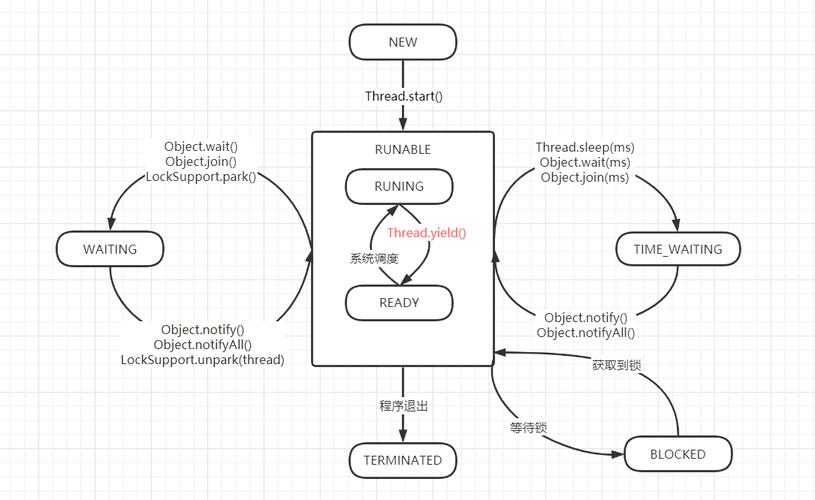
This is different from wait(). If a thread is sleeping inside a synchronized block, no other thread can enter that same synchronized block on the same object until the sleeping thread wakes up and voluntarily releases the lock.
Method Signatures
There are two overloaded versions of the sleep() method:
-
public static void sleep(long millis) throws InterruptedException- Pauses the thread for the specified number of milliseconds.
-
public static void sleep(long millis, int nanos) throws InterruptedException (图片来源网络,侵删)
- Pauses the thread for a specified number of milliseconds and nanoseconds.
- The
nanosargument must be between 0 and 999,999 inclusive.
Both methods throw an InterruptedException. We'll cover what that means later.
Simple Code Example
Here is a basic example showing how to use Thread.sleep().
public class SleepExample {
    public static void main(String[] args) {
        System.out.println("Main thread starts.");
        try {
            // Pause the main thread for 2 seconds (2000 milliseconds)
            System.out.println("Main thread is going to sleep for 2 seconds...");
            Thread.sleep(2000); // The main thread will pause here
        } catch (InterruptedException e) {
            // This block will execute if another thread interrupts this one while it's sleeping
            System.err.println("Main thread was interrupted!");
            e.printStackTrace();
        }
        System.out.println("Main thread wakes up and continues.");
    }
}
Output:
Main thread starts.
Main thread is going to sleep for 2 seconds...
// (A 2-second pause happens here)
Main thread wakes up and continues.
The InterruptedException
You might have noticed the throws InterruptedException in the method signature. This is a crucial concept.
Why does it exist?
sleep() is an "interruptible" blocking method. This means that another thread can "wake up" the sleeping thread by calling its interrupt() method.
When a sleeping thread is interrupted:
- The
sleep()method immediately throws anInterruptedException. - The thread's interrupt status is cleared.
This is a form of cooperative cancellation. It allows one thread to politely ask another thread to stop what it's doing and handle the interruption gracefully.
Handling InterruptedException
There are two main ways to handle an InterruptedException:
Propagate it (Best for library code)
If you are writing a method that might be interrupted, the cleanest way is to declare that your method also throws the exception.
public void myTask() throws InterruptedException {
    System.out.println("Task starting...");
    Thread.sleep(5000); // If interrupted here, the exception is passed to the caller
    System.out.println("Task finished.");
}
Catch and Restore the Status (Sometimes necessary)
If you can't or don't want to throw the exception, you should catch it and restore the thread's interrupt status. This is important because other parts of the code or the Java runtime might rely on checking the interrupt status.
public void myTask() {
    try {
        System.out.println("Task starting...");
        Thread.sleep(5000);
    } catch (InterruptedException e) {
        System.err.println("Task was interrupted!");
        // Restore the interrupt status so higher-level code can see it
        Thread.currentThread().interrupt();
        return; // Exit the method
    }
    System.out.println("Task finished.");
}
Common Pitfalls and Best Practices
Pitfall 1: Assuming sleep() is Precise
Thread.sleep() is a hint to the operating system, not a precise timer. The actual time the thread sleeps can be longer than requested due to:
- OS Scheduling: The OS might not reschedule your thread immediately after the sleep duration expires.
- System Clock Granularity: On some systems, the sleep can only be scheduled in intervals of, for example, 10-15 milliseconds.
Example of imprecision:
long startTime = System.currentTimeMillis();
Thread.sleep(1000);
long endTime = System.currentTimeMillis();
System.out.println("Slept for: " + (endTime - startTime) + " ms");
// Output might be: "Slept for: 1002 ms" or "Slept for: 1015 ms"
Pitfall 2: Using sleep() for Synchronization
This is a very common mistake among beginners. People sometimes use sleep() to wait for another thread to finish a task.
WRONG WAY:
// Thread A
sharedResource.setValue(10);
Thread.sleep(1000); // Trying to give Thread B time to see the change
// Thread B
int value = sharedResource.getValue(); // This is NOT guaranteed to see 10!
This is unreliable. Thread B might run before the sleep ends, or it might be scheduled much later. The correct way to coordinate threads is with wait(), notify(), notifyAll(), or higher-level concurrency utilities like CountDownLatch or CyclicBarrier.
Pitfall 3: Forgetting to Handle the Exception
If you call sleep() in a main method or a simple test, you can get away with not handling it. But in any real application code, you must handle the InterruptedException. Ignoring it can lead to subtle bugs.
Alternatives to Thread.sleep()
For modern Java development, you often have better tools than Thread.sleep() for specific tasks.
| Method | Use Case | Key Advantage |
|---|---|---|
Thread.sleep() |
General-purpose pausing of the current thread. | Simple, basic, and available everywhere. |
TimeUnit.sleep() |
A more readable way to call Thread.sleep(). |
TimeUnit.SECONDS.sleep(1) is much clearer than Thread.sleep(1000). |
Object.wait() |
Waiting for a condition within a synchronized block. |
Releases the lock, allowing other threads to work. Essential for producer-consumer patterns. |
ScheduledExecutorService |
Scheduling tasks to run after a delay or periodically. | More powerful, flexible, and integrates well with the rest of the java.util.concurrent framework. |
Example using TimeUnit:
import java.util.concurrent.TimeUnit;
// This is much more readable
TimeUnit.SECONDS.sleep(1);
TimeUnit.MILLISECONDS.sleep(500);
Example using ScheduledExecutorService:
import java.util.concurrent.Executors;
import java.util.concurrent.ScheduledExecutorService;
import java.util.concurrent.TimeUnit;
public class ScheduledTaskExample {
    public static void main(String[] args) {
        ScheduledExecutorService scheduler = Executors.newScheduledThreadPool(1);
        // Schedule a task to run after 2 seconds
        scheduler.schedule(() -> {
            System.out.println("This task runs after a 2-second delay!");
        }, 2, TimeUnit.SECONDS);
        // Schedule a task to run every 1 second, starting immediately
        scheduler.scheduleAtFixedRate(() -> {
            System.out.println("This task runs every second.");
        }, 0, 1, TimeUnit.SECONDS);
        // Let it run for a bit then shutdown
        try {
            Thread.sleep(5000); // Main thread sleeps to see the output
        } catch (InterruptedException e) {
            e.printStackTrace();
        }
        scheduler.shutdown();
    }
}
Summary
| Feature | Description |
|---|---|
| What it does | Pauses the current thread for a specified duration. |
| Locks | Does NOT release any locks held by the thread. |
| Exception | Throws InterruptedException if the thread is interrupted while sleeping. |
| Precision | Not precise. It's a hint to the OS. |
| Use Case | Simple delays, pacing loops, simulating I/O latency. |
| Alternatives | TimeUnit for readability, wait()/notify() for synchronization, ScheduledExecutorService for task scheduling. |