Of course! Here's a comprehensive guide to using SSL/TLS sockets in Java, covering everything from the basics to a complete, runnable client-server example.
What is an SSL Socket?
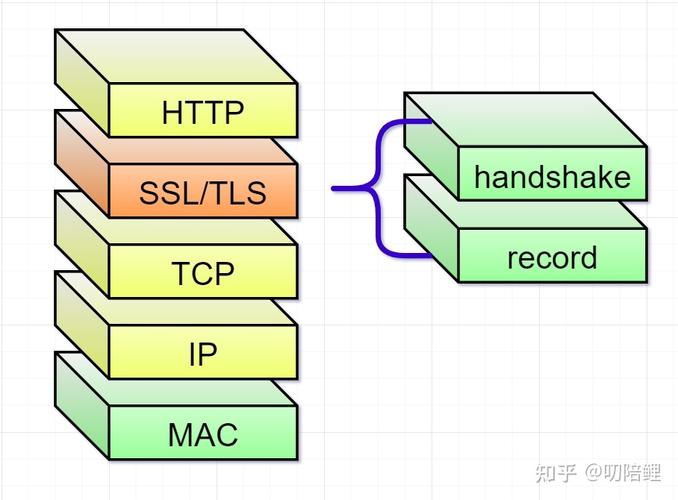
An SSL (Secure Sockets Layer) or its successor, TLS (Transport Layer Security), socket is a network socket that provides secure, encrypted communication over a standard network. It ensures:
- Confidentiality: Data is encrypted so that eavesdroppers cannot read it.
- Integrity: Data is protected from being tampered with in transit.
- Authentication: The server (and optionally the client) can prove its identity to the other party, preventing man-in-the-middle attacks.
In Java, the javax.net.ssl package provides the classes and interfaces for creating and managing SSL sockets. The primary classes are:
SSLSocket: The client-side socket for secure communication.SSLServerSocket: The server-side socket for accepting secure client connections.SSLContext: The factory for creatingSSLSocketFactoryandSSLServerSocketFactory. This is the central entry point for configuring SSL/TLS.
The Core Components: Keystores and Truststores
To establish a secure connection, both the client and server need cryptographic material, which is stored in keystores and truststores.
-
Keystore: A database of private keys and their corresponding public key certificates (cert chains). It's used to prove the identity of the party (client or server).
 (图片来源网络,侵删)
- Server: The server uses its keystore to present its certificate to the client.
- Client: If the client is authenticating itself (mutual TLS/2-way SSL), it uses its keystore to present its certificate to the server.
-
Truststore: A database of trusted certificates (typically from Certificate Authorities - CAs). It's used to verify the identity of the remote party.
- Server: The server uses its truststore to verify the client's certificate (if mutual TLS is enabled).
- Client: The client uses its truststore to verify the server's certificate. By default, the client trusts certificates issued by well-known CAs (like VeriSign, DigiCert).
For this example, we'll use Java Keytool (included with the JDK) to create self-signed certificates for both the server and client.
Step 1: Generate Keystores and Truststores (Using Keytool)
Open a terminal or command prompt and run these commands.
Create the Server's Keystore and Truststore
The server will have its own identity (keystore) and will trust its own certificate (truststore).
# Create a server keystore with a self-signed certificate
keytool -keystore server-keystore.jks -storepass password -alias server -keypass password -keyalg RSA -genkey -dname "CN=localhost, O=MyOrg, C=US"
# Export the server's certificate from the keystore
keytool -keystore server-keystore.jks -storepass password -alias server -exportcert -file server-cert.cer
# Create the server's truststore and import its own certificate into it
keytool -keystore server-truststore.jks -storepass password -importcert -alias server-ca -file server-cert.cer -noprompt
Create the Client's Keystore and Truststore
The client will also have its own identity and will trust the server's certificate.
# Create a client keystore with a self-signed certificate
keytool -keystore client-keystore.jks -storepass password -alias client -keypass password -keyalg RSA -genkey -dname "CN=my-client, O=MyClient, C=US"
# Export the client's certificate from the keystore
keytool -keystore client-keystore.jks -storepass password -alias client -exportcert -file client-cert.cer
# Create the client's truststore and import the server's certificate into it
keytool -keystore client-truststore.jks -storepass password -importcert -alias server-ca -file server-cert.cer -noprompt
After running these commands, you will have the following files in your directory:
server-keystore.jksserver-truststore.jksclient-keystore.jksclient-truststore.jksserver-cert.cerclient-cert.cer
Step 2: The SSL Server Code
This server listens for incoming connections, creates an SSLSocket, and communicates securely with the client.
SSLServer.java
import javax.net.ssl.*;
import java.io.*;
import java.net.InetAddress;
import java.security.KeyStore;
public class SSLServer {
    private static final int PORT = 8443;
    private static final String KEYSTORE_PATH = "server-keystore.jks";
    private static final String TRUSTSTORE_PATH = "server-truststore.jks";
    private static final String KEYSTORE_PASSWORD = "password";
    private static final String TRUSTSTORE_PASSWORD = "password";
    public static void main(String[] args) throws Exception {
        // 1. Set up KeyManagerFactory and TrustManagerFactory
        KeyStore keyStore = KeyStore.getInstance("JKS");
        keyStore.load(new FileInputStream(KEYSTORE_PATH), KEYSTORE_PASSWORD.toCharArray());
        KeyManagerFactory kmf = KeyManagerFactory.getInstance(KeyManagerFactory.getDefaultAlgorithm());
        kmf.init(keyStore, KEYSTORE_PASSWORD.toCharArray());
        KeyStore trustStore = KeyStore.getInstance("JKS");
        trustStore.load(new FileInputStream(TRUSTSTORE_PATH), TRUSTSTORE_PASSWORD.toCharArray());
        TrustManagerFactory tmf = TrustManagerFactory.getInstance(TrustManagerFactory.getDefaultAlgorithm());
        tmf.init(trustStore);
        // 2. Create SSLContext
        SSLContext sslContext = SSLContext.getInstance("TLS");
        sslContext.init(kmf.getKeyManagers(), tmf.getTrustManagers(), null);
        // 3. Create SSLServerSocketFactory
        SSLServerSocketFactory sslServerSocketFactory = sslContext.getServerSocketFactory();
        // 4. Create SSLServerSocket
        try (SSLServerSocket sslServerSocket = (SSLServerSocket) sslServerSocketFactory.createServerSocket(PORT, 50, InetAddress.getByName("localhost"))) {
            System.out.println("SSL Server started on port " + PORT);
            System.out.println("Waiting for a client to connect...");
            // 5. Accept client connection
            SSLSocket sslSocket = (SSLSocket) sslServerSocket.accept();
            System.out.println("Client connected: " + sslSocket.getRemoteSocketAddress());
            // 6. Communicate with the client
            try (BufferedReader in = new BufferedReader(new InputStreamReader(sslSocket.getInputStream()));
                 PrintWriter out = new PrintWriter(new OutputStreamWriter(sslSocket.getOutputStream()), true)) {
                String message = in.readLine();
                System.out.println("Received from client: " + message);
                String response = "Hello from SSL Server! Your message was: " + message;
                out.println(response);
                System.out.println("Sent to client: " + response);
            }
            System.out.println("Connection closed.");
        }
    }
}
Step 3: The SSL Client Code
This client connects to the server, verifies its certificate, and communicates securely.
SSLClient.java
import javax.net.ssl.*;
import java.io.*;
import java.security.KeyStore;
public class SSLClient {
    private static final String HOST = "localhost";
    private static final int PORT = 8443;
    private static final String TRUSTSTORE_PATH = "client-truststore.jks";
    private static final String KEYSTORE_PATH = "client-keystore.jks";
    private static final String TRUSTSTORE_PASSWORD = "password";
    private static final String KEYSTORE_PASSWORD = "password";
    public static void main(String[] args) throws Exception {
        // 1. Set up TrustManagerFactory and KeyManagerFactory
        KeyStore trustStore = KeyStore.getInstance("JKS");
        trustStore.load(new FileInputStream(TRUSTSTORE_PATH), TRUSTSTORE_PASSWORD.toCharArray());
        TrustManagerFactory tmf = TrustManagerFactory.getInstance(TrustManagerFactory.getDefaultAlgorithm());
        tmf.init(trustStore);
        KeyStore keyStore = KeyStore.getInstance("JKS");
        keyStore.load(new FileInputStream(KEYSTORE_PATH), KEYSTORE_PASSWORD.toCharArray());
        KeyManagerFactory kmf = KeyManagerFactory.getInstance(KeyManagerFactory.getDefaultAlgorithm());
        kmf.init(keyStore, KEYSTORE_PASSWORD.toCharArray());
        // 2. Create SSLContext
        SSLContext sslContext = SSLContext.getInstance("TLS");
        // Note: For a client-only scenario, you can often pass null for KeyManagers.
        // We include it here for completeness of a mutual TLS example.
        sslContext.init(kmf.getKeyManagers(), tmf.getTrustManagers(), null);
        // 3. Create SSLSocketFactory
        SSLSocketFactory sslSocketFactory = sslContext.getSocketFactory();
        // 4. Create SSLSocket and connect to the server
        try (SSLSocket sslSocket = (SSLSocket) sslSocketFactory.createSocket(HOST, PORT)) {
            System.out.println("Connected to SSL server at " + HOST + ":" + PORT);
            // 5. Communicate with the server
            try (BufferedReader in = new BufferedReader(new InputStreamReader(sslSocket.getInputStream()));
                 PrintWriter out = new PrintWriter(new OutputStreamWriter(sslSocket.getOutputStream()), true)) {
                String message = "Hello from SSL Client!";
                System.out.println("Sending to server: " + message);
                out.println(message);
                String response = in.readLine();
                System.out.println("Received from server: " + response);
            }
        }
        System.out.println("Connection closed.");
    }
}
Step 4: How to Run the Example
-
Compile the code:
javac SSLServer.java SSLClient.java
-
Run the Server: Open a terminal and start the server. It will wait for a connection.
java SSLServer
Output:
SSL Server started on port 8443 Waiting for a client to connect... -
Run the Client: Open a second terminal and start the client.
java SSLClient
Output (in the client terminal):
Connected to SSL server at localhost:8443 Sending to server: Hello from SSL Client! Received from server: Hello from SSL Server! Your message was: Hello from SSL Client! -
Check the Server Terminal: The server terminal will now show the received message and its response. Output (in the server terminal):
Client connected: /127.0.0.1:54321  (Port number will vary)
Received from client: Hello from SSL Client!
Sent to client: Hello from SSL Server! Your message was: Hello from SSL Client!
Connection closed.
Common Issues and Troubleshooting
-
SSLHandshakeException: No subject alternative names present: This happens when the client tries to connect to a host (e.g.,localhost) that is not listed in the server's certificate's Subject Alternative Name (SAN) extension. The easiest fix is to addSAN=IP:127.0.0.1to the-dnamewhen generating the server's certificate withkeytool.# Corrected server cert generation keytool -keystore server-keystore.jks ... -genkey -dname "CN=localhost, OU=MyUnit, O=MyOrg, L=MyCity, ST=MyState, C=US" -ext "SAN=IP:127.0.0.1"
Then regenerate the truststore with the new certificate.
-
SSLHandshakeException: PKIX path building failed: This means the client's truststore does not contain the server's certificate, or the server's certificate chain is not trusted. Ensure you correctly imported theserver-cert.cerinto theclient-truststore.jks. -
SSLHandshakeException: Received fatal alert: certificate_unknown: Similar to the above. The server's truststore might not be configured correctly if you are using mutual TLS. For this simple example, the server only trusts its own certificate, which is fine because the client is not authenticating itself. If you enable mutual TLS, you'd need to import theclient-cert.cerinto theserver-truststore.jks.
Going Further: Using System Properties
For simpler setups or testing, you can configure keystores and truststores via JVM system properties instead of hardcoding them in the code. This is very useful for frameworks like Spring Boot.
To run the client with system properties:
java -Djavax.net.ssl.trustStore=client-truststore.jks \
     -Djavax.net.ssl.trustStorePassword=password \
     -Djavax.net.ssl.keyStore=client-keystore.jks \
     -Djavax.net.ssl.keyStorePassword=password \
     SSLClient
The Java runtime will automatically pick up these properties and configure the default SSLContext, simplifying your client code. The server would need similar properties if you wanted to configure it that way.