Of course. Let's break down Python sockets, specifically focusing on creating a raw TCP SYN packet. This is a common task for network scanning tools like the original nmap.
Important Disclaimer: Ethical and Legal Use
Creating and sending raw SYN packets is a powerful technique. However, it's also the first step in a TCP SYN flood attack, which is a form of Denial-of-Service (DoS).
- Legitimate Use: Network administrators use it for security auditing (e.g., finding open, unsecured ports on their own network) and network discovery.
- Illegal/Unethical Use: Using it to scan networks you don't own or to launch an attack against any system without explicit permission is illegal and unethical.
This guide is for educational purposes to understand how network protocols work at a low level. Always get explicit, written permission before scanning any network or system that you do not own.
The Concept: What is a SYN Packet?
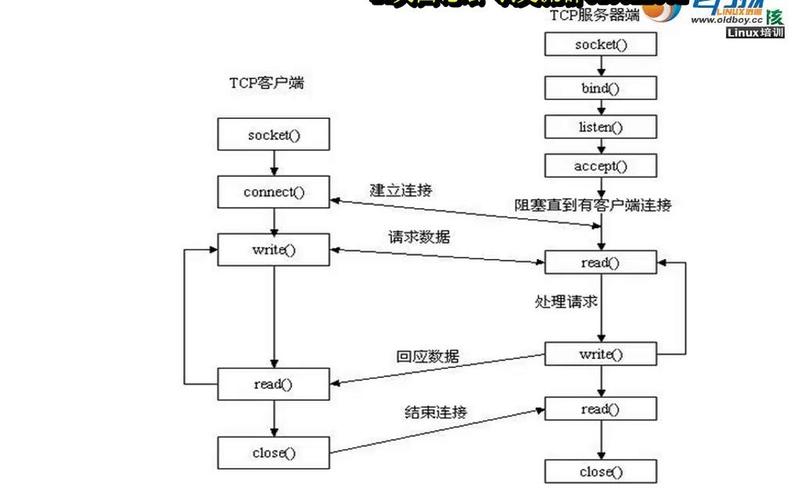
A normal TCP connection starts with a "three-way handshake":
- SYN (Synchronize): The client sends a SYN packet to the server to initiate a connection.
- SYN-ACK (Synchronize-Acknowledge): The server responds with a SYN-ACK packet, acknowledging the client's request and sending its own SYN.
- ACK (Acknowledge): The client sends an ACK packet to the server, completing the handshake. The connection is now established.
A SYN scan (or "half-open" scan) sends a SYN packet and then waits for a response.

- If it gets a SYN-ACK, it means the port is open. The scanner then immediately sends a
RST(Reset) packet to tear down the half-open connection, so the full handshake is never completed. - If it gets a RST, it means the port is closed. The server is rejecting the connection attempt.
- If it gets no response, the port might be filtered by a firewall.
The Challenge: Raw Sockets in Python
By default, Python's socket.socket() API operates at a high level. It uses the operating system's TCP/IP stack to handle all the low-level details of creating, formatting, and sending TCP packets.
To manually craft a SYN packet, we need to bypass the OS stack and create a raw socket. This gives us full control over the packet's headers.
We'll need the scapy library, which is a fantastic Python library for packet manipulation. It makes this task much easier than using the raw socket module alone.
Step 1: Install Scapy
If you don't have it installed, open your terminal or command prompt and run:
pip install scapy
Step 2: Crafting and Sending a SYN Packet with Scapy
Scapy's syntax is very intuitive. You build packets by stacking layers. For a SYN packet, we need:
- Ether (Layer 2): The Ethernet frame. We need the destination and source MAC addresses.
- IP (Layer 3): The IP packet. We need the source and destination IP addresses.
- TCP (Layer 4): The TCP packet. This is where we set the
SYNflag.
Here is a complete, commented Python script that crafts and sends a single SYN packet to a specified IP and port.
import scapy.all as scapy
from scapy.layers.l2 import Ether, ARP
# --- Configuration ---
# Target IP address you want to scan
target_ip = "10.0.2.15"  # Example: A common IP in a VirtualBox NAT network
# Target port you want to check
target_port = 80         # Example: HTTP port
# --- Get Your Network Interface Information ---
# Scapy needs to know which network interface to send the packet from.
# It also needs the correct MAC address for the IP layer.
# We'll use ARP to find our own gateway's MAC, which is a common way to get the interface's MAC.
# NOTE: This might need adjustment depending on your network setup.
try:
    # Get the default gateway IP
    gw_ip = scapy.conf.route.route("0.0.0.0")[2]
    # Send an ARP request to the gateway to get its MAC
    arp_request = scapy.ARP(pdst=gw_ip)
    broadcast = Ether(dst="ff:ff:ff:ff:ff:ff")
    arp_request_broadcast = broadcast/arp_request
    answered, unanswered = scapy.srp(arp_request_broadcast, timeout=1, verbose=False)
    if answered:
        # We found the gateway, so we can infer our interface's MAC from the response
        # For simplicity, we'll just use the gateway's MAC as a placeholder for the source MAC.
        # In a real script, you'd get the MAC of the interface you're using.
        src_mac = answered[0][1].hwsrc
    else:
        # Fallback if ARP fails (e.g., no gateway)
        print("Could not find gateway MAC. Using a placeholder.")
        src_mac = "00:0c:29:12:34:56" # Placeholder, replace with your actual MAC
except Exception as e:
    print(f"Could not determine network interface details: {e}")
    print("Please manually set 'src_mac' and 'interface_name'.")
    src_mac = "00:0c:29:12:34:56" # Replace with your machine's MAC
    # You might also need to specify the interface name, e.g., "eth0"
    # scapy.conf.iface = "eth0"
# --- Packet Crafting ---
# 1. Ethernet Layer (Layer 2)
# We'll use a broadcast destination for the Ethernet frame, as the IP layer will handle routing.
# The actual destination MAC will be resolved by the switch/router.
ethernet = Ether(src=src_mac, dst="ff:ff:ff:ff:ff:ff")
# 2. IP Layer (Layer 3)
ip_packet = scapy.IP(src=target_ip, dst=target_ip) # For a local network scan, src and dst can be the same
# 3. TCP Layer (Layer 4)
# We set the 'sport' (source port) to a random ephemeral port.
# We set the 'dport' (destination port) to our target.
# The crucial part is `flags="S"`, which sets the SYN flag.
tcp_packet = scapy.TCP(sport=scapy.RandShort(), dport=target_port, flags="S", seq=1000)
# Stack the layers to build the final packet
syn_packet = ethernet / ip_packet / tcp_packet
print(f"[*] Sending SYN Packet to {target_ip}:{target_port}")
print(f"[*] Packet: {syn_packet.summary()}")
# --- Send and Receive ---
# scapy.sr() sends packets and receives answers.
# `timeout=2` means we'll wait for 2 seconds for a response.
# `verbose=False` suppresses the default output.
# We expect a response for every packet we sent, so we use `sr1` for a single packet.
# `sr1` is for sending one packet and returning only the first answer.
try:
    # sr1 is perfect for sending a single packet and waiting for one response
    response = scapy.sr1(syn_packet, timeout=2, verbose=False)
    if response is None:
        # No response received
        print(f"\n[-] No response from {target_ip}. The port is likely filtered or host is down.")
    else:
        # A response was received, let's inspect it
        print(f"\n[+] Response received: {response.summary()}")
        # Check if the response has a TCP layer
        if response.haslayer(scapy.TCP):
            tcp_layer = response.getlayer(scapy.TCP)
            flags = tcp_layer.flags
            # Check for SYN-ACK flag
            if flags & 0x12: # 0x12 is the binary for SYN-ACK (00010010)
                print(f"[+] Port {target_port} is OPEN (Received SYN-ACK)")
                # Optionally, send a RST to close the half-open connection
                rst_packet = ethernet / ip_packet / scapy.TCP(sport=tcp_layer.dport, dport=target_port, flags="R", seq=tcp_layer.ack, ack=tcp_layer.seq)
                scapy.send(rst_packet, verbose=False)
                print("[*] Sent RST to close the connection.")
            # Check for RST flag
            elif flags & 0x04: # 0x04 is the binary for RST (00000100)
                print(f"[-] Port {target_port} is CLOSED (Received RST)")
            else:
                print(f"[-] Received unexpected TCP flags: {flags}")
        # Check for ICMP error (e.g., "Port Unreachable")
        elif response.haslayer(scapy.ICMP):
            icmp_layer = response.getlayer(scapy.ICMP)
            # Type 3, Code 3 is "Destination Unreachable", often meaning port is closed
            if icmp_layer.type == 3 and icmp_layer.code == 3:
                print(f"[-] Port {target_port} is CLOSED (ICMP Port Unreachable)")
            else:
                print(f"[-] Received ICMP error: Type {icmp_layer.type}, Code {icmp_layer.code}")
except PermissionError:
    print("\n[!] ERROR: Permission Denied.")
    print("    You likely need to run this script as an administrator/root.")
    print("    On Linux: sudo python3 script.py")
    print("    On Windows: Run Command Prompt/PowerShell as Administrator")
except Exception as e:
    print(f"\n[!] An error occurred: {e}")
How to Run the Script
- Save the code above as a Python file (e.g.,
syn_scan.py). - Crucially, you must run this script with administrator (root) privileges. Raw socket operations are restricted for security reasons.
- On Linux/macOS:
sudo python3 syn_scan.py - On Windows: Open Command Prompt or PowerShell as Administrator, then run
python syn_scan.py.
- On Linux/macOS:
- Modify the
target_ipandtarget_portvariables to suit your test environment (e.g., a virtual machine or a local server you control).
Summary of Key Scapy Objects
Ether(): Creates an Ethernet layer. Needs source and destination MAC addresses.IP(): Creates an IP layer. Needs source and destination IP addresses.TCP(): Creates a TCP layer. Needs source/destination ports and flags.flags="S": Sets the SYN flag.flags="SA": Sets SYN-ACK.flags="R": Sets RST.scapy.RandShort(): A handy Scapy feature to generate a random source port.scapy.sr1(): Sends a packet and waits for a single response.response.haslayer(scapy.TCP): Checks if the received packet contains a TCP layer.response.getlayer(scapy.TCP): Extracts the TCP layer from the packet to inspect its details (like flags).