Java Socket 文件上传实现指南
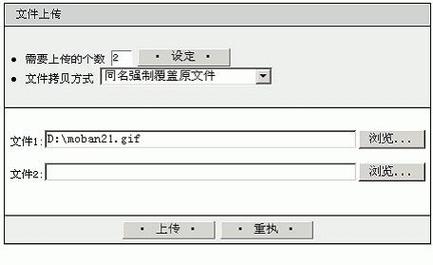
下面我将提供一个完整的 Java Socket 文件上传实现方案,包括服务器端和客户端代码。
(图片来源网络,侵删)
服务器端实现
import java.io.*;
import java.net.*;
public class FileUploadServer {
    public static void main(String[] args) {
        int port = 12345;
        try (ServerSocket serverSocket = new ServerSocket(port)) {
            System.out.println("服务器启动,等待客户端连接...");
            while (true) {
                try (Socket clientSocket = serverSocket.accept();
                     DataInputStream dis = new DataInputStream(clientSocket.getInputStream());
                     FileOutputStream fos = new FileOutputStream("received_" + System.currentTimeMillis() + ".txt")) {
                    // 读取文件名
                    String fileName = dis.readUTF();
                    System.out.println("正在接收文件: " + fileName);
                    // 读取文件大小
                    long fileSize = dis.readLong();
                    System.out.println("文件大小: " + fileSize + " bytes");
                    // 读取文件内容
                    byte[] buffer = new byte[4096];
                    int bytesRead;
                    long totalBytesRead = 0;
                    while (totalBytesRead < fileSize && (bytesRead = dis.read(buffer)) != -1) {
                        fos.write(buffer, 0, bytesRead);
                        totalBytesRead += bytesRead;
                    }
                    System.out.println("文件接收完成: " + fileName);
                } catch (IOException e) {
                    System.err.println("处理客户端请求时出错: " + e.getMessage());
                }
            }
        } catch (IOException e) {
            System.err.println("服务器启动失败: " + e.getMessage());
        }
    }
}
客户端实现
import java.io.*;
import java.net.*;
public class FileUploadClient {
    public static void main(String[] args) {
        String serverAddress = "localhost";
        int port = 12345;
        String filePath = "example.txt"; // 要上传的文件路径
        try (Socket socket = new Socket(serverAddress, port);
             DataOutputStream dos = new DataOutputStream(socket.getOutputStream());
             FileInputStream fis = new FileInputStream(filePath)) {
            // 发送文件名
            File file = new File(filePath);
            dos.writeUTF(file.getName());
            // 发送文件大小
            long fileSize = file.length();
            dos.writeLong(fileSize);
            // 发送文件内容
            byte[] buffer = new byte[4096];
            int bytesRead;
            while ((bytesRead = fis.read(buffer)) != -1) {
                dos.write(buffer, 0, bytesRead);
            }
            System.out.println("文件上传完成: " + filePath);
        } catch (IOException e) {
            System.err.println("上传文件时出错: " + e.getMessage());
        }
    }
}
增强版实现(带进度显示和错误处理)
服务器端增强版
import java.io.*;
import java.net.*;
import java.util.concurrent.*;
public class EnhancedFileUploadServer {
    private static final int PORT = 12345;
    private static final int THREAD_POOL_SIZE = 10;
    public static void main(String[] args) {
        ExecutorService threadPool = Executors.newFixedThreadPool(THREAD_POOL_SIZE);
        try (ServerSocket serverSocket = new ServerSocket(PORT)) {
            System.out.println("增强版文件上传服务器启动,监听端口: " + PORT);
            while (true) {
                Socket clientSocket = serverSocket.accept();
                threadPool.execute(new FileUploadHandler(clientSocket));
            }
        } catch (IOException e) {
            System.err.println("服务器启动失败: " + e.getMessage());
        } finally {
            threadPool.shutdown();
        }
    }
    private static class FileUploadHandler implements Runnable {
        private final Socket clientSocket;
        public FileUploadHandler(Socket socket) {
            this.clientSocket = socket;
        }
        @Override
        public void run() {
            String clientAddress = clientSocket.getInetAddress().getHostAddress();
            System.out.println("客户端连接: " + clientAddress);
            try (DataInputStream dis = new DataInputStream(clientSocket.getInputStream());
                 FileOutputStream fos = new FileOutputStream("received_" + System.currentTimeMillis() + ".txt")) {
                // 读取文件名
                String fileName = dis.readUTF();
                System.out.println("正在接收文件: " + fileName + " 来自: " + clientAddress);
                // 读取文件大小
                long fileSize = dis.readLong();
                System.out.println("文件大小: " + fileSize + " bytes");
                // 读取文件内容并显示进度
                byte[] buffer = new byte[4096];
                int bytesRead;
                long totalBytesRead = 0;
                int progress = 0;
                while (totalBytesRead < fileSize && (bytesRead = dis.read(buffer)) != -1) {
                    fos.write(buffer, 0, bytesRead);
                    totalBytesRead += bytesRead;
                    // 计算并显示进度
                    int currentProgress = (int) ((totalBytesRead * 100) / fileSize);
                    if (currentProgress > progress) {
                        progress = currentProgress;
                        System.out.printf("接收进度: %d%%%n", progress);
                    }
                }
                System.out.println("文件接收完成: " + fileName + " 来自: " + clientAddress);
            } catch (IOException e) {
                System.err.println("处理客户端 " + clientAddress + " 时出错: " + e.getMessage());
            } finally {
                try {
                    clientSocket.close();
                } catch (IOException e) {
                    System.err.println("关闭客户端连接时出错: " + e.getMessage());
                }
            }
        }
    }
}
客户端增强版
import java.io.*;
import java.net.*;
import java.util.concurrent.*;
public class EnhancedFileUploadClient {
    private static final String SERVER_ADDRESS = "localhost";
    private static final int PORT = 12345;
    public static void main(String[] args) {
        if (args.length != 1) {
            System.out.println("用法: java EnhancedFileUploadClient <文件路径>");
            return;
        }
        String filePath = args[0];
        File file = new File(filePath);
        if (!file.exists() || !file.isFile()) {
            System.err.println("文件不存在或不是有效文件: " + filePath);
            return;
        }
        ExecutorService executor = Executors.newSingleThreadExecutor();
        Future<Integer> future = executor.submit(new FileUploadTask(file));
        try {
            int result = future.get();
            if (result == 0) {
                System.out.println("文件上传成功: " + filePath);
            } else {
                System.err.println("文件上传失败,错误码: " + result);
            }
        } catch (InterruptedException | ExecutionException e) {
            System.err.println("上传过程中出错: " + e.getMessage());
        } finally {
            executor.shutdown();
        }
    }
    private static class FileUploadTask implements Callable<Integer> {
        private final File file;
        public FileUploadTask(File file) {
            this.file = file;
        }
        @Override
        public Integer call() {
            try (Socket socket = new Socket(SERVER_ADDRESS, PORT);
                 DataOutputStream dos = new DataOutputStream(socket.getOutputStream());
                 FileInputStream fis = new FileInputStream(file)) {
                // 发送文件名
                dos.writeUTF(file.getName());
                // 发送文件大小
                long fileSize = file.length();
                dos.writeLong(fileSize);
                // 发送文件内容并显示进度
                byte[] buffer = new byte[4096];
                int bytesRead;
                long totalBytesWritten = 0;
                int progress = 0;
                while ((bytesRead = fis.read(buffer)) != -1) {
                    dos.write(buffer, 0, bytesRead);
                    totalBytesWritten += bytesRead;
                    // 计算并显示进度
                    int currentProgress = (int) ((totalBytesWritten * 100) / fileSize);
                    if (currentProgress > progress) {
                        progress = currentProgress;
                        System.out.printf("上传进度: %d%%%n", progress);
                    }
                }
                return 0; // 成功返回0
            } catch (UnknownHostException e) {
                System.err.println("无法连接到服务器: " + e.getMessage());
                return 1;
            } catch (IOException e) {
                System.err.println("上传文件时出错: " + e.getMessage());
                return 2;
            }
        }
    }
}
使用说明
-
启动服务器:
java EnhancedFileUploadServer
-
启动客户端(上传文件):
java EnhancedFileUploadClient example.txt
关键点说明
-
数据流处理:
- 使用
DataInputStream和DataOutputStream来处理文件名和文件大小等元数据 - 使用
FileInputStream和FileOutputStream处理文件内容
- 使用
-
进度显示:
 (图片来源网络,侵删)
通过计算已传输字节数占总字节数的百分比来显示进度
-
多线程处理:
服务器使用线程池处理多个客户端并发上传
-
错误处理:
 (图片来源网络,侵删)
对文件不存在、网络错误等情况进行了处理
-
性能优化:
使用缓冲区(4096字节)减少I/O操作次数
扩展建议
- 可以添加文件校验(如MD5或SHA校验)确保文件完整性
- 可以实现断点续传功能
- 可以添加用户认证机制
- 可以支持大文件分块上传
- 可以添加SSL/TLS加密传输
这个实现提供了基本的文件上传功能,可以根据实际需求进行扩展和优化。