Of course! Parsing dates in Java has evolved significantly over the years. Here’s a comprehensive guide covering the old, the new, and the best practices.
The Short Answer (TL;DR)
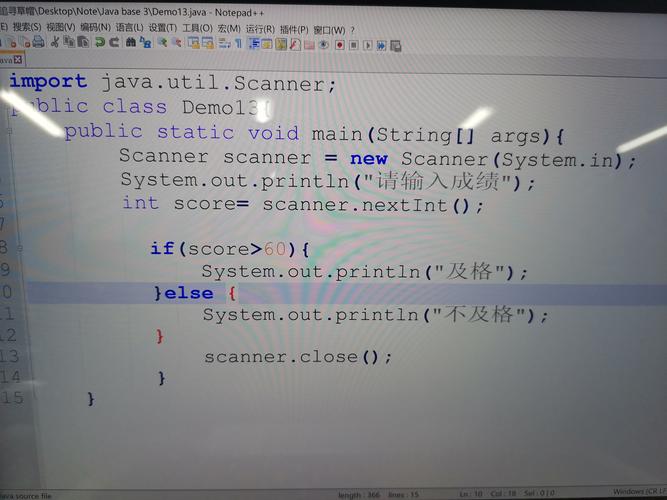
For modern Java (8 and later), always use java.time. It's safer, more powerful, and less error-prone than the old Date and SimpleDateFormat classes.
Here is the most common pattern:
import java.time.LocalDate;
import java.time.format.DateTimeFormatter;
public class ModernParseExample {
    public static void main(String[] args) {
        String dateString = "2025-10-27";
        // 1. Define the format of your input string
        DateTimeFormatter formatter = DateTimeFormatter.ofPattern("yyyy-MM-dd");
        // 2. Parse the string into a LocalDate object
        LocalDate date = LocalDate.parse(dateString, formatter);
        System.out.println("Parsed Date: " + date); // Parsed Date: 2025-10-27
        System.out.println("Day of Month: " + date.getDayOfMonth()); // Day of Month: 27
    }
}
The Detailed Guide: A Journey Through Java's Date/Time APIs
Let's break down the different ways to parse dates, from the legacy approach to the modern standard.
The Modern Approach: java.time (Java 8+)
This is the recommended and best practice for all new Java development. The java.time package was introduced in Java 8 to fix the design flaws of the old date/time libraries.
Key Classes for Parsing:
LocalDate: Represents a date (year, month, day) without a time or time zone. Perfect for birthdays, anniversaries, etc.LocalDateTime: Represents a date and time, but without a time zone.ZonedDateTime: Represents a date and time with a time zone. The most complete representation.DateTimeFormatter: The formatter to use for parsing (and formatting) date-time objects. It's immutable and thread-safe, unlike the oldSimpleDateFormat.
Examples with java.time
Example 1: Parsing a simple date (LocalDate)
import java.time.LocalDate;
import java.time.format.DateTimeFormatter;
public class LocalDateParse {
    public static void main(String[] args) {
        String dateStr = "25/12/2025";
        // Define the pattern that matches the input string
        DateTimeFormatter formatter = DateTimeFormatter.ofPattern("dd/MM/yyyy");
        try {
            LocalDate date = LocalDate.parse(dateStr, formatter);
            System.out.println("Successfully parsed: " + date);
            System.out.println("Day of week: " + date.getDayOfWeek());
        } catch (Exception e) {
            System.err.println("Failed to parse date. Invalid format.");
            e.printStackTrace();
        }
    }
}
// Output:
// Successfully parsed: 2025-12-25
// Day of week: WEDNESDAY
Example 2: Parsing a date and time (LocalDateTime)
import java.time.LocalDateTime;
import java.time.format.DateTimeFormatter;
public class LocalDateTimeParse {
    public static void main(String[] args) {
        String dateTimeStr = "20-05-2025T15:30:00";
        // The 'T' is the standard ISO 8601 separator between date and time
        DateTimeFormatter formatter = DateTimeFormatter.ofPattern("dd-MM-yyyy'T'HH:mm:ss");
        LocalDateTime dateTime = LocalDateTime.parse(dateTimeStr, formatter);
        System.out.println("Parsed DateTime: " + dateTime);
        System.out.println("Hour: " + dateTime.getHour());
    }
}
// Output:
// Parsed DateTime: 2025-05-20T15:30
// Hour: 15
Example 3: Parsing with a time zone (ZonedDateTime)
import java.time.ZonedDateTime;
import java.time.format.DateTimeFormatter;
public class ZonedDateTimeParse {
    public static void main(String[] args) {
        String zonedDateTimeStr = "2025-10-27T10:00:00-05:00[America/New_York]";
        // You can often parse this directly without a formatter if it's ISO 8601 compliant
        ZonedDateTime zonedDateTime = ZonedDateTime.parse(zonedDateTimeStr);
        System.out.println("Parsed ZonedDateTime: " + zonedDateTime);
        System.out.println("Zone: " + zonedDateTime.getZone());
    }
}
// Output:
// Parsed ZonedDateTime: 2025-10-27T10:00-04:00[America/New_York]
// Zone: America/New_York
The Legacy Approach: java.util.Date and SimpleDateFormat (Pre-Java 8)
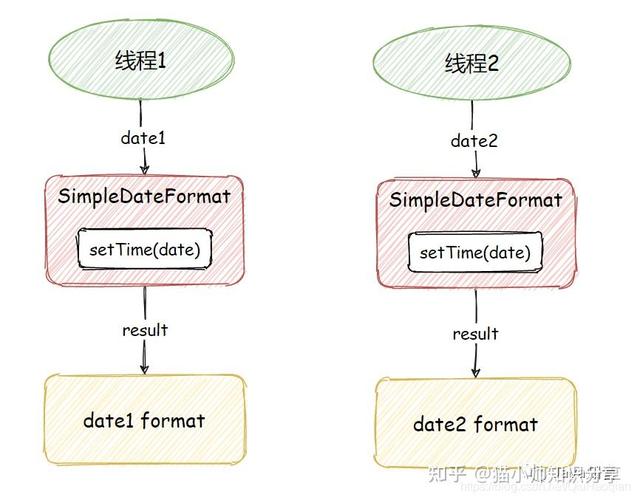
You will encounter this in older codebases. It's important to understand its flaws, especially not being thread-safe.
Warning: Avoid using this in new code.
import java.text.ParseException;
import java.text.SimpleDateFormat;
import java.util.Date;
public class LegacyDateParse {
    public static void main(String[] args) {
        String dateStr = "10/27/2025";
        // 1. Create a SimpleDateFormat instance. NOT THREAD-SAFE!
        SimpleDateFormat formatter = new SimpleDateFormat("MM/dd/yyyy");
        try {
            // 2. Parse the string into a Date object
            Date date = formatter.parse(dateStr);
            System.out.println("Parsed Date (legacy): " + date);
            // Note: The output format is system-dependent and includes time.
            // Example: Parsed Date (legacy): Fri Oct 27 00:00:00 CEST 2025
        } catch (ParseException e) {
            System.err.println("Failed to parse date.");
            e.printStackTrace();
        }
    }
}
Key Problems with SimpleDateFormat:
- Not Thread-Safe: If you share a single instance of
SimpleDateFormatacross multiple threads, you will get incorrect results and runtime exceptions. You must create a new instance for every parse or format operation, which is inefficient. - Confusing API: The
Dateobject itself is mutable and mixes date and time, which often leads to bugs. - Poor Error Handling:
ParseExceptionis checked, which can be cumbersome, but it's better than silently failing.
The Almost-Legacy Approach: java.text.DateFormat
DateFormat is an abstract class. SimpleDateFormat is its concrete implementation. It was designed as an internationalization helper, but it inherits all the thread-safety issues from SimpleDateFormat. It offers no real advantage for simple parsing.
Comparison and Best Practices
| Feature | java.time (Modern) |
java.util.Date (Legacy) |
|---|---|---|
| Introduction | Java 8 | Java 1.0 |
| Thread Safety | Yes. DateTimeFormatter and other classes are immutable and thread-safe. |
No. SimpleDateFormat is notoriously not thread-safe. |
| API Clarity | Excellent. Classes like LocalDate, LocalTime are clear and specific. |
Poor. java.util.Date is confusing, mixing date and time. |
| Functionality | Rich. Includes built-in support for time zones, durations, periods, and advanced formatting. | Limited. Requires more manual work for complex operations. |
| Error Handling | Throws DateTimeParseException (a runtime exception). |
Throws checked ParseException. |
| Recommendation | Use for all new code. | Avoid. Only for maintaining legacy systems. |
Common Pitfalls and How to Avoid Them
-
Incorrect Pattern: The pattern string (
"yyyy-MM-dd") must exactly match the input string ("2025-10-27").yyyy= 4-digit yearMM= 2-digit month (uppercase M)dd= 2-digit day (lowercase d)HH= 24-hour clock (0-23)hh= 12-hour clock (1-12)mm= minutesss= seconds
-
Using
Datefor Logic: Don't usejava.util.Dateto store a date-only value. If you parse a string like"2025-10-27", the resultingDateobject will also have a time component (usually midnight). This can lead to subtle bugs. UseLocalDatefor pure dates. -
Legacy Code Interoperability: Sometimes you need to convert between
java.timeandjava.util.Date(e.g., to use an old library).// Convert java.time to java.util.Date LocalDate localDate = LocalDate.now(); Date legacyDate = Date.from(localDate.atStartOfDay(ZoneId.systemDefault()).toInstant()); // Convert java.util.Date to java.time Date legacyDate = new Date(); LocalDate localDate = legacyDate.toInstant().atZone(ZoneId.systemDefault()).toLocalDate();
Summary
| Your Goal | Recommended Class | Why? |
|---|---|---|
| Parse a date (e.g., "2025-10-27") | LocalDate |
Represents a date only. Immutable and thread-safe. |
| Parse a time (e.g., "15:30:00") | LocalTime |
Represents a time only. Immutable and thread-safe. |
| Parse a date and time (e.g., "2025-10-27T15:30") | LocalDateTime |
Represents a date and time without a zone. |
| Parse a date and time with a zone (e.g., "2025-10-27T15:30+02:00") | ZonedDateTime |
The most complete representation for real-world events. |
| Formatter to use | DateTimeFormatter |
The standard, thread-safe formatter for all java.time classes. |