Of course! This is a classic and very useful topic. Let's break down how to create a simple client-server communication using sockets in both PHP and Java.
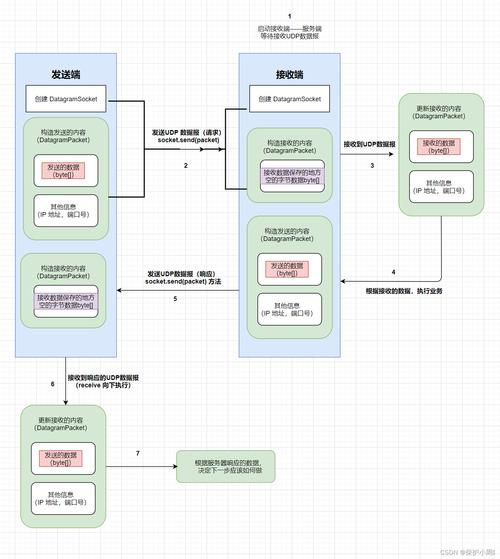
We'll create a basic Echo Server. The server will listen for a connection from a client. When the client sends a message, the server will read it and send the exact same message back to the client.
Core Concepts (Applicable to Both Languages)
-
Server:
- Creates a
ServerSocket(or equivalent) that listens on a specific IP address and port. - Waits for a client to connect (
accept()). - Once a client connects, it gets a dedicated
Socket(orInputStream/OutputStream) to communicate with that specific client. - Reads data from the client's input stream.
- Writes data to the client's output stream.
- Creates a
-
Client:
- Creates a
Socketand connects it to the server's IP address and port. - Gets the input and output streams from its own socket.
- Writes data to the output stream (to the server).
- Reads data from the input stream (from the server).
- Creates a
-
Port: A number between 1024 and 49151 (for user applications) that identifies a specific process/service on a machine. Both the client and server must agree on the same port.
 (图片来源网络,侵删)
 -
Loopback Address:
0.0.1orlocalhost. This address always refers to the current machine. It's perfect for testing client-server applications on the same computer.
Java Implementation
Java's socket API is very robust and part of the standard java.net package. We'll create two separate files: EchoServer.java and EchoClient.java.
A. Java Echo Server (EchoServer.java)
This server will run in a loop, waiting for a single client, handle its message, and then close the connection.
// EchoServer.java
import java.io.BufferedReader;
import java.io.IOException;
import java.io.InputStreamReader;
import java.io.PrintWriter;
import java.net.ServerSocket;
import java.net.Socket;
public class EchoServer {
    public static void main(String[] args) {
        int port = 6789; // The port the server will listen on
        try (ServerSocket serverSocket = new ServerSocket(port)) {
            System.out.println("Server is listening on port " + port);
            // Wait for a client to connect. This is a blocking call.
            Socket clientSocket = serverSocket.accept();
            System.out.println("Client connected: " + clientSocket.getInetAddress().getHostAddress());
            // Set up streams to communicate with the client
            // PrintWriter for sending data (autoFlush=true sends data immediately)
            PrintWriter out = new PrintWriter(clientSocket.getOutputStream(), true);
            // BufferedReader for reading data
            BufferedReader in = new BufferedReader(new InputStreamReader(clientSocket.getInputStream()));
            String inputLine;
            // Read from the client until "exit" is sent or the connection is closed
            while ((inputLine = in.readLine()) != null) {
                System.out.println("Received from client: " + inputLine);
                if ("exit".equalsIgnoreCase(inputLine)) {
                    System.out.println("Client requested to close the connection.");
                    break;
                }
                // Echo the message back to the client
                out.println("Server: " + inputLine);
            }
            System.out.println("Closing client connection.");
            // The try-with-resources statement will automatically close the socket and streams
        } catch (IOException e) {
            System.out.println("Server exception: " + e.getMessage());
            e.printStackTrace();
        }
    }
}
B. Java Echo Client (EchoClient.java)
This client will connect to the server, read a line from the console, send it to the server, print the server's response, and repeat until the user types "exit".
// EchoClient.java
import java.io.BufferedReader;
import java.io.IOException;
import java.io.InputStreamReader;
import java.io.PrintWriter;
import java.net.Socket;
import java.net.UnknownHostException;
public class EchoClient {
    public static void main(String[] args) {
        String hostname = "127.0.0.1"; // The server's IP address
        int port = 6789;             // The server's port
        try (
            // Connect to the server
            Socket socket = new Socket(hostname, port);
            // Set up streams to communicate with the server
            PrintWriter out = new PrintWriter(socket.getOutputStream(), true);
            BufferedReader in = new BufferedReader(new InputStreamReader(socket.getInputStream()));
            // BufferedReader to read from the console
            BufferedReader stdIn = new BufferedReader(new InputStreamReader(System.in))
        ) {
            System.out.println("Connected to the echo server. Type 'exit' to quit.");
            String userInput;
            // Read from the console
            while ((userInput = stdIn.readLine()) != null) {
                // Send the user's input to the server
                out.println(userInput);
                // Read the response from the server
                String response = in.readLine();
                System.out.println("Server response: " + response);
                if ("exit".equalsIgnoreCase(userInput)) {
                    break;
                }
            }
        } catch (UnknownHostException e) {
            System.err.println("Don't know about host " + hostname);
            System.exit(1);
        } catch (IOException e) {
            System.err.println("Couldn't get I/O for the connection to " +
                hostname + ". Please ensure the server is running.");
            System.exit(1);
        }
    }
}
How to Run the Java Example
- Save the two files (
EchoServer.javaandEchoClient.java) in the same directory. - Open two terminal/command prompt windows.
- In the first terminal, compile and run the server:
javac EchoServer.java
java EchoServer
You should see:
Server is listening on port 6789 - In the second terminal, compile and run the client:
javac EchoClient.java
java EchoClient
You should see:
Connected to the echo server. Type 'exit' to quit. - Now, type a message in the client terminal and press Enter. You will see the echoed message appear in both the client and server terminals.
PHP Implementation
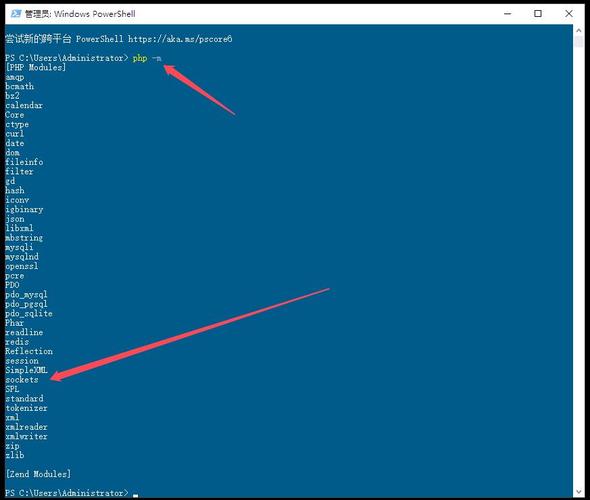
PHP also has a robust socket extension enabled by default. We'll create two files: echo_server.php and echo_client.php.
A. PHP Echo Server (echo_server.php)
This server uses stream_socket_server, which is a modern and flexible way to handle sockets in PHP.
<?php
// echo_server.php
$host = '127.0.0.1';
$port = 6789;
// Create a TCP stream socket server
$socket = stream_socket_server("tcp://$host:$port", $errno, $errstr);
if (!$socket) {
    echo "$errstr ($errno)\n";
    exit(1);
}
echo "Server is listening on $host:$port\n";
// Set the socket to non-blocking mode
stream_set_blocking($socket, 0);
$clients = [];
while (true) {
    // Accept a new connection (non-blocking)
    $client = @stream_socket_accept($socket);
    if ($client) {
        // Get the client's IP address
        $clientIp = stream_socket_get_name($client, true);
        echo "New client connected: $clientIp\n";
        // Add the new client to our array
        $clients[] = $client;
        // Set the client socket to non-blocking
        stream_set_blocking($client, 0);
    }
    // Check for data from all connected clients
    foreach ($clients as $key => $client) {
        $data = fread($client, 1024);
        if ($data === false || $data === '') {
            // Connection closed or error
            echo "Client disconnected.\n";
            fclose($client);
            unset($clients[$key]);
            continue;
        }
        echo "Received from client: " . trim($data) . "\n";
        if (trim($data) === "exit") {
            echo "Client requested to close the connection.\n";
            fwrite($client, "Server: Closing connection.\n");
            fclose($client);
            unset($clients[$key]);
            continue;
        }
        // Echo the message back to the client
        fwrite($client, "Server: " . trim($data) . "\n");
    }
    // Sleep briefly to prevent the loop from consuming 100% CPU
    usleep(100000); // 0.1 seconds
}
fclose($socket);
?>
B. PHP Echo Client (echo_client.php)
This client connects to the server and allows you to type messages to send.
<?php
// echo_client.php
$host = '127.0.0.1';
$port = 6789;
// Create a TCP stream socket client
$socket = stream_socket_client("tcp://$host:$port", $errno, $errstr, 30);
if (!$socket) {
    echo "$errstr ($errno)\n";
    exit(1);
}
echo "Connected to the echo server. Type 'exit' to quit.\n";
// Set the socket to non-blocking so we can check for data without waiting
stream_set_blocking($socket, 0);
while (true) {
    // Check if there's data to read from the server
    $serverResponse = fread($socket, 1024);
    if ($serverResponse !== false && $serverResponse !== '') {
        echo "Server response: " . trim($serverResponse) . "\n";
    }
    // Check if there's data to read from the console (STDIN)
    $stdin = fopen('php://stdin', 'r');
    stream_set_blocking($stdin, 0); // Also make STDIN non-blocking
    $userInput = fread($stdin, 1024);
    if ($userInput !== false && $userInput !== '') {
        // Send the user's input to the server
        fwrite($socket, $userInput);
        if (trim($userInput) === "exit") {
            break;
        }
    }
    // Close the STDIN handle to prevent resource leaks in the loop
    fclose($stdin);
    // Sleep briefly to prevent the loop from consuming 100% CPU
    usleep(100000); // 0.1 seconds
}
fclose($socket);
echo "Connection closed.\n";
?>
How to Run the PHP Example
- Save the two files (
echo_server.phpandecho_client.php) in the same directory. - Open two terminal/command prompt windows.
- In the first terminal, run the server using the PHP CLI:
php echo_server.php
You should see:
Server is listening on 127.0.0.1:6789 - In the second terminal, run the client:
php echo_client.php
You should see:
Connected to the echo server. Type 'exit' to quit. - Now, type a message in the client terminal and press Enter. You will see the echoed message appear in the client terminal. The server terminal will also log the received message.
Comparison: PHP vs. Java Sockets
| Feature | Java | PHP |
|---|---|---|
| API Style | Object-Oriented. You work with Socket, ServerSocket, InputStream, OutputStream objects. |
Procedural/Stream-based. You use functions like fread(), fwrite(), stream_socket_server(). |
| Blocking/Non-Blocking | Simpler blocking I/O is the default for basic sockets. For non-blocking, you'd use Selector with Channels (NIO), which is more complex but very powerful for high-concurrency servers. |
Non-blocking is easier to implement manually with stream_set_blocking() and a while(true) loop. This is a common pattern in PHP for long-running scripts. |
| Concurrency | Excellent. Java's NIO framework is designed for high-performance, scalable servers that can handle thousands of concurrent connections efficiently. | Challenging. A single-threaded PHP script with a non-blocking loop can handle multiple clients, but it's not as inherently scalable or robust as Java's NIO for massive scale. PHP's typical request-response model is not designed for long-running socket servers. |
| Use Case | Ideal for building complex, high-performance, multi-threaded network applications (e.g., chat servers, game servers, microservices). | Excellent for quick prototyping, simple tools, or integrating with existing PHP applications that need a lightweight communication channel (e.g., a background worker that receives tasks). |
| Execution | Requires compilation (javac) and running on the Java Virtual Machine (JVM). |
Interpreted by the Zend Engine. No compilation needed. Just run with the php command. |
Summary
Both PHP and Java can create socket-based client-server applications.
- Choose Java if you are building a complex, high-performance, scalable server that needs to handle many concurrent connections. Its object-oriented and NIO frameworks are built for this.
- Choose PHP if you need a quick and simple solution, or if you are integrating socket communication into an existing PHP-based system. It's great for prototypes or specific tasks where a full Java application might be overkill.