Of course! Let's dive deep into Java WebServices and WSDL. This is a fundamental topic in enterprise Java, and understanding it is key to building interoperable applications.
We'll cover:
- What is a WebService? (A quick refresher)
- What is WSDL? (The core of the topic)
- Two Main Java WebService APIs: JAX-WS and JAX-RS
- Creating a WebService with JAX-WS (The Classic Approach)
- Consuming a WebService with WSDL
- Anatomy of a WSDL File
- Best Practices and Tools
What is a WebService?
A WebService is a method of communication between two electronic devices over a network. It's a standardized way for applications to expose functionality and exchange data, typically using XML, JSON, or other text-based formats.
Key characteristics:
- Interoperable: Can be written in any language (Java, Python, C#, etc.) and consumed by any other language.
- Platform Independent: Doesn't depend on the operating system or hardware.
- Loosely Coupled: The client and service don't need to know the internal details of each other.
What is WSDL?
Web Services Description Language (WSDL) is an XML-based language that describes a web service.
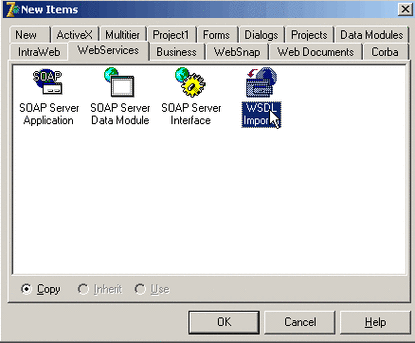
Think of it as the "contract" or "blueprint" for the service. It tells a potential client everything they need to know to use the service:
- What is it called? (The service name)
- Where is it? (The URL endpoint)
- What operations can it perform? (Methods like
getCustomer,placeOrder) - What messages are required for each operation? (The input, like
customerId) - What will the response look like? (The output, like
customerDetails) - What communication protocol does it use? (SOAP over HTTP, typically)
A client application can read the WSDL file and automatically generate the necessary code (a "client stub") to make calls to the web service.
Two Main Java WebService APIs
Java has two primary APIs for creating web services, which handle different types of services.
| Feature | JAX-WS (Java API for XML Web Services) | JAX-RS (Java API for RESTful Web Services) |
|---|---|---|
| Protocol | SOAP (Simple Object Access Protocol) | HTTP (Representational State Transfer) |
| Data Format | Primarily XML (defined by a strict schema) | Primarily JSON, but also XML, plain text, etc. |
| WSDL | Yes, it automatically generates a WSDL file. This is its core strength. | No. REST services do not have a WSDL. They are described by OpenAPI/Swagger specifications. |
| Use Case | Enterprise applications, financial systems, integrations requiring strict contracts, WS-Security (encryption, digital signatures). | Public APIs, mobile backends, microservices, any web/mobile application needing lightweight data. |
| Annotation | @WebService, @WebMethod |
@Path, @GET, @POST, @Produces, @Consumes |
For this guide, we will focus on JAX-WS, as it is directly tied to WSDL.
Creating a JAX-WS WebService (The Classic Approach)
We'll use a standard Maven project. The key is to use the JAX-WS RI (Reference Implementation), which is included in the JDK.
Step 1: Create a Maven Project
Use your IDE (IntelliJ, Eclipse) or the command line to create a new Maven project (maven-archetype-quickstart is fine).
Step 2: Add Dependencies
You don't need many external dependencies for a basic JAX-WS service, as the JDK provides the core. However, for a web server (like Tomcat), you'll need a Servlet API.
In your pom.xml:
<dependencies>
    <!-- Provided by the Servlet container (e.g., Tomcat) at runtime -->
    <dependency>
        <groupId>jakarta.servlet</groupId>
        <artifactId>jakarta.servlet-api</artifactId>
        <version>6.0.0</version>
        <scope>provided</scope>
    </dependency>
</dependencies>
Step 3: Create the Service Endpoint Interface (SEI)
This is a Java interface that defines the methods your web service will expose. It's a "contract" in Java form.
src/main/java/com/example/HelloService.java
package com.example;
import jakarta.jws.WebMethod;
import jakarta.jws.WebService;
import jakarta.jws.soap.SOAPBinding;
// This annotation marks this interface as a WebService
@WebService
// Defines the style (DOCUMENT) and use (LITERAL) of the SOAP message
@SOAPBinding(style = SOAPBinding.Style.DOCUMENT, use = SOAPBinding.Use.LITERAL)
public interface HelloService {
    // This annotation marks a method as a web service operation
    @WebMethod
    String sayHello(String name);
}
Step 4: Create the Service Implementation Bean (SIB)
This is the concrete class that implements the SEI. This is where your actual business logic resides.
src/main/java/com/example/HelloServiceImpl.java
package com.example;
import jakarta.jws.WebService;
// This annotation links this implementation to the SEI.
// endpointInterface is crucial!
@WebService(endpointInterface = "com.example.HelloService")
public class HelloServiceImpl implements HelloService {
    @Override
    public String sayHello(String name) {
        return "Hello, " + name + "! Welcome to JAX-WS.";
    }
}
Step 5: Create the Publisher
This is a class with a main method that starts a simple HTTP server and publishes your service. This is great for testing.
src/main/java/com/example/HelloServicePublisher.java
package com.example;
import com.sun.net.httpserver.HttpServer;
import com.sun.net.httpserver.HttpHandler;
import com.sun.net.httpserver.HttpExchange;
import javax.xml.ws.Endpoint;
import java.io.IOException;
import java.io.OutputStream;
import java.net.InetSocketAddress;
public class HelloServicePublisher {
    public static void main(String[] args) throws IOException {
        // --- Method 1: Using the built-in lightweight HTTP server ---
        System.out.println("Starting server on port 8888...");
        HttpServer server = HttpServer.create(new InetSocketAddress(8888), 0);
        // Create a simple handler for the root path
        server.createContext("/", new HttpHandler() {
            @Override
            public void handle(HttpExchange exchange) throws IOException {
                String response = "JAX-WS Server is running. WSDL is at: http://localhost:8888/hello?wsdl";
                exchange.sendResponseHeaders(200, response.length());
                try (OutputStream os = exchange.getResponseBody()) {
                    os.write(response.getBytes());
                }
            }
        });
        // Publish the JAX-WS endpoint
        // The second argument is the SIB (Service Implementation Bean)
        Endpoint.publish("http://localhost:8888/hello", new HelloServiceImpl());
        server.start();
        System.out.println("Server started. WSDL available at: http://localhost:8888/hello?wsdl");
    }
}
Step 6: Run and Test
- Run the
HelloServicePublisherclass. - Open your web browser and navigate to
http://localhost:8888/hello?wsdl. - You should see the raw XML content of the WSDL file. This is your service contract!
Consuming a WebService from a WSDL
This is where the power of WSDL shines. A client can use the WSDL to generate the necessary Java code to call the service.
Step 1: Generate Client Code
You need the wsimport tool, which comes with the JDK. Open a terminal/command prompt and run this command, pointing it to your WSDL URL:
wsimport -p com.example.client -keep http://localhost:8888/hello?wsdl
-p com.example.client: The package for the generated Java files.-keep: Tellswsimportto keep the generated source files so you can inspect them.
This command will generate several Java files:
HelloService.java(SEI)HelloServiceService.java(A service locator class)HelloServiceImplService.java(Another service class)SayHello.java(A request wrapper class)SayHelloResponse.java(A response wrapper class)- And more...
Step 2: Use the Generated Client Code
Now, you can write a simple Java client that uses these generated classes.
src/main/java/com/example/client/HelloServiceClient.java
package com.example.client;
public class HelloServiceClient {
public static void main(String[] args)