Of course! Here is a comprehensive guide to building a RESTful API in Python, covering the most popular frameworks, best practices, and a complete example.

We'll focus on two main frameworks:
- Flask: A lightweight "micro-framework" perfect for beginners and small to medium-sized APIs. It's simple and flexible.
- FastAPI: A modern, high-performance framework that's incredibly easy to use and provides automatic interactive documentation. It's gaining massive popularity for its speed and developer experience.
What is a RESTful API?
First, let's quickly define the terms:
- API (Application Programming Interface): A set of rules and definitions that allows different software applications to communicate with each other.
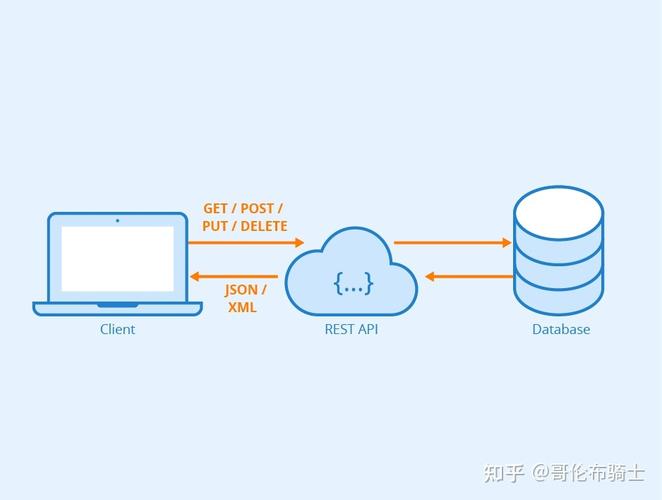
- REST (Representational State Transfer): An architectural style for designing networked applications. RESTful APIs use standard HTTP methods to perform operations on resources.
Key Principles of REST:
- Resources: Everything is a resource (e.g., a user, a product, an order). Resources are identified by a URI (e.g.,
/users,/products/123). - HTTP Methods: Use standard HTTP verbs to perform actions on resources:
GET: Retrieve a resource or a list of resources.POST: Create a new resource.PUT: Fully update an existing resource.PATCH: Partially update an existing resource.DELETE: Remove a resource.
- Stateless: Each request from a client to the server must contain all the information needed to understand and process the request. The server does not store client state between requests.
- Data Formats: Data is typically exchanged in JSON format.
Building an API with Flask
Flask is a great starting point because it's minimal and gives you full control.
Step 1: Installation
First, install Flask:
pip install Flask
Step 2: A Simple "Hello World" API
Let's create a basic API endpoint.
Create a file named app.py:
from flask import Flask, jsonify
# Create a Flask application instance
app = Flask(__name__)
# Define a route for the root URL
# The 'methods' argument specifies the HTTP methods allowed for this endpoint
@app.route('/', methods=['GET'])
def home():
    return "Welcome to the Python RESTful API!"
# Define a route that returns JSON data
@app.route('/api/v1/info', methods=['GET'])
def get_info():
    info = {
        "version": "1.0",
        "author": "Your Name"
    }
    # jsonify converts a Python dictionary to a JSON response
    return jsonify(info)
# This allows the script to be run directly
if __name__ == '__main__':
    # debug=True enables the development server with auto-reload
    app.run(debug=True)
Run the server:
python app.py
You'll see output indicating the server is running, usually on http://127.0.0.1:5000.
Test the endpoints:
- Open your browser or use
curl:curl http://127.0.0.1:5000/ # Output: Welcome to the Python RESTful API!
- Test the JSON endpoint:
curl http://127.0.0.1:5000/api/v1/info
# Output: {"author":"Your Name","version":"1.0"}
Step 3: Building a CRUD API for "Items"
Now let's create a more complete example with CRUD (Create, Read, Update, Delete) operations.
We'll use an in-memory list as a simple database.
from flask import Flask, jsonify, request
app = Flask(__name__)
# In-memory "database"
items = [
    {"id": 1, "name": "Laptop", "price": 1200},
    {"id": 2, "name": "Keyboard", "price": 75}
]
# A simple counter to generate new IDs
next_id = 3
# --- READ ---
# GET all items
@app.route('/api/v1/items', methods=['GET'])
def get_items():
    return jsonify(items)
# GET a single item by ID
@app.route('/api/v1/items/<int:item_id>', methods=['GET'])
def get_item(item_id):
    item = next((item for item in items if item['id'] == item_id), None)
    if item is None:
        return jsonify({"error": "Item not found"}), 404
    return jsonify(item)
# --- CREATE ---
# POST a new item
@app.route('/api/v1/items', methods=['POST'])
def create_item():
    global next_id
    if not request.json or not 'name' in request.json:
        return jsonify({"error": "Request must be JSON and contain 'name'"}), 400
    new_item = {
        "id": next_id,
        "name": request.json['name'],
        "price": request.json.get('price', 0) # Use .get for optional fields
    }
    items.append(new_item)
    next_id += 1
    # Return the newly created item with a 201 Created status
    return jsonify(new_item), 201
# --- UPDATE ---
# PUT a new item (or replace an existing one)
@app.route('/api/v1/items/<int:item_id>', methods=['PUT'])
def update_item(item_id):
    item = next((item for item in items if item['id'] == item_id), None)
    if item is None:
        return jsonify({"error": "Item not found"}), 404
    if not request.json:
        return jsonify({"error": "Request must be JSON"}), 400
    item['name'] = request.json.get('name', item['name'])
    item['price'] = request.json.get('price', item['price'])
    return jsonify(item)
# --- DELETE ---
# DELETE an item
@app.route('/api/v1/items/<int:item_id>', methods=['DELETE'])
def delete_item(item_id):
    global items
    item_to_delete = next((item for item in items if item['id'] == item_id), None)
    if item_to_delete is None:
        return jsonify({"error": "Item not found"}), 404
    items = [item for item in items if item['id'] != item_id]
    return jsonify({"result": True, "message": "Item deleted successfully"})
if __name__ == '__main__':
    app.run(debug=True)
How to test this CRUD API (using curl):
-
GET all items:
curl http://127.0.0.1:5000/api/v1/items
-
CREATE a new item:
curl -X POST -H "Content-Type: application/json" -d '{"name": "Mouse", "price": 25}' http://127.0.0.1:5000/api/v1/items -
GET a single item (assuming ID 1 exists):
curl http://127.0.0.1:5000/api/v1/items/1
-
UPDATE an item:
curl -X PUT -H "Content-Type: application/json" -d '{"name": "Gaming Mouse", "price": 50}' http://127.0.0.1:5000/api/v1/items/3 -
DELETE an item:
curl -X DELETE http://127.0.0.1:5000/api/v1/items/2
Building an API with FastAPI
FastAPI is a more modern alternative that is significantly faster (thanks to Starlette and Pydantic) and provides automatic, beautiful API documentation.
Step 1: Installation
Install FastAPI and an ASGI server like Uvicorn:
pip install "fastapi[all]"
The [all] option includes uvicorn for running the server and pydantic for data validation.
Step 2: A Simple "Hello World" API
Create a file named main.py:
from fastapi import FastAPI
app = FastAPI()
@app.get("/")
def read_root():
    return {"message": "Welcome to the FastAPI RESTful API!"}
@app.get("/api/v1/info")
def get_info():
    return {"version": "1.0", "author": "Your Name"}
Run the server:
uvicorn main:app --reload
main: The filemain.py.app: The objectapp = FastAPI()inside the file.--reload: Enables auto-reloading for development.
Test the endpoints:
curl http://127.0.0.1:8000/
curl http://127.0.0.1:8000/api/v1/info
The Best Part: Interactive Documentation Open your browser and go to:
- Swagger UI:
http://127.0.0.1:8000/docs - ReDoc:
http://127.0.0.1:8000/redoc
You'll get a fully interactive API documentation page where you can explore endpoints and even call them directly from the browser!
Step 3: Building a CRUD API with Pydantic Models
The real power of FastAPI comes from Pydantic, which handles data validation and serialization automatically.
from fastapi import FastAPI, HTTPException
from pydantic import BaseModel
app = FastAPI()
# --- Pydantic Models for Data Validation ---
class Item(BaseModel):
    name: str
    price: float
    is_offer: bool = False # Optional field with a default
# In-memory "database"
items_db = {
    1: {"name": "Laptop", "price": 1200.0, "is_offer": False},
    2: {"name": "Keyboard", "price": 75.5, "is_offer": False}
}
# --- READ ---
@app.get("/api/v1/items", response_model=list[Item])
def get_items():
    # Convert dict values to a list of Item objects
    return [Item(**item) for item in items_db.values()]
@app.get("/api/v1/items/{item_id}", response_model=Item)
def get_item(item_id: int):
    if item_id not in items_db:
        raise HTTPException(status_code=404, detail="Item not found")
    return Item(**items_db[item_id])
# --- CREATE ---
@app.post("/api/v1/items", response_model=Item)
def create_item(item: Item):
    # In a real app, you'd generate a new ID here
    new_id = max(items_db.keys()) + 1
    items_db[new_id] = item.model_dump()
    return item
# --- UPDATE ---
@app.put("/api/v1/items/{item_id}", response_model=Item)
def update_item(item_id: int, item: Item):
    if item_id not in items_db:
        raise HTTPException(status_code=404, detail="Item not found")
    items_db[item_id] = item.model_dump()
    return item
# --- DELETE ---
@app.delete("/api/v1/items/{item_id}")
def delete_item(item_id: int):
    if item_id not in items_db:
        raise HTTPException(status_code=404, detail="Item not found")
    del items_db[item_id]
    return {"result": True, "message": "Item deleted successfully"}
if __name__ == "__main__":
    import uvicorn
    uvicorn.run(app, host="0.0.0.0", port=8000)
Key Differences from Flask:
- Type Hints: FastAPI uses Python type hints (
item_id: int,item: Item) for validation and documentation. - Pydantic Models: The
BaseModeldefines the structure of your data, ensuring that incoming requests match the expected format and that outgoing data is correctly formatted. - HTTPException: Used to cleanly return standard HTTP error codes (like 404).
- Automatic Docs: You get interactive docs for free, which is a huge productivity boost.
Flask vs. FastAPI: Which to Choose?
| Feature | Flask | FastAPI |
|---|---|---|
| Philosophy | Micro-framework (minimal, batteries-included philosophy) | Modern, fast, and feature-rich |
| Performance | Good, but slower than async frameworks | Very High (one of the fastest Python frameworks) |
| Ease of Use | Extremely easy for beginners. Simple and intuitive. | Easy, but requires understanding of type hints and async concepts for advanced use. |
| Data Validation | Manual (you check request.json yourself) |
Automatic via Pydantic models. A huge advantage. |
| Interactive Docs | Requires manual setup (e.g., with Flask-RESTx or Swagger UI) | Automatic and built-in (Swagger UI & ReDoc) |
| Best For | Small projects, prototypes, learning, or when you need full control over every component. | Production APIs, microservices, projects where performance and robust data validation are critical. |
Best Practices for a Production-Ready API
- Use a Database: Replace the in-memory lists/dicts with a real database like PostgreSQL, MySQL, or MongoDB. Use an ORM like SQLAlchemy (for Flask/FastAPI) or MongoDB Motor (for async FastAPI).
- Environment Configuration: Don't hardcode configuration. Use environment variables (e.g., with
python-dotenv). - Project Structure: Organize your code into a proper project structure with blueprints (Flask) or routers (FastAPI) for better modularity.
- Authentication & Authorization: Secure your endpoints. Use standards like JWT (JSON Web Tokens) or OAuth2.
- Input Validation: Always validate incoming data. FastAPI does this automatically with Pydantic. In Flask, you'd use libraries like Marshmallow or Cerberus.
- Error Handling: Implement consistent error handling and return meaningful error messages with appropriate HTTP status codes.
- Logging: Use Python's built-in
loggingmodule to track events and errors in your application. - Testing: Write unit and integration tests for your API endpoints using a framework like
pytest. - Containerization: Use Docker to containerize your application, ensuring it runs consistently in any environment.